Cursor 0.50.7 + anysphere.remote-wsl 1.0.0
Can’t connect to a WSL distro. Worked fine on Friday until I had the brilliant idea of upgrading to Cursor 0.50.7.
The sympton is that Cursor gets stuck on “Setting up WSL Distro: Ununtu” and never actually connects. I have a terminal on that distro and it’s working fine, so I don’t know what Cursor wants.
Version: 0.50.7 (user setup)
VSCode Version: 1.96.2
Commit: 02270c8441bdc4b2fdbc30e6f470a589ec78d600
Date: 2025-05-24T18:32:30.918Z
Electron: 34.3.4
Chromium: 132.0.6834.210
Node.js: 20.18.3
V8: 13.2.152.41-electron.0
OS: Windows_NT x64 10.0.22631
Hi @leo_untether , could you share the logs from the “Remote - WSL” output window?
Facing the same problem here. I dont know what to do.
Terminal output:#1 )
[Trace - 12:53:49.840] WSL stderr: your 131072x1 screen size is bogus. expect trouble
[Trace - 12:53:49.843] WSL stdout: No running servers found
[Trace - 12:53:49.851] WSL stdout: Removing all existing Cursor installations
[Trace - 12:53:49.855] WSL stdout: removed directory ‘/home/vinicius/.cursor-server/bin/53b99ce608cba35127ae3a050c1738a959750860’
[Trace - 12:53:49.879] WSL stdout: Downloading server from https://cursor.blob.core.windows.net/remote-releases/53b99ce608cba35127ae3a050c1738a959750860/vscode-reh-linux-x64.tar.gz
Hi @vinicius-adolfo-akad , if it is hanging there, could you check whether you are able to download the server directly? Are you using a proxy?
The direct download took almost 3 minutes. On Cursor it took more than 15 minutes. Looks like a network related issue.
Run cursor . in the WSL home directory.
Installation of Cursor-server for WSL will begin, and after a short wait you will be able to connect to WSL from the Windows application Cursor.
I tried reinstalling Cursor, deleting Appdata, deleting .cursor, etc., but the above solved the problem.
zyfee
June 17, 2025, 8:21am
11
i meet the same problem, hang in setting up wsl disto: ubuntu very long time.
ravirahman
June 17, 2025, 10:08am
13
zyfee
June 24, 2025, 1:26am
14
I have set wsl config:#1 )
����N�x: W s l / S e r v i c e / E _ U N E X P E C T E D
2025-06-24 08:58:37.640 [info] Resolving wsl remote authority ‘wsl+ubuntu’ (attempt #1 )
����N�x: W s l / S e r v i c e / E _ U N E X P E C T E D ."
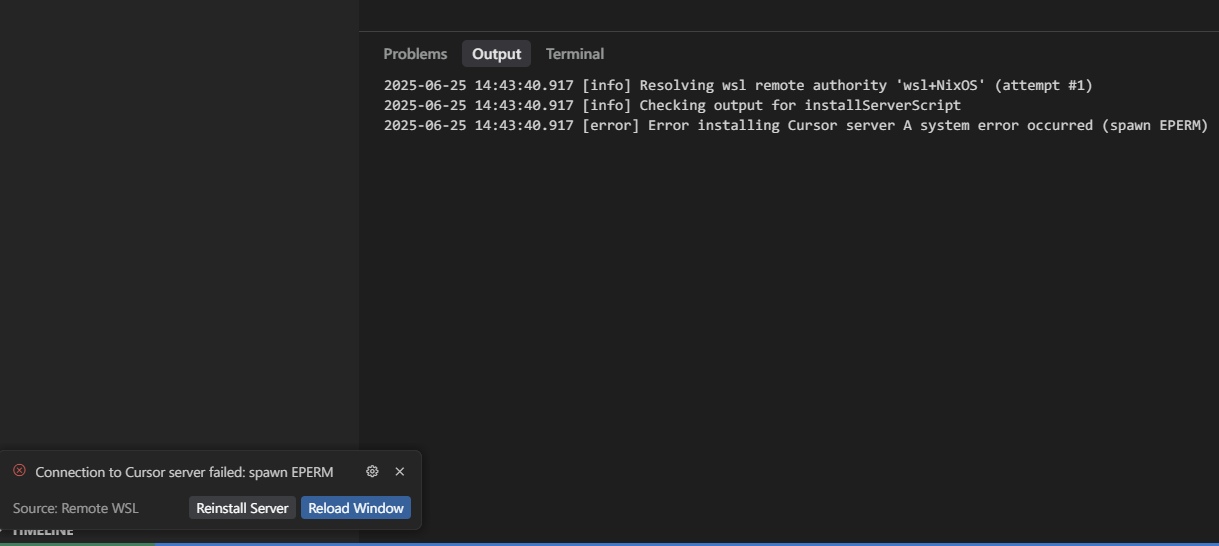
I have the same issue, ever since Anysphere.WSL is used instead of the normal WSL extension Cursor has not worked. I’m running on WSL+NixOS, I first had to patch the OS to add /bin/bash, since the WSL extension wrongly assumes it’s there (wich is not POSIX standard).
I’ve removed .cursor-server and re-installed with cursor ., which installs the server and launches cursor, however, it’s hung with this:
Version: 1.1.6 (user setup)
VSCode Version: 1.96.2
Commit: 5b19bac7a947f54e4caa3eb7e4c5fbf832389850
Date: 2025-06-25T02:20:02.577Z
Electron: 34.5.1
Chromium: 132.0.6834.210
Node.js: 20.19.0
V8: 13.2.152.41-electron.0
OS: Windows_NT x64 10.0.26100
This is driving me nuts and cursor is completely unusuable, what should I try?
VS Code WSL continues to work just fine.
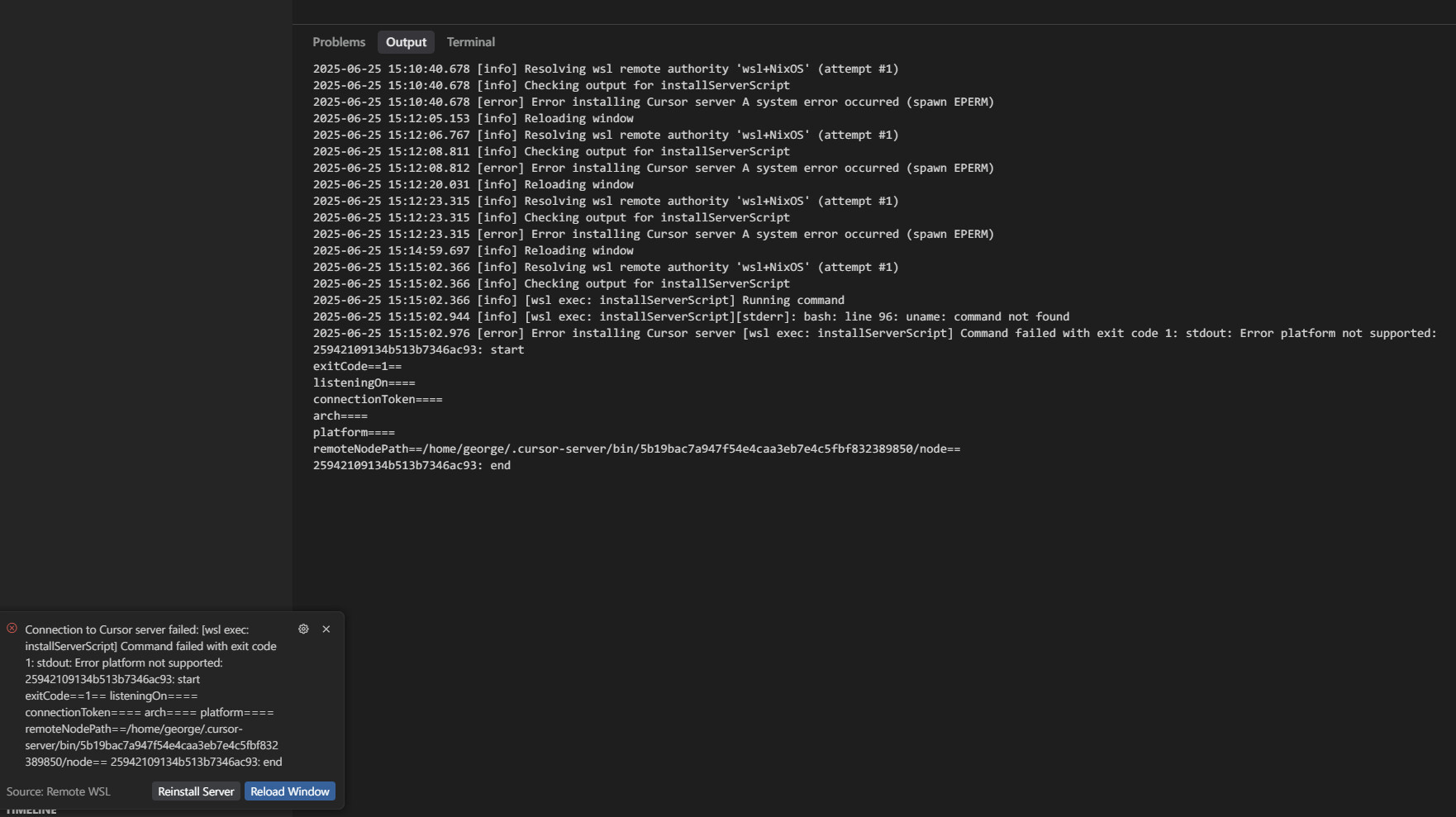
After many cursor restarts, I’ve got a new error:
Hi @noonien , thanks for this bug report. Our Remote WSL extension currently does not support NixOS; we’ll see if we can add support for this.
As a workaround, would you be able to set up a SSH server inside WSL, and then try our remote SSH extension to SSH into your WSL environment? This one does work with NixOS. Please see this forum thread . Thanks!
ravirahman
June 28, 2025, 10:52pm
21
Hi @noonien , please also see this thread for using Cursor with WSL and nixOS: Install Cursor in nix-os on WSL-2 - #2 by meskill
p-arth
July 2, 2025, 5:31pm
22
Hey @leo_untether @noonien did you manage to make it work? I’ve tried every fix possible I could find, no success. Cursor’s support is also not able to help with that, crazy, it’s driving me nuts as well

 but could download server directly very quickly.