Where does the bug appear (feature/product)?
Cursor IDE
Describe the Bug
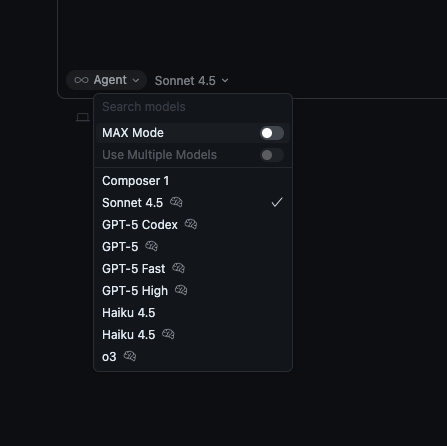
AUTO disappeared after last update I also try to reinstall from 2 sources and no way to get it back.
Steps to Reproduce
Open cursor and go to the agent tab and Auto mode is disapeared.
Same version work with auto on my laptop.
Screenshots / Screen Recordings
Operating System
MacOS
Current Cursor Version (Menu → About Cursor → Copy)
Version: 2.0.50
VSCode Version: 1.99.3
Commit: a788ca5efbb89cf7c24e873ea3623b2e47b42490
Date: 2025-11-02T23:59:00.227Z
Electron: 37.7.0
Chromium: 138.0.7204.251
Node.js: 22.20.0
V8: 13.8.258.32-electron.0
OS: Darwin arm64 24.6.0
Does this stop you from using Cursor
No - Cursor works, but with this issue