Where does the bug appear (feature/product)?
Cursor IDE
Describe the Bug
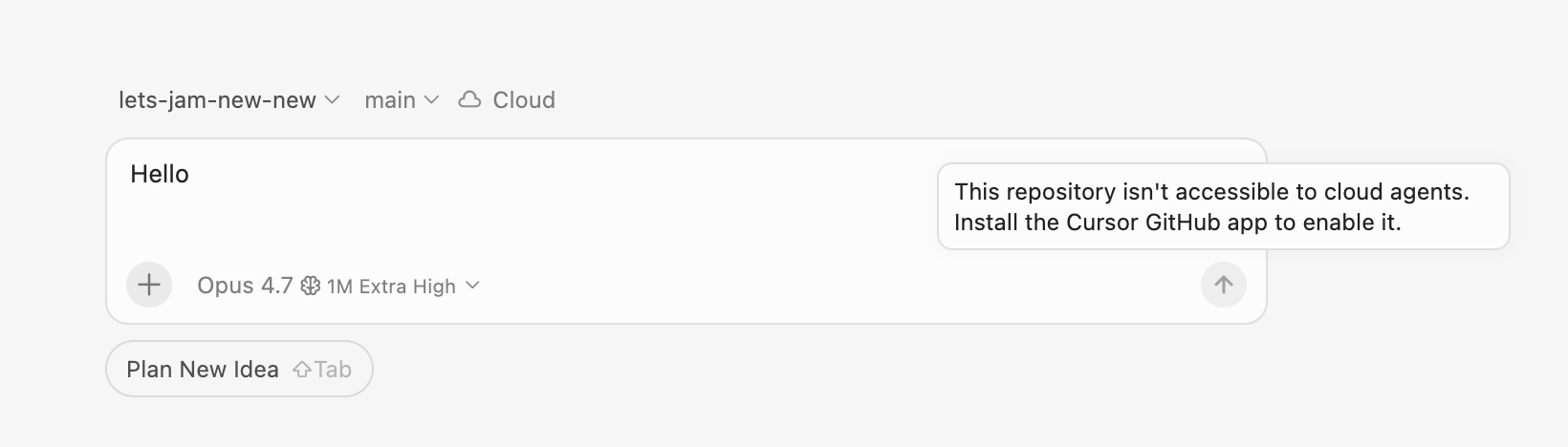
When I try to start a new cloud agent query from the Cursor IDE, it’s telling me that I don’t have the Cursor GitHub app installed, and it won’t let me start a new chat. However, I am able to start a new cloud agent chat from the Cursor web app. Sharing here for visibility 
Steps to Reproduce
When I click the plus (+) icon next to the repository in the cursor desktop app and try to type in that new chat it won’t allow me to submit the agent query.
Expected Behavior
It should allow me to submit the query.
Screenshots / Screen Recordings
Operating System
MacOS
Version Information
Version: 3.4.20
VSCode Version: 1.105.1
Commit: 0cf8b06883f54e26bb4f0fb8647c9500ccb43310
Date: 2026-05-15T02:26:10.351Z
Layout: glass
Build Type: Stable
Release Track: Default
Electron: 39.8.1
Chromium: 142.0.7444.265
Node.js: 22.22.1
V8: 14.2.231.22-electron.0
OS: Darwin arm64 25.3.0
For AI issues: which model did you use?
Opus 4.7
Does this stop you from using Cursor
No - Cursor works, but with this issue