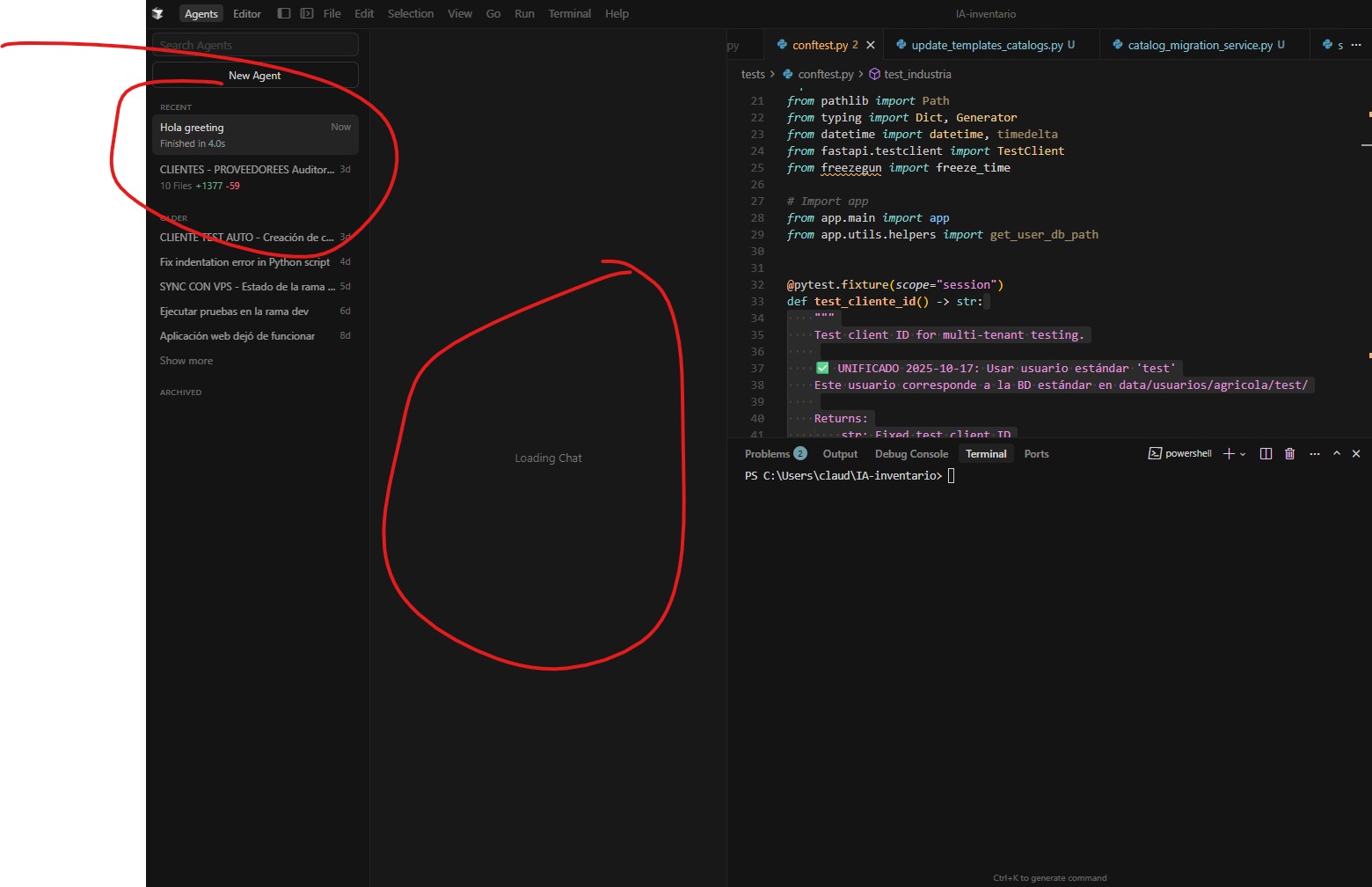
Chat stuck on “Loading Chat” — cannot access previous conversation

Where does the bug appear (feature/product)?

Cursor IDE

Describe the Bug

Hey, since three days my chat inside Cursor has been permanently stuck on “Loading Chat”. It used to work perfectly before, but now it never loads. I really need access to that chat because it contains important information — I don’t want to delete or reset it, just recover it.

I already have the request ID if that helps with debugging. Could someone please help me restore access to the chat?

Thanks in advance.

Steps to Reproduce

Open Cursor.

Go to the chat tab that was previously active.

Wait for it to load — it stays on “Loading Chat” forever.

Expected Behavior

The chat should load normally and show all previous messages as it did before.

Screenshots / Screen Recordings

Operating System

Windows 10/11

Current Cursor Version (Menu → About Cursor → Copy)

Version: 2.0.69 (system setup)
VSCode Version: 1.99.3
Commit: 63fcac100bd5d5749f2a98aa47d65f6eca61db30
Date: 2025-11-07T18:21:29.650Z
Electron: 37.7.0
Chromium: 138.0.7204.251
Node.js: 22.20.0
V8: 13.8.258.32-electron.0
OS: Windows_NT x64 10.0.26100

For AI issues: which model did you use?

Auto Mode

For AI issues: add Request ID with privacy disabled

8957c04f-a5a2-48bc-b3cd-a9118bf5840c

Does this stop you from using Cursor

No - Cursor works, but with this issue
6 Likes


my Disk space is over 794gb empty
and no recently upgrade

1 Like
same problem here
1 Like

Hey Thanks for the report. This confirms there’s a technical issue with the chat data.

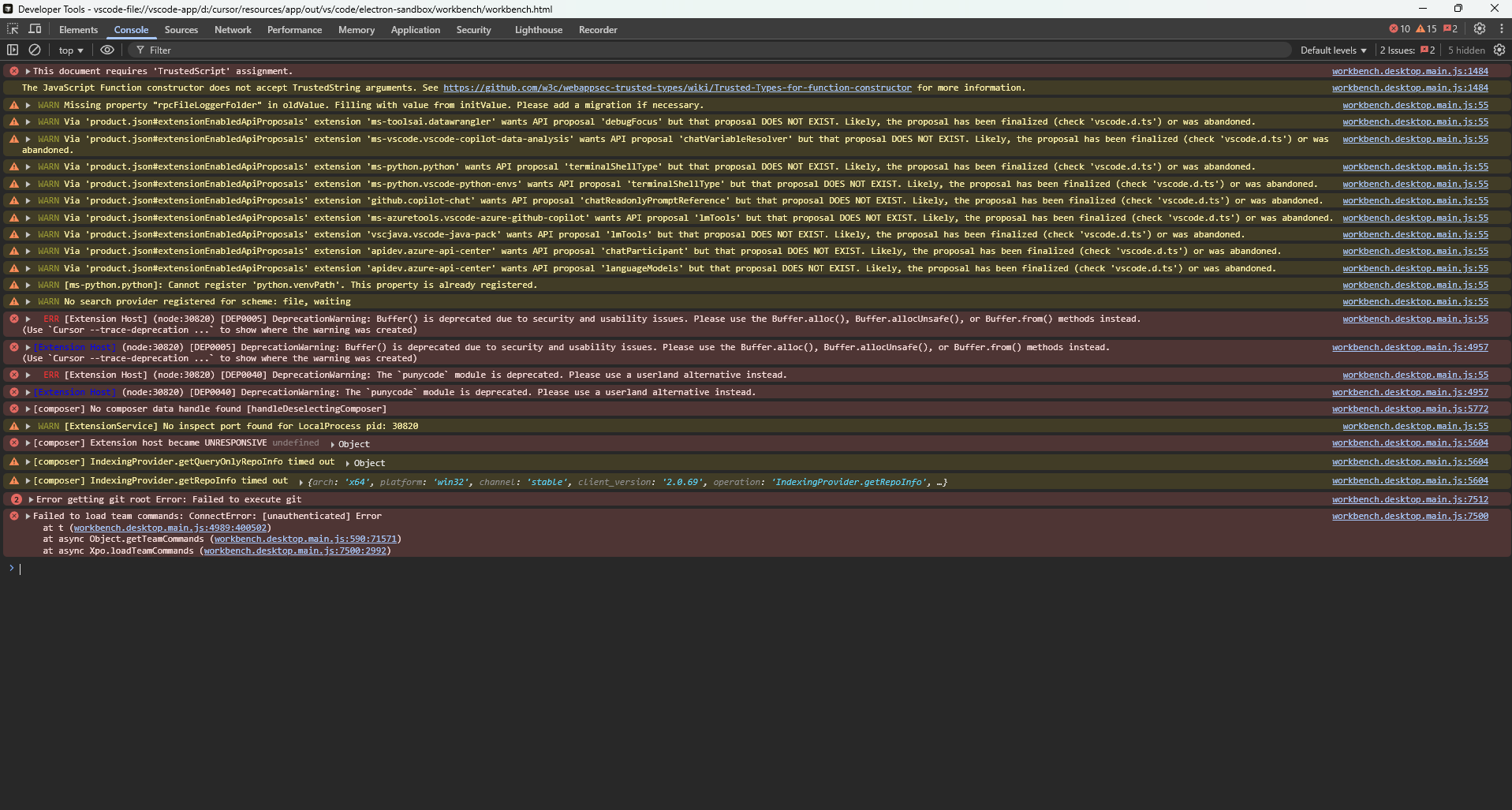
What I saw: the console shows [Composer] No Composer data handle found and authentication errors - this points to a Composer data integrity issue rather than typical history corruption.

To help the team: click the stuck chat again while watching the Console tab (filter to “Errors” only), and share any new red errors that appear at the moment you click.

In the meantime:

  • New chats should work normally
  • Don’t delete the stuck chat - it may be recoverable after the investigation
  • For the future: export important chats (three dots → Export Chat) or use the SpecStory extension for automatic backups

This happens like ever few days. usually when cursor suddenly logs out. the hardest part is new chat dont have any reference what we are talking. i have lost almost 2+ hours due to this bug.

4 Likes

Hey, here’s the follow-up after testing with Preserve Log enabled:

  • When I click the stuck chat, I get these errors every time:

    • workbench.desktop.main.js:5772 [composer] No composer data handle found [handleDeselectingComposer]

    • workbench.desktop.main.js:1484 This document requires 'TrustedScript' assignment.

    • workbench.desktop.main.js:7500 Failed to load team commands: ConnectError: [unauthenticated]

  • New chats work fine.

  • Reloading didn’t help.

  • Disabling SpecStory and Copilot Chat extensions didn’t change anything.

    vscode-app-1762789343628.txt (2,0 KB)

1 Like

Thanks for the detailed diagnostics. This confirms a Composer data integrity issue that’s affecting multiple users.

Unfortunately, based on similar cases, once this corruption occurs the stuck chat typically can’t be recovered. The errors you’re seeing indicate the chat data handle is permanently broken.

I’m escalating this to the engineering team.

1 Like

So basically I’m paying monthly for an AI that can just lose days or even weeks of work — and you’re telling me that a chat stored in your own cloud can’t be recovered once it breaks?
What’s the point of paying for a “pro” plan with more features if at the end of the day, all that work from over two weeks can just vanish without any way to restore it?

3 Likes

I understand your frustration about losing important work.

Important clarification: Chat history is stored locally on your computer (in %APPDATA%\Cursor\User\workspaceStorage), not in the cloud. This is why recovery isn’t possible once the local data corrupts - there’s no cloud backup to restore from.

That’s even worse then.
So the chats aren’t backed up anywhere, even though the app requires an online account and syncs everything else through your servers?
If all chat data is stored only locally, that should be made very clear to paying users — because nobody expects multi-week projects and documentation to vanish just because of a local corruption.
At least give users an automatic cloud backup or export option, otherwise this risk makes the whole tool unreliable for serious work.

3 Likes

About local vs cloud storage: chat history is intentionally stored locally for performance and privacy reasons. However, you’re right that this should be communicated more clearly to users, and we’ll share this with the product team.

We’re also considering adding cloud chat history in the future.

In the meantime, until a permanent fix ships, please:

  • Export important chats regularly (three dots → Export Chat)
  • Consider the SpecStory extension for automatic backups
1 Like

I appreciate the clarification, but from a user perspective that design choice really doesn’t make sense for an AI tool that heavily relies on long-term conversations.
If chats are stored only locally without any automatic backup, one small corruption can wipe out weeks of work — and that’s unacceptable for paid users.

You don’t need to sacrifice privacy to provide optional encrypted cloud sync or versioned backups. Even a basic “auto-export every X hours” feature would prevent data loss like this.

Please treat this as a priority — losing full conversations basically breaks the trust in using Cursor for serious projects.

2 Likes

Thanks @deanrie for mentioning above about SpecStory.
@Danivisit Please do checkout SpecStory, it can be installed easily through Cursor marketplace, and through SpecStory cloud, you can sync all your chats in one place. Also, it’s all free
Website: specstory.com/cloud
Let us know if you have any doubts. Happy to help!

1 Like

Yeah, I already installed SpecStory — but it doesn’t bring back two weeks of lost work either.
It’s just frustrating that issues like this weren’t communicated earlier.
If users knew from the start that Cursor stores chats locally and that corruption can wipe everything, we could’ve installed SpecStory right away and avoided losing so much work.

wow for mee too… Exactly 13 - 14 days of work. chat got corrupted. Now I feel like its a pattern.

:warning: Because the Cursor Support Team Couldn’t Fix It – I Did.
by Danivisit Studio’s

Since the moderators and support team didn’t manage to solve this issue, I decided to teach myself how to recover deleted or corrupted chats manually.
This thread should be pinned permanently for every user facing the “Loading chat” issue —
and it should not auto-delete after 22 days, at least until you release a proper feature for chat recovery or backups.


:floppy_disk: Cursor Chat Recovery Tutorial

How to bring back your lost chats when Cursor says “Loading chat” forever
Written by Danivisit Studio’s


:brain: Short Version

If your chat disappears or keeps loading forever, it’s not gone — just stuck in local storage.
Cursor keeps all chat data here:

%APPDATA%\Cursor\User\workspaceStorage

Every project or chat has its own random folder name, for example:

df481d4a973fa25419205aff46268df6


:brick: Full Recovery Tutorial (Step-by-Step)

:one: Locate your Cursor data

Open:

C:\Users\<YourName>\AppData\Roaming\Cursor\User\workspaceStorage

If your folder is empty, corrupted, or missing — don’t worry.


:two: Use R-Studio to recover lost files

  1. Open R-Studio (Demo version is enough)

  2. Scan your system drive (usually C:).

  3. Recover your workspace folder:

    ...\Cursor\User\workspaceStorage\<folder name>\
    
    
  4. Save it to a safe place (for example D:\Cursor backup\).


:three: Inspect it with DB Browser for SQLite

Open the file:

state.vscdb

You’ll find data like:

workbench.panel.aichat.view...
workbench.panel.composerChatViewPanel...

That means your chat data still exists — it’s just not visible inside Cursor.


:four: Extract and rebuild your chat

Look for .json or .md files inside:

\anysphere.cursor-retrieval\

These often contain your chat content, images, and prompts.
Rename or restore them as:

chat.md

and move them into:

.specstory\history\

Then restart Cursor → your recovered chat will appear again.


:five: If you only have a Markdown file

You can still continue your session manually:

  • Create a New Chat in Cursor.

  • Ask the AI:

    Can you read a Markdown file?


    When it says “Yes”, reply:

    Okay, then read this MD file completely and continue exactly where we left off. 
    Make sure you understand all context before continuing.
    
    
  • Attach or paste your recovered .md file → done.


:speech_balloon: My Honest Opinion

Yes — it takes time.
But I’d rather spend an hour restoring my two weeks of work
than pretend it’s gone forever.
Until Cursor adds proper cloud-sync or chat backup,
this method saves your projects.


:puzzle_piece: Tools You’ll Need

6 Likes

Where does the bug appear (feature/product)?

Somewhere else…

Describe the Bug

chat doesn’t load up in any of my projects

Steps to Reproduce

im not sure

Expected Behavior

load up chat straight away

Operating System

Windows 10/11

Current Cursor Version (Menu → About Cursor → Copy)

the version i am using is 2.0

For AI issues: which model did you use?

sonnet 4

Does this stop you from using Cursor

Yes - Cursor is unusable

Where does the bug appear (feature/product)?

Cursor IDE

Describe the Bug

When selecting Recent, Ordered, or Archived chats, the interface gets stuck on “Loading chat” and never opens. The same happens when trying to start a New Chat — it doesn’t load, and I can’t work with any agents at all.

I’ve already tried refreshing, restarting Cursor, and checking my internet connection, but the issue persists.

Steps to Reproduce

Open Cursor IDE.

Go to the Chat or Agents section.

Try to open any recent or archived chat.

Observe that it stays stuck on “Loading chat” indefinitely.

Expected Behavior

Chats and new sessions should load normally, allowing interaction with agents.

Actual behavior:
The chat interface freezes on “Loading chat,” and no interaction is possible.

Screenshots / Screen Recordings

Operating System

Windows 10/11

Current Cursor Version (Menu → About Cursor → Copy)

Version: 2.0.69 (user setup)
VSCode Version: 1.99.3
Commit: 63fcac100bd5d5749f2a98aa47d65f6eca61db30
Date: 2025-11-07T18:21:29.650Z
Electron: 37.7.0
Chromium: 138.0.7204.251
Node.js: 22.20.0
V8: 13.8.258.32-electron.0
OS: Windows_NT x64 10.0.26100

Does this stop you from using Cursor

Yes - Cursor is unusable

1 Like

I am having similar issues, I asked your ai how to fix it and it deleted my cache which in turn deleted all of my agent chat history. Now I’m trying to figure out how to get my chat back and yeah, basically, after this it’s been pretty unusable. And I’m using up credits trying to figure out why my app isn’t loading. It has been pretty buggy overall, but i would need some coaching on how to report bugs to you guys as I am new here and I’m not a traditional developer.

macOS 14.8.1 (23J30)
Version: 2.0.75

VSCode Version: 1.99.3

Commit: 9e7a27b76730ca7fe4aecaeafc58bac1e2c82120

Date: 2025-11-12T17:34:21.472Z (7 hrs ago)

Electron: 37.7.0

Chromium: 138.0.7204.251

Node.js: 22.20.0

V8: 13.8.258.32-electron.0

OS: Darwin x64 23.6.0

1 Like

Where does the bug appear (feature/product)?

Cursor IDE

Describe the Bug

I intended to just close and reopen cursor, due to the [undo button not appearing] bug that I previously filed. When I reopened Cursor, it automatically updated, reset all of my settings as if it was a fresh install, and now whenever I try to access the chat that I was just working in, as well as all of my previous chats, it gets stuck on ‘loading chat’ and never loads.

The chat names show up in the agent sidebar, but trying to click on any chat names besides the most recent chat doesn’t work, and the most recent chat stays highlighted.

I also tried closing Cursor and re-opening it. Cursor is unusable with this bug.

Steps to Reproduce

No idea

Expected Behavior

All my chats should not be stuck on ‘loading chat’
Cursor should not update unless asked
Cursor should not reset all of my settings when updating
Cursor should tell me what’s new after updating

Screenshots / Screen Recordings

Operating System

Windows 10/11

Current Cursor Version (Menu → About Cursor → Copy)

Version: 2.0.75 (user setup)
VSCode Version: 1.99.3
Commit: 9e7a27b76730ca7fe4aecaeafc58bac1e2c82120
Date: 2025-11-12T17:34:21.472Z
Electron: 37.7.0
Chromium: 138.0.7204.251
Node.js: 22.20.0
V8: 13.8.258.32-electron.0
OS: Windows_NT x64 10.0.19045

Additional Information

I would like more control over when cursor updates so that disruptions like this do not happen in the future.

Does this stop you from using Cursor

Yes - Cursor is unusable