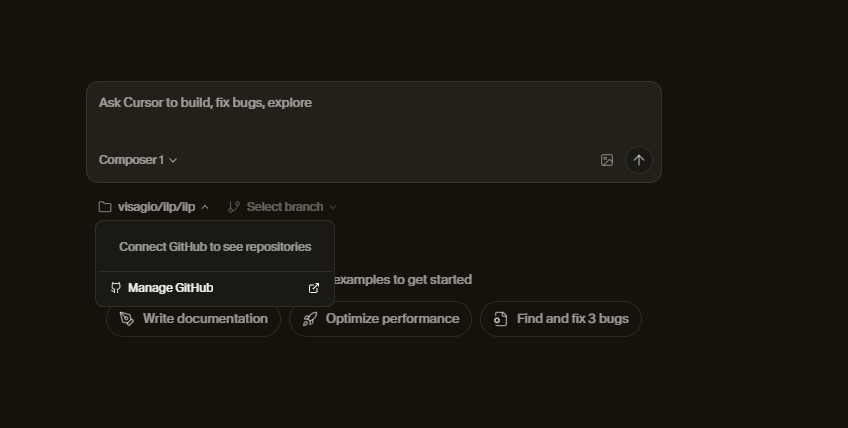
Hey, thanks for the report. Cloud Agents for self-hosted GitLab: the agent terminates in 0.2 seconds, branches aren’t visible in the web.
Recently, GitLab for Cloud Agents started working, but there’s a bug with group projects: personal ones work, group ones don’t (error ERROR_GITHUB_NO_USER_CREDENTIALS). Similar: Gitlab cloud agent - #8 by favll
Could you please share:
Is this a personal project in GitLab or a group one (under organization/group)?
Do you have a Teams or Enterprise plan? Are you a team admin?
Help > Toggle Developer Tools > Console > Network when selecting the repo
Screenshots of GitLab OAuth/App settings (Application ID/Scopes/Redirect URI), and where the error appears
Disable GitLab integration in Dashboard, in GitLab itself “Revoke” the app, then reconnect
In the web interface, open DevTools > Network and send the response of the problematic request (often /api/background-composer/get-repository-branches) - status/code, JSON
If it’s a group project: try creating a test personal project in GitLab, connect it and say if branches appear.
If it’s confirmed that it reproduces on self-hosted and/or group projects, I’ll pass it to the team. Report the test results with the personal project and logs
I can setup cloud agents in the web with self hosted gitlab but can’t get the environments setup using the cursor IDE
Steps to Reproduce
Connect Gitlab Self hosted,
attempt to configure the cloud agent, it will say no github connection so go fix it
Expected Behavior
According to the documentation, Cloud Agents support both GitHub and GitLab repositories. The IDE’s Cloud Agent setup flow should allow me to select and configure GitLab repositories, just like the web interface does.