Describe the Bug
I dont know whether this can be called a bug, but I find one certain UI issue really annoying when using Cursor:
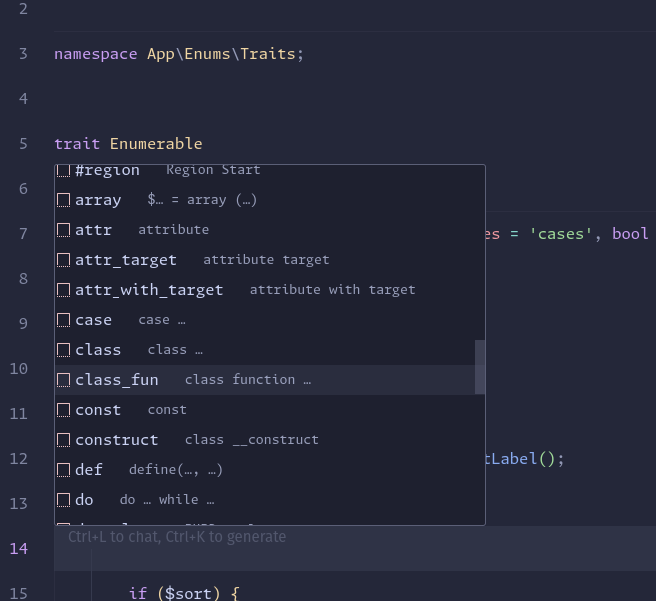
The code completion popup items are not justify aligned (with space between). If an entry contains two items like symbol or shortcut / snippet first and description second, both are left aligned and only separated by four whitespaces as it seems.
All other editors / IDEs I’ve seen work in the way that the first item is left aligned and the second one right aligned and I find it hard to get used to this non-justified view.
A justified view gives the user a way better visual structure.
Would be cool to have this configurable or even changed.
Steps to Reproduce
Simply open a file and hit ctrl + space and search for an code completion popup item with description.
It’ll be rendered like this:
item ---- description
And not like this:
item -------------------------------- description
Operating System
Linux
Current Cursor Version (Menu → About Cursor → Copy)
Version: 1.4.3
VSCode Version: 1.99.3
Commit: e50823e9ded15fddfd743c7122b4724130c25df0
Date: 2025-08-08T17:34:53.060Z
Electron: 34.5.1
Chromium: 132.0.6834.210
Node.js: 20.19.0
V8: 13.2.152.41-electron.0
OS: Linux x64 6.12.10-76061203-generic
Does this stop you from using Cursor
No - Cursor works, but with this issue