Ctrl + K doesn't work always

Where does the bug appear (feature/product)?

Cursor IDE

Describe the Bug

On terminal ctrl+k is supposed to open the input box for generate command but it just doesn’t work sometimes

Steps to Reproduce

press ctrl + k on terminal

Expected Behavior

should open dialog for prompt to generate command

Screenshots / Screen Recordings

Operating System

Windows 10/11

Current Cursor Version (Menu → About Cursor → Copy)

Version: 1.7.54 (system setup)
VSCode Version: 1.99.3
Commit: 5c17eb2968a37f66bc6662f48d6356a100b67be0
Date: 2025-10-21T19:07:38.476Z
Electron: 34.5.8
Chromium: 132.0.6834.210
Node.js: 20.19.1
V8: 13.2.152.41-electron.0
OS: Windows_NT x64 10.0.26200

Does this stop you from using Cursor

No - Cursor works, but with this issue
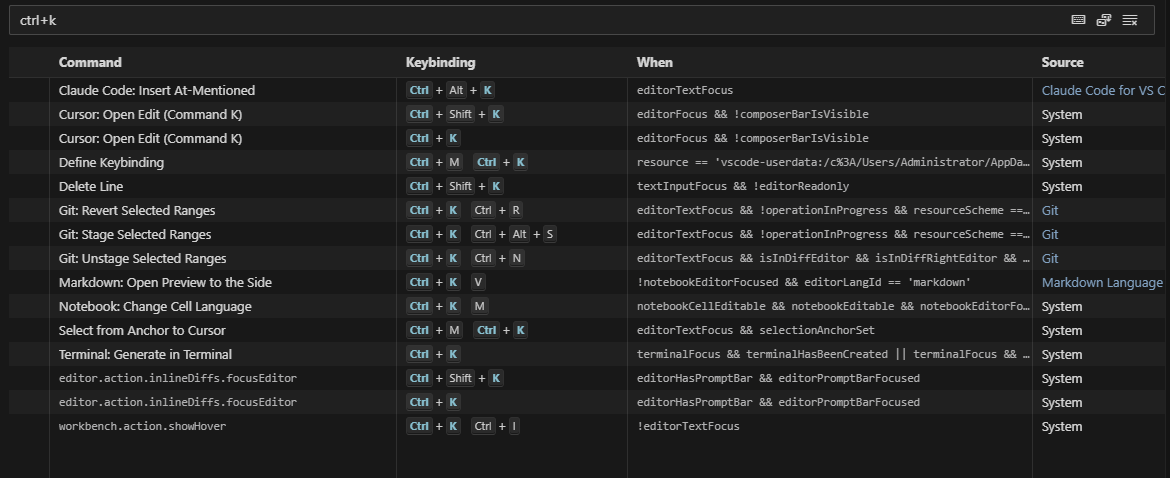
Hey, thanks for the report. I see your terminal is in the bottom panel, so this is different from the known editor-area issue.

To help diagnose, could you share:

  • Does it work right after launching Cursor, then stop later?
  • Does clicking into the terminal first (to give it focus) change anything?
  • Does restarting Cursor temporarily fix it?
  • Do you have any extensions that might use Ctrl+K?
  • No, it doesn’t work right after launching
  • Nope, I am already focused
  • It’s very random, sometimes restarting works, sometimes doesn’t
  • Nope

I am attaching another SS which might be helpful

Thanks for the info, we’ll look into it.

This topic was automatically closed 22 days after the last reply. New replies are no longer allowed.