Where does the bug appear (feature/product)?
Cursor IDE
Describe the Bug
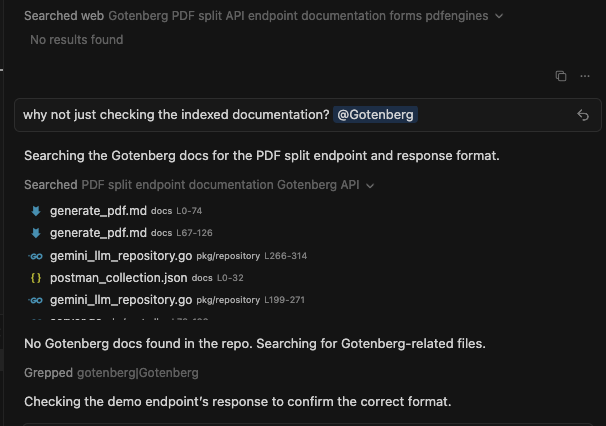
When I explicitly mention my indexed documentation (for example, using @Gotenberg) in a prompt, the AI ignores it and seems unable to find or access those docs. Instead of retrieving information from the indexed documentation, it performs unrelated actions — such as searching the web or grepping through the repository files.
This suggests that Cursor is not properly linking or retrieving the indexed documentation context during queries, even when explicitly referenced.
Steps to Reproduce
- Ask the AI a question that requires using those docs, for example:
- Example: “Check the Gotenberg docs for the PDF split endpoint and response format.”
Observe the behavior:
- The AI searches the web for results.
- It scans files in the repository instead of using the indexed documentation.
- Answer is wrong as it wan’t capable of finding the docs
Expected Behavior
When I reference indexed documentation (such as @Gotenberg), the AI should correctly recognize and use those docs to retrieve the relevant information. It should not perform external web searches or file greps when local indexed documentation is available.
Screenshots / Screen Recordings
Operating System
MacOS
Current Cursor Version (Menu → About Cursor → Copy)
Version: 1.7.33
VSCode Version: 1.99.3
Commit: a84f941711ad680a635c8a3456002833186c4840
Date: 2025-10-03T03:28:06.574Z (3 days ago)
Electron: 34.5.8
Chromium: 132.0.6834.210
Node.js: 20.19.1
V8: 13.2.152.41-electron.0
OS: Darwin arm64 24.5.0
For AI issues: which model did you use?
Sonnet 4.5 (no thinking)
Does this stop you from using Cursor
No - Cursor works, but with this issue