I switched to using cursor pro so I can further manage basic tasks in my codebase using Auto mode.
I just told my ai to git status, add ., commit with message and push which it perfectly did.
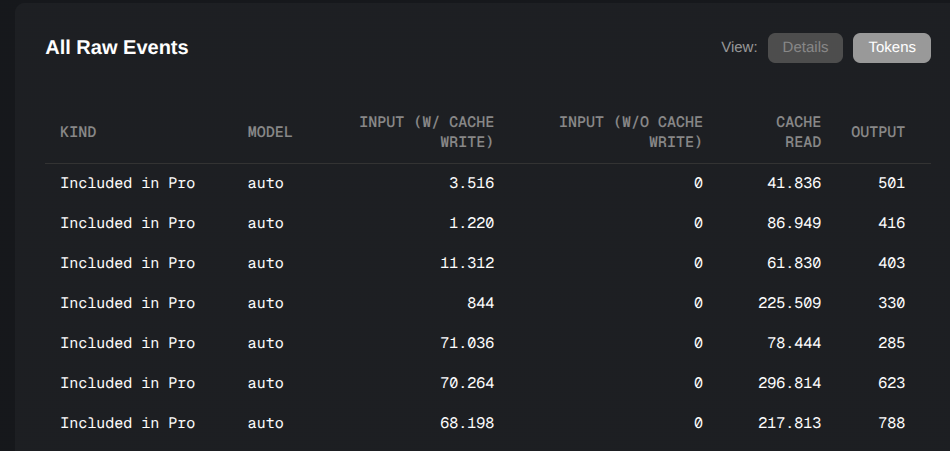
But looking at the tokens usage, I really wonder what is going on (see screenshot).
Nearly 300k tokens for this seems massive (easily over 1k DIN A4 Pages of text, if I am not mistaken).
about the request ID: I would love to provide more details, but last time I read about the privacy mode, I was left a bit puzzled about what details will be shared with which provider. Is this more transparent now? If so, where can I read about it to make an informed decision?
thanks, I also went on searching and just read it.
If I now disable privacy mode and provide the request ID and enable it again… what will be roughly shared for what purpose
after switching it to off and
after switching it on again?
background:
I am from a country with a sometimes weird obsession about data privacy.
the documentation of used tokens in the cursor dashboard is rather fluid and may change after executing another (unrelated?) request. For an existing Git request that was already documented, the number of documented tokens used shot up to ~360k tokens.
I removed my rules, which shaved ~100k
I removed the context completly and just provided a path which reduced everything down to 33k
Request Id with the 33k example:
2c9a9498-a0dd-4373-b7b3-112cfe7a0c10
Why I initially saw no problem with my rules or context:
A few weeks ago, I had many requests with the same rules and far more context directly added to the context, doing heavy implementation workloads using fewer tokens.
all these numbers above and what removing my rules and some context shaved off still seem massive to me, including the completly naked 33k request.
ironically, the documented tokens for the 33k example shot up to 45k during writing this post:
I will ask the engineers to have a detailed look to make sure nothing is going wrong.
From the screenshots and my experience with AI APIs this is how it works.
The first request sends the ‘task’, (incl. system prompt), AI response produces what needs to be done next > Tool call for terminal
Tool call happens and response is sent with full preceding chat (cached, so not processed again) to make a response, e.g. next step
this repeats until the ‘task’ is complete.
Cache reads are cheapest tokens.
Anthropic charges 10% of input token price for cache reads.
Gemini charges 25% of input token price for cache reads.
So if we would turn off the cache the input token price would multiply by 10, assuming the model is from Anthropic.
On the new plans the request total cost matters. This is combined by AI API price per token type depending on tokens consumed, model and provider.
Though as auto is not limited it does not contribute to your monthly plan usage (on new plans).
Cache reads may add up on long chat threads and with follow up requests. Its actually a good point to test token usage and understanding of context with Auto.