I have a BRAND NEW GitHub installed on my PC. Everything is new. the PC still has protective plastic on it.
Great, please install Git on it first. You may not need then to remove Cursor at all.
I have GitHub installed on my PC. Should I reinstall it ?
While GitHub does have a desktop app, it may not correctly set the Git tool into your path.
You can find Git for Windows here.
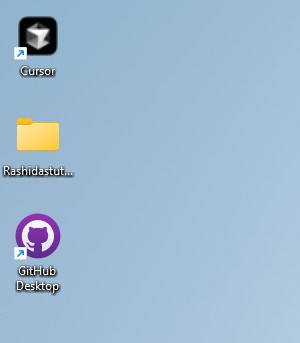
Look, Git installed last night .. new. Commands you gave me earlier did not work .. I did not expect them to work.
Ok, let me try this.
After installing Git the following commands should work in command line.
git --version
which git
Then also cloning a repo would work.
Ok, this worked! So there is a fake display version of GitHub for desktop and then there is the unofficial one ? wow. Thank you for your help. This certainly is not described in Cursor help scenarios …
As GitHub is provided by Microsoft one would expect it to install Git properly as well 
1 Like
I am new to vibe coding and Cursor … just wanna say that this is all a cancer inducing activity. Gosh. All arbitrary commands in a chaotic sphere where you are expected to know them. wow.
I don’t Git it. At ALL !
No worries, make sure to create a GitHub Account so you can store your code there and that way prevent accidental loss of code.
Do I not have a GitHub account by default ?
I assume that you do not have an GitHub account, unless you remember creating the account by yourself.
I do have a GitHub account. This is it. DinoCodes is my GH account. Is there yet another publicly unknown step that we should take and create some extra account ?
Once you have a GitHub account you do not need a second one.
I’m impressed by the level of support Cursor is giving here!
This is not a Cursor issue, it’s a (reasonable) misunderstanding of the Git Cli, GitHub, and the GitHub desktop app, but hats off @condor @deanrie for getting @DinoCodes through this!
Perhaps we need a best-practice prerequisite guide for getting Cursor up and running, especially in Windows with/without WSL. We have info on rules, models etc, but many users are coming here not having touched VSCode, or the terminal before.
3 Likes
Yes we noted to improve onboarding guide.
1 Like
Well …
I love Cursor, SWE with 8 years of experience, and I also can’t figure out this ■■■■ for weeks so I never try again. I have even added “GitHub Actions” extension, I have confirmed I see all the actions in it, it connected no issue, but agent keeps saying “Connect GitHub”. I tried reinstalling, updating, logging out and logging back in, nothing works. Guys this is a terrible experience and I can’t imagine what an actual vibe coders with no engineering experience are facing lol. You’re really dropping the bag massively.