Cursor IDE
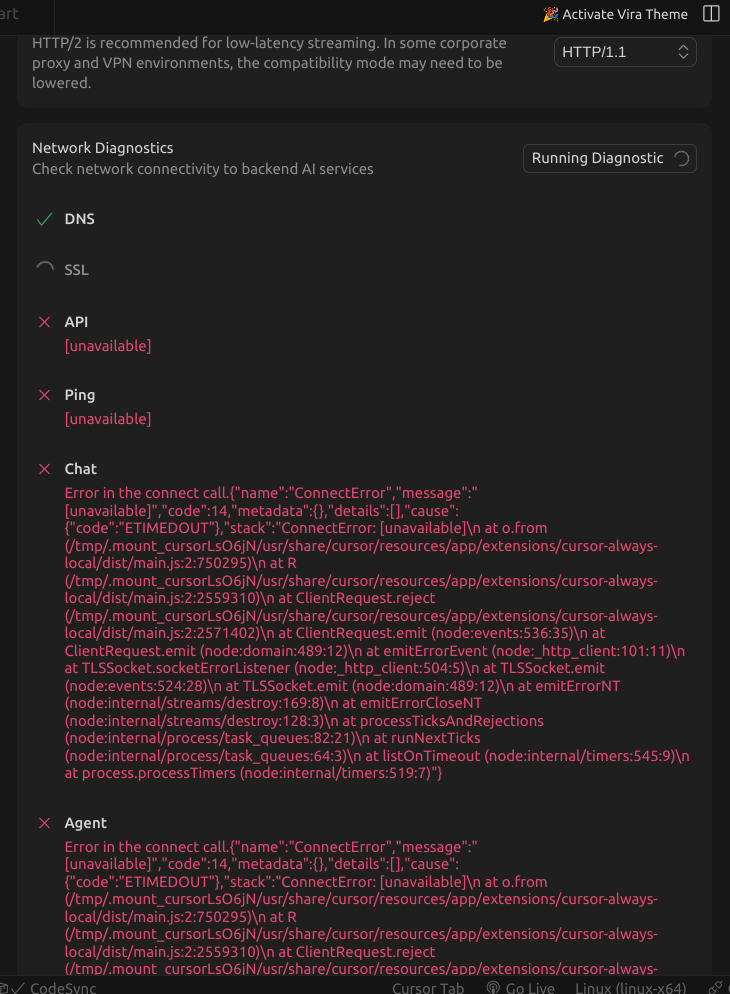
Whenever I try to use Cursor Chat, it just loads and loads then just returns nothing. I was told to check the Network Diagnostics, there I found connectivity issues for Cursor Chat, Background Agent and more.
Open cursor on Ubuntu, open any project and try to ask Cursor Chat anything about the project. Also open Cursor Settings > Network > Run Diagnostics.
It should return something about what you’ve asked Cursor Chat or even an error explaining what went wrong.
Linux
Version: 1.7.53
Yes - Cursor is unusable
deanrie
October 23, 2025, 1:02pm
2
Hey, thanks for the report. I can see HTTP/1.1 is enabled, but you’re getting ETIMEDOUT errors — this means connections to Cursor’s backend services are being blocked at the network level before they complete.
Please check:
Are you behind a corporate firewall or proxy? If yes, IT may need to whitelist Cursor’s domains.
Test direct connectivity from the terminal:curl -v https://api2.cursor.sh
Check active firewall/VPN:
Temporarily disable UFW: sudo ufw disable (for testing only)
If using a VPN, try disabling it
Check if any security software is running
Network location: Are you on a restricted network (university, office, public Wi‑Fi with filtering)?
Quick fixes:
Switch DNS to Google/Cloudflare:8.8.8.8 or 1.1.1.1
Since DNS and SSL pass but API/Chat/Agent time out, something is likely blocking outbound HTTPS to Cursor’s backend. Common causes:
Corporate firewall policies
ISP‑level filtering
VPN interference
Local firewall rules (ufw/iptables)
Let me know the results of the connectivity test and details about your network setup.
Hello Deanrie,
I’m currently not behind any corporate firewall and I’m not using any VPN.
Trying 23.22.226.177:443…
Connected to api2.cursor.sh (23.22.226.177) port 443 (#0 )
ALPN, offering h2
ALPN, offering http/1.1
CAfile: /etc/ssl/certs/ca-certificates.crt
CApath: /etc/ssl/certs
TLSv1.0 (OUT), TLS header, Certificate Status (22):
TLSv1.3 (OUT), TLS handshake, Client hello (1):
TLSv1.2 (IN), TLS header, Certificate Status (22):
TLSv1.3 (IN), TLS handshake, Server hello (2):
TLSv1.2 (IN), TLS header, Finished (20):
TLSv1.2 (IN), TLS header, Supplemental data (23):
TLSv1.3 (IN), TLS handshake, Encrypted Extensions (8):
TLSv1.2 (IN), TLS header, Supplemental data (23):
TLSv1.3 (IN), TLS handshake, Certificate (11):
TLSv1.2 (IN), TLS header, Supplemental data (23):
TLSv1.3 (IN), TLS handshake, CERT verify (15):
TLSv1.2 (IN), TLS header, Supplemental data (23):
TLSv1.3 (IN), TLS handshake, Finished (20):
TLSv1.2 (OUT), TLS header, Finished (20):
TLSv1.3 (OUT), TLS change cipher, Change cipher spec (1):
TLSv1.2 (OUT), TLS header, Supplemental data (23):
TLSv1.3 (OUT), TLS handshake, Finished (20):
SSL connection using TLSv1.3 / TLS_AES_128_GCM_SHA256
ALPN, server accepted to use h2
Server certificate:
subject: CN=api2.cursor.sh
start date: Dec 11 00:00:00 2024 GMT
expire date: Jan 10 23:59:59 2026 GMT
subjectAltName: host “api2.cursor.sh” matched cert’s “api2.cursor.sh”
issuer: C=US; O=Amazon; CN=Amazon RSA 2048 M03
SSL certificate verify ok.
Using HTTP2, server supports multiplexing
Connection state changed (HTTP/2 confirmed)
Copying HTTP/2 data in stream buffer to connection buffer after upgrade: len=0
TLSv1.2 (OUT), TLS header, Supplemental data (23):
TLSv1.2 (OUT), TLS header, Supplemental data (23):
TLSv1.2 (OUT), TLS header, Supplemental data (23):
Using Stream ID: 1 (easy handle 0x5c5c3fa249f0)
TLSv1.2 (OUT), TLS header, Supplemental data (23):
GET / HTTP/2/
TLSv1.2 (IN), TLS header, Supplemental data (23):
TLSv1.3 (IN), TLS handshake, Newsession Ticket (4):
TLSv1.2 (IN), TLS header, Supplemental data (23):
Connection state changed (MAX_CONCURRENT_STREAMS == 128)!
TLSv1.2 (OUT), TLS header, Supplemental data (23):
TLSv1.2 (IN), TLS header, Supplemental data (23):
TLSv1.2 (IN), TLS header, Supplemental data (23):
Connection #0 to host api2.cursor.sh left intact