Where does the bug appear (feature/product)?
Cursor IDE
Describe the Bug
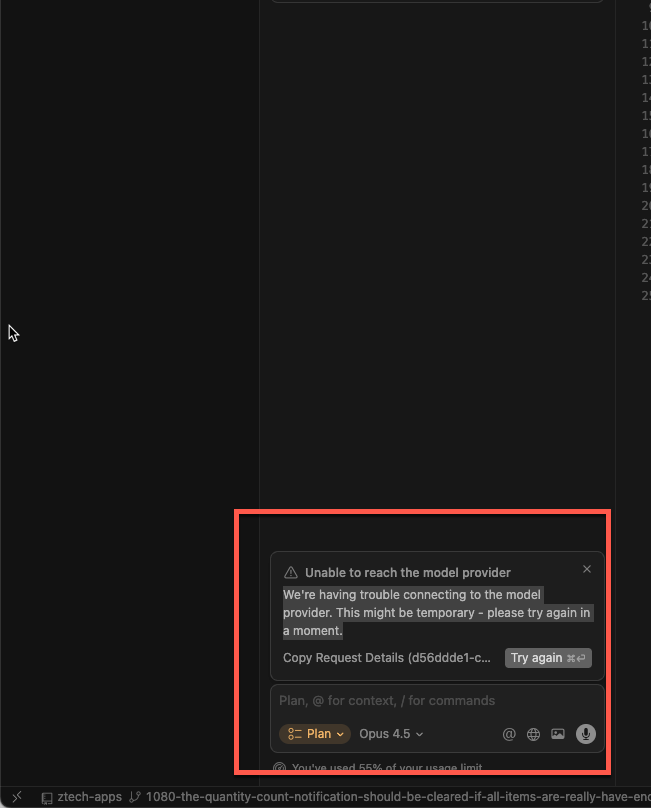
Using Opus and Gemini does not work for me, while GPT and other models work fine.
I consistently get this error:
“We’re having trouble connecting to the model provider. This might be temporary — please try again in a moment.”
It has already been 6 hours and the issue persists.
Since GPT works, it’s clearly not a network problem. I also ran the network diagnostics and everything shows as OK.
Steps to Reproduce
Just create a plan using any Anthropic or Google models
Expected Behavior
It should be able to create plan
Screenshots / Screen Recordings
Operating System
MacOS
Current Cursor Version (Menu → About Cursor → Copy)
Version: 2.1.48
VSCode Version: 1.105.1
Commit: ce371ffbf5e240ca47f4b5f3f20efed084991120
Date: 2025-12-04T19:26:27.263Z
Electron: 37.7.0
Chromium: 138.0.7204.251
Node.js: 22.20.0
V8: 13.8.258.32-electron.0
OS: Darwin arm64 24.6.0
For AI issues: which model did you use?
All Anthropic and All Google models
For AI issues: add Request ID with privacy disabled
Request ID: d44b23dd-2a2e-4fab-81ea-e759dbf062c2
{“error”:“ERROR_OPENAI”,“details”:{“title”:“Unable to reach the model provider”,“detail”:“We’re having trouble connecting to the model provider. This might be temporary - please try again in a moment.”,“additionalInfo”:{},“buttons”:,“planChoices”:},“isExpected”:false}
Does this stop you from using Cursor
Yes - Cursor is unusable