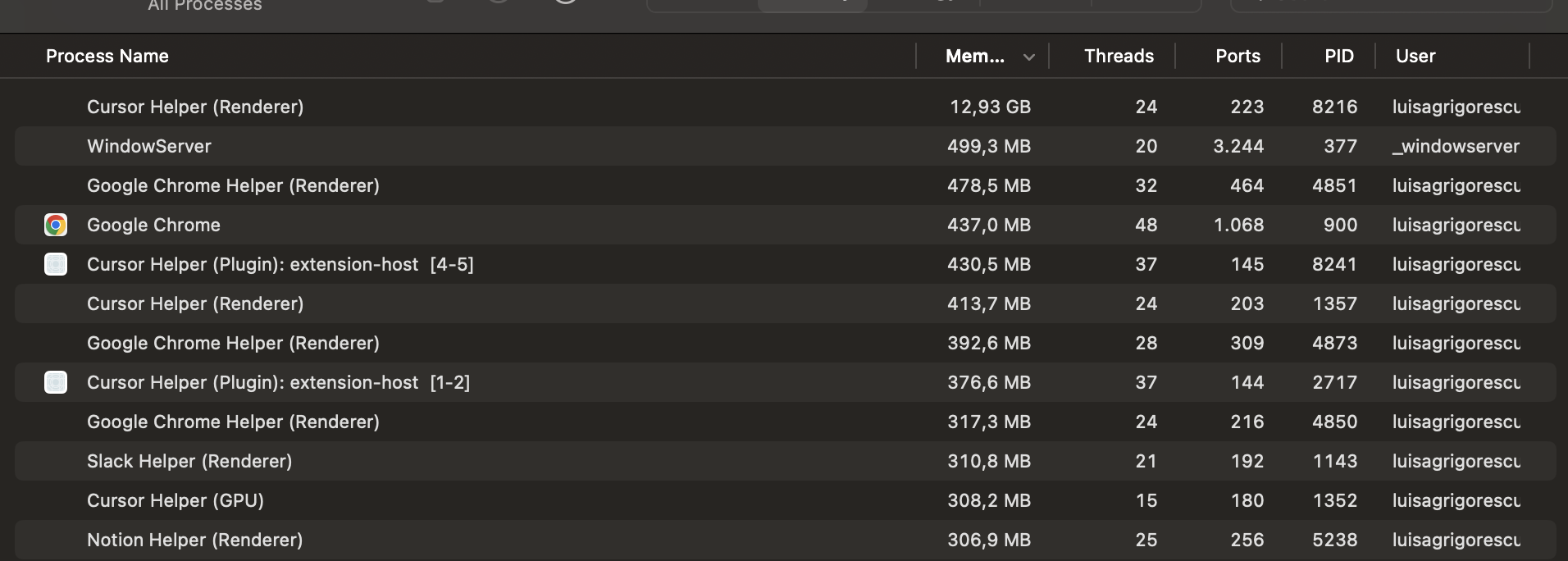
IDE is frozen - for the past hours, I am not able to use Cursor! It’s very small repo, that I just added a new lambda with a few config settings! I have only two chats open, and I use the models in auto mode.
Steps to Reproduce
I’m not sure, cause it used to work fine, up until recently, after I did a cdk synth it started acting very weird.
I restarted my laptop, Cursor, opened up a new chat, but after using it a few times it hangs.
Here is how the memory looks when Cursor stops working! There is no query or request running, just two past chats opened! I suspect maybe the chat is too long? but before I had so many instances of Cursor running, 4-5 and some of them even doing work in the background. Now I can’t even check the code with one instance!
Sorry for the trouble! That 12.93GB RAM usage from Cursor Helper (Renderer) is abnormally high.
Since this started after cdk synth, the generated cdk.out/ folder may be causing some issues. Try adding it to a .cursorignore file in your project root:
cdk.out/
Also try these diagnostics:
Test without extensions: Run cursor --disable-extensions from terminal - if this fixes it, an extension is the culprit
Check Process Explorer: CMD + Shift + P > “Developer: Open Process Explorer” to see which process is consuming resources
Clear chat history: Long conversations can cause memory bloat - try starting fresh with no chats open
Closing the chats and opening a new one seemed to have fixed it, but what’s weird is that even if I opened a project with fewer chats it would ran into the issue!
I have done cdk synth a bunch of times before, and even with bigger projects, no issue in the past, but I’ll still add it to ignore, as it’s context not needed for Cursor anyways.
@sanjeed5 it happens with any repo, even the ones that don’t have the cdk.out! Before the latest updates I could run cdk synth, and a lot of other commands, no issues whatsoever, even without a .cursorignore.
I updated Cursor yesterday and same issue. After chatting and doing some small changes it freezes. Memory went all the way to 16GB.
I’ll try re-installing the latest one again and if not I’ll re-install an older version! I’ll keep you post it if I notice patterns with reproducing it!
@sanjeed5 Haven’t had any memory issues since Friday! I reinstalled Cursor same version as before, but it seems to be working fine now. Maybe something just needed a clean reset.