Been spending some time addressing some random issues I had with Cursor, along with styling the UI.
The Launcher
First comes the launcher. I was always annoyed to boot up Cursor (and all my other IDEs) to find I had to update both the application itself, and the extensions… pair this with reloading the custom css & js, reloading extensions, re-patching the store… oh and I am one of those that suffered from the Cursor.exe deleting itself after failing to update for some Node.js related shenanigans.
So I’ve now built a launcher for Cursor, VSCode, Claude, and a handful of other programs. Cursors specifically has around 80 or so settings, adjustable by either editing the config file directly, or by launching the launcher with the settings flag (simplified by creating a separate shortcut or .exe).
The Launcher boots up Cursor > checks for an IDE update > asks if you would like to update > Then check extensions > Updates your extensions | All of those can be toggled between automatic, skipped, or asked Yes/No.
It then checks the VSIX store patch, patching it if the store is detected as not patched (allows for MS Extension Marketplace downloads).
Then, it uses a mix of Custom CSS & JSS extension flags, VSCode Animations, and my own custom CSS & JS files to patch and reload Cursors UI - All before the screen ever appears (Basically, it doesn’t even really have to reload anything, it’s just making sure that Custom JS & CSS are active and working, thus saving you the hassle of having to reload your UI).
Additionally, it also patches the “Your installation is broken” notification.
All-in-All launching Cursor takes about 10-20 seconds, and I do not have to worry about reloading my UI, or any other nonsense. If there is an IDE update, it obviously takes a small bit longer.

Plus some cool modular SVG’s I made for IDE/Tool Icons (excuse me, I got lazy and didn’t get a full-sized render of my Cursor and Meta Icons, so instead I’m showing so PNGs I’ve already rendered):

Cursor UI Theme
Next up is the Cursor Agent window UI Theming. This one is something I’m still working on, and with the help of Claude, it’s been a-lot of fun.
Long story short, Opus built me an explorer and mapping .exe for the IDE. Explorer auto-maps the DOM for me, using most of the common paths, while Mapper is for manually exploring. Both processes record/log the DOM, parse it for the proper and useful CSS information, and then document it for ease of editing for agents and I. It has a few other features relating to updates and their subsequent UI changes, although I have yet to test this with any BIG Cursor UI changes.
Currently I am still working on Styling the agent window, but these are how things look so far:
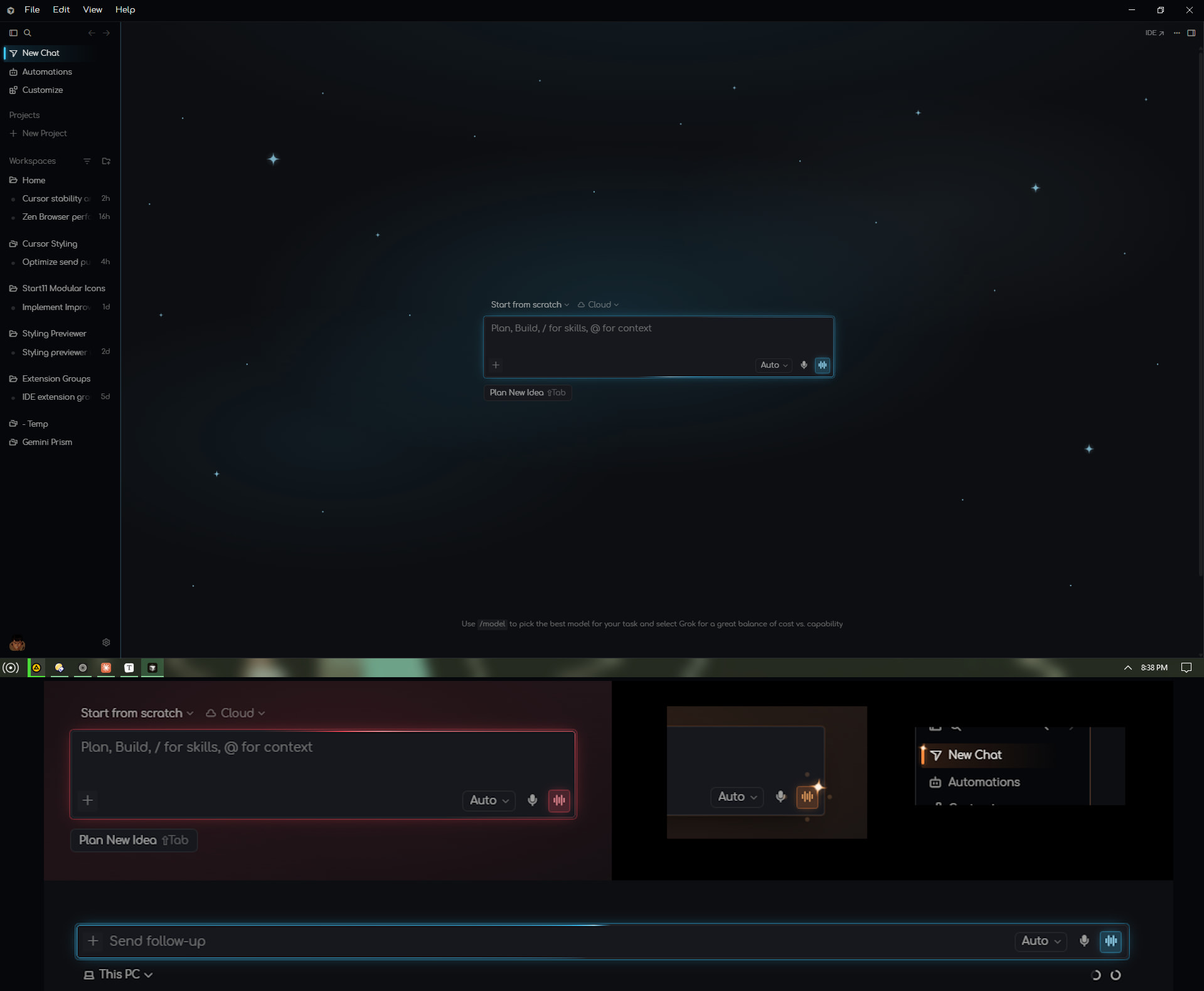
Unfortunately, I cannot really show off the animations and all the little details in full here. However, so far the theme has quite a few flashy design choices, the chat input animates and the bright line rides along the border. The send button and many others have various sparkle effects. The Stars in the background breathe, and a few other things like that.
ALSO - Despite not snagging a picture of it, the UI is fully customizable from WITHIN in the Agent window, a little window appears at the bottom right through a keybind. In this window it holds the animation speed and degree of motion, The UI radius shapes (square, soft, round), Various Colors, and a handful of other things.
Oh - and the best part? Shockingly it’s been extremely performant so far!
Anyway, really just wanted to show this off - hope you think it is as cool as I do. 
Edit: I forgot to mention there are surely a few features I am forgetting; one of which is the Launcher handles the prior mentioned Node.js issue, by killing any left-over Node processes when closing Cursor - that were from Cursor. Thus helping a lot with runaway Node.js BS, resource hogging, and update issues. | Not as exciting as the other stuff, but still very helpful.
