Where does the bug appear (feature/product)?
Cursor IDE
Describe the Bug
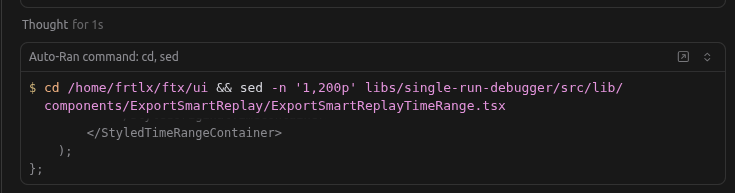
When creating a custom mode called “Planner” and give it all tools it still don’t behave like agent regarding reading files and uses commands instead of using the read_file tool
Steps to Reproduce
Create a custom mode and give it all permission (in my case it’s a planner mode) and then ask for a change and see how it reads files
Expected Behavior
to see read_file tool calls as agent work but instead we see
Screenshots / Screen Recordings

Operating System
Linux
Current Cursor Version (Menu → About Cursor → Copy)
Version: 2.0.77
VSCode Version: 1.99.3
Commit: ba90f2f88e4911312761abab9492c42442117cf0
Date: 2025-11-13T23:10:43.113Z
Electron: 37.7.0
Chromium: 138.0.7204.251
Node.js: 22.20.0
V8: 13.8.258.32-electron.0
OS: Linux x64 6.8.0-87-generic
For AI issues: which model did you use?
GPT-5.1 Codex High, GPT-5 High, Sonnet 4.5
Does this stop you from using Cursor
No - Cursor works, but with this issue
