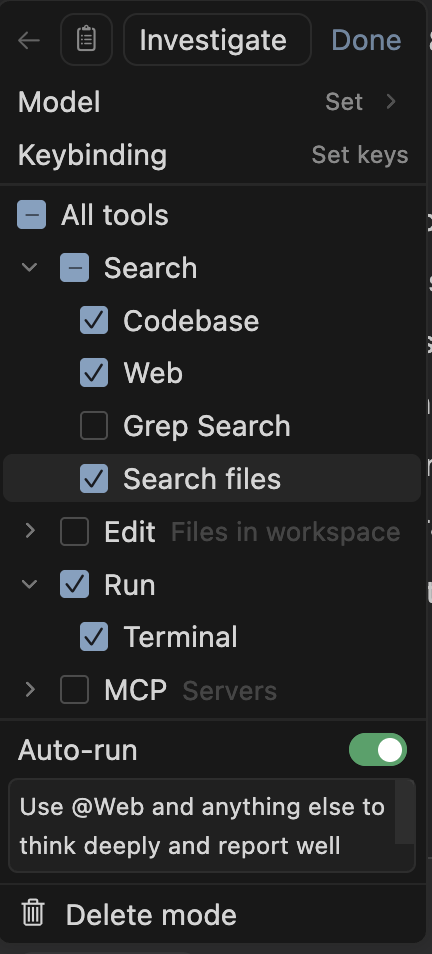
Describe the Bug
When in Investigate mode, the agent (GPT-5 for example) starts trying to use sed or other tools, instead of just reading files with the native tools
Steps to Reproduce
- switch to investigate
- ask the model to figure something out where it has to read files
Expected Behavior
It should use the Cursor read tool, not the shell tool.
Screenshots / Screen Recordings
(strange it tried to read the wrong file here:)

Note the comment about the read_file tool not being part of the function definition. Important?:

GPT-5 doesn’t mention the read_file tool:

Operating System
MacOS
Current Cursor Version (Menu → About Cursor → Copy)
Version: 2.0.64 (Universal)
VSCode Version: 1.99.3
Commit: 25412918da7e74b2686b25d62da1f01cfcd27680
Date: 2025-11-06T04:35:14.424Z
Electron: 37.7.0
Chromium: 138.0.7204.251
Node.js: 22.20.0
V8: 13.8.258.32-electron.0
OS: Darwin arm64 24.6.0
For AI issues: which model did you use?
GPT-5, though I suspect others would have the same issue. I saw this more than 4 times in different chates before reporting
Additional Information
If I switch back and forth it seems to start using the tool eventually. Perhaps some memory leak between chats gave it the clue? Regardless, I have seen this a number of times over the last few days. I have never seen it happen in “agent” mode.
Perhaps there is a clue in the way Composer reports its tool lists as the read tool being “not listed as explicit tools in the function definition”.
Does this stop you from using Cursor
Yes - Cursor is unusable