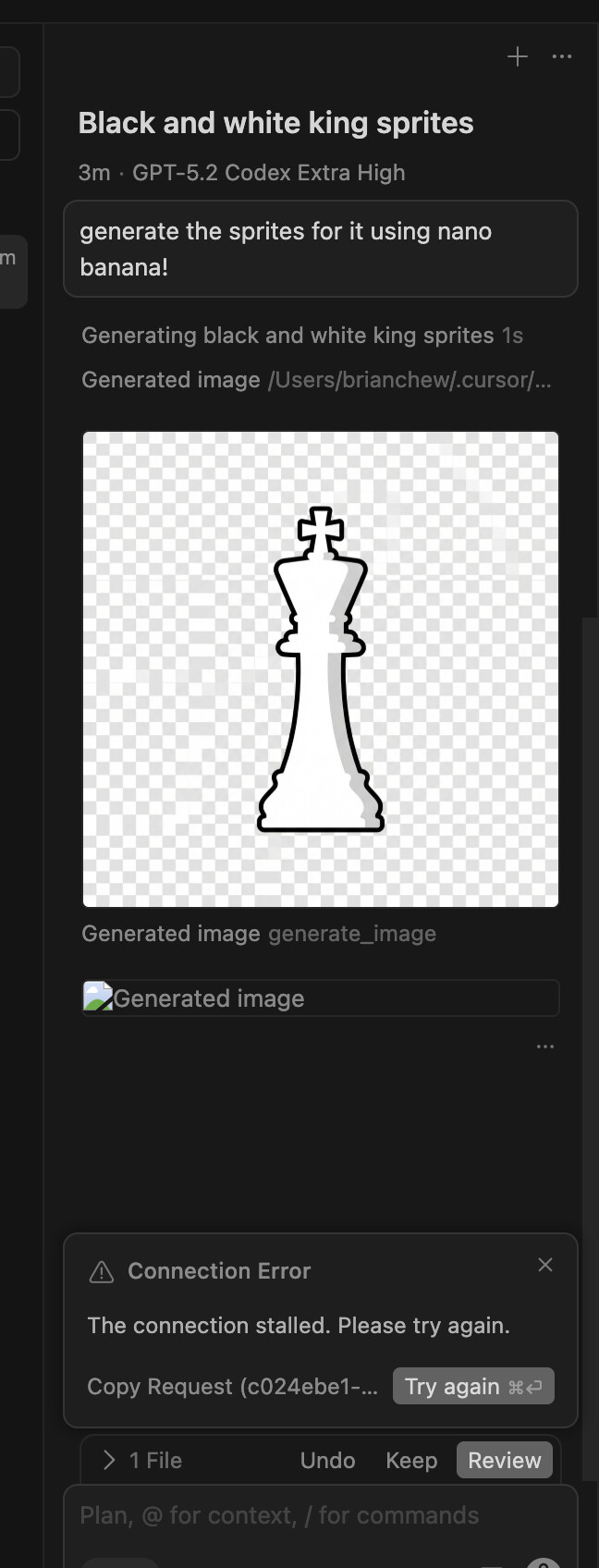
Image Generation Connection Error in Cursor 2.4

Where does the bug appear (feature/product)?

Cursor IDE

Describe the Bug

I’m experiencing a connection error when trying to use the new image generation feature introduced in Cursor version 2.4. According to the changelog, image generation should be available using Google Nano Banana Pro.

What I tried:
Attempted to generate an image using the agent’s image generation feature
Used a simple text description to generate an image

Error encountered:
A “Connection Error” dialog appeared with the following details:
Error message: “The connection stalled. Please try again.”
Request ID: 2f66fe1d-d2fd-4f4c-bc2c-69b0a1edfb5f
The error occurred during the image generation process

Expected behavior:
The image should be generated and saved to the assets/ folder as mentioned in the changelog.

Actual behavior:
The connection stalled and the image generation failed.

Environment:
Cursor version: 2.4
OS: Windows 10 (Build 26200)
Shell: bash

Questions:
Is there a known issue with image generation in version 2.4?
Are there any specific requirements or setup steps needed for image generation?
Should I check any network or firewall settings?
Is there a way to retry the request using the provided Request ID?

I’ve attached a screenshot of the error dialog for reference. Any help or guidance would be greatly appreciated!

Thank you.

Steps to Reproduce

When I try to generate an image in the chat of the agent under the cursor, it fails and no image is generated.

Expected Behavior

Image Generation

Screenshots / Screen Recordings

Operating System

Windows 10/11

Version Information

IDE 2.4.21

For AI issues: which model did you use?

Auto Mode

Additional Information

I’m experiencing a connection error when trying to use the new image generation feature introduced in Cursor version 2.4. According to the changelog, image generation should be available using Google Nano Banana Pro.

What I tried:
Attempted to generate an image using the agent’s image generation feature
Used a simple text description to generate an image

Error encountered:
A “Connection Error” dialog appeared with the following details:
Error message: “The connection stalled. Please try again.”
Request ID: 2f66fe1d-d2fd-4f4c-bc2c-69b0a1edfb5f
The error occurred during the image generation process

Expected behavior:
The image should be generated and saved to the assets/ folder as mentioned in the changelog.

Actual behavior:
The connection stalled and the image generation failed.

Environment:
Cursor version: 2.4
OS: Windows 10 (Build 26200)
Shell: bash

Questions:
Is there a known issue with image generation in version 2.4?
Are there any specific requirements or setup steps needed for image generation?
Should I check any network or firewall settings?
Is there a way to retry the request using the provided Request ID?

I’ve attached a screenshot of the error dialog for reference. Any help or guidance would be greatly appreciated!

Thank you.

Does this stop you from using Cursor

No - Cursor works, but with this issue

+1 here, might have created a duplicate post, sorry!

Here’s my response.

It appears in Opus 4.5.

It’s a feature.

Isn’t this a feature for generating images?

I thought Chat could generate images, but is that not the case?

2 Likes

Hey, thanks for the report. I’ll pass it to the team.

2 Likes

Where does the bug appear (feature/product)?

Cursor IDE

Describe the Bug

I am experiencing a technical failure where the agent is unable to execute image generation, even though the model’s internal reasoning logs show it is explicitly attempting to do so.

The Setup:

  • Cursor Version: 2.4.21

The Problem:

When I prompt the agent to generate an image (e.g., “Create a high-fidelity logo for this landing page”), the agent understands the request perfectly. In the “Thinking” / Reasoning trace, I can see the model explicitly deciding to call the image generation tool:

Example from logs: “I will now use the image generation tool to create the requested asset using the Nano Banana model…”

The Failure:

Despite the model emitting the intent to call the MCP tool/image generation service:

  1. No image preview appears.

  2. No file is created in the assets/ folder.

  3. The agent eventually “hangs” or responds with text as if it performed the action, but no tool output is actually generated.

My Analysis:

Since the model wants to call the tool but the IDE doesn’t execute it, this feels like a permissions or billing-gate issue.

I am on the Legacy Pro plan (500 requests). It appears that the Agent Harness in the latest build (2.4+) sees the request for a high-cost asset (Nano Banana) and silently fails the MCP call because it cannot deduct the cost from a “Request-based” counter (as opposed to the new Credit-based system).

Questions for the Engineering Team:

  1. Why is the MCP call for image generation failing silently instead of providing an error message?

  2. Is image generation explicitly disabled for Legacy Pro users, even if the model’s reasoning suggests it should be available?

  3. If this is a billing restriction, can you implement a proper UI notification (e.g., “Upgrade to Credit-based billing to use this tool”) rather than a silent failure in the Reasoning chain?

I would appreciate it if someone from the dev team could confirm if the “Legacy 500-request” backend is technically capable of executing the Nano Banana MCP calls.

Thank you!

Steps to Reproduce

When I prompt the agent to generate an image (e.g., “Create a high-fidelity logo for this landing page”), the agent understands the request perfectly. In the “Thinking” / Reasoning trace, I can see the model explicitly deciding to call the image generation tool:

Example from logs: “I will now use the image generation tool to create the requested asset using the Nano Banana model…”

Operating System

Windows 10/11

Version Information

Version: 2.4.21 (system setup)
VSCode Version: 1.105.1
Commit: dc8361355d709f306d5159635a677a571b277bc0
Date: 2026-01-22T16:57:59.675Z
Build Type: Stable
Release Track: Nightly
Electron: 39.2.7
Chromium: 142.0.7444.235
Node.js: 22.21.1
V8: 14.2.231.21-electron.0
OS: Windows_NT x64 10.0.26200

Does this stop you from using Cursor

Sometimes - I can sometimes use Cursor

Where does the bug appear (feature/product)?

Cursor IDE

Describe the Bug

I can’t generate an image in any way; here’s a simple example.

request id 1f2d4289-76ea-4fe4-89b1-22e4b529dc40

Steps to Reproduce

.

Screenshots / Screen Recordings

Operating System

Windows 10/11

Version Information

Version: 2.4.21 (system setup)
VSCode Version: 1.105.1
Commit: dc8361355d709f306d5159635a677a571b277bc0
Date: 2026-01-22T16:57:59.675Z
Build Type: Stable
Release Track: Early Access
Electron: 39.2.7
Chromium: 142.0.7444.235
Node.js: 22.21.1
V8: 14.2.231.21-electron.0
OS: Windows_NT x64 10.0.26200

For AI issues: which model did you use?

sonnet 4.5, opus 4.5, auto, gpt’s

Does this stop you from using Cursor

Sometimes - I can sometimes use Cursor

Where does the bug appear (feature/product)?

Cursor IDE

Describe the Bug

when I ask in the chat to generate an image but it always uses python to be able to create the image

Steps to Reproduce

go to the chat, ask to generate an image and it doesn’t use the tool to generate an image with nano banana pro

Expected Behavior

to use the tool instead of python

Operating System

Windows 10/11

Version Information

Version: 2.4.21 (user setup)
VSCode Version: 1.105.1
Commit: dc8361355d709f306d5159635a677a571b277bc0
Date: 2026-01-22T16:57:59.675Z
Build Type: Stable
Release Track: Default
Electron: 39.2.7
Chromium: 142.0.7444.235
Node.js: 22.21.1
V8: 14.2.231.21-electron.0
OS: Windows_NT x64 10.0.26200

For AI issues: which model did you use?

auto model, gemini 3.0 flash, gemini 3.0 pro

For AI issues: add Request ID with privacy disabled

8d33f31b-2446-495a-942e-6e4e6beb865b

Does this stop you from using Cursor

No - Cursor works, but with this issue

+1 here, same issue.

image

Operating System

Linux (Arch)

Version Information

IDE 2.4.21

For AI issues: which model did you use?

Opus 4.5

Additional Information

Same issue as OP describes

Does this stop you from using Cursor

No.

+1 here same issue.
Request ID: 95b9598e-c15c-43fa-bdc5-243704b45d21

Connection stalled

LTe: Connection stalled

at $mf (vscode-file://vscode-app/c:/Program%20Files/cursor/resources/app/out/vs/workbench/workbench.desktop.main.js:9096:4764)

at ova.run (vscode-file://vscode-app/c:/Program%20Files/cursor/resources/app/out/vs/workbench/workbench.desktop.main.js:9096:8170)

at async qyt.runAgentLoop (vscode-file://vscode-app/c:/Program%20Files/cursor/resources/app/out/vs/workbench/workbench.desktop.main.js:34190:57047)

at async Wpc.streamFromAgentBackend (vscode-file://vscode-app/c:/Program%20Files/cursor/resources/app/out/vs/workbench/workbench.desktop.main.js:34239:7695)

at async Wpc.getAgentStreamResponse (vscode-file://vscode-app/c:/Program%20Files/cursor/resources/app/out/vs/workbench/workbench.desktop.main.js:34239:8436)

at async FTe.submitChatMaybeAbortCurrent (vscode-file://vscode-app/c:/Program%20Files/cursor/resources/app/out/vs/workbench/workbench.desktop.main.js:9170:14575)

at async Oi (vscode-file://vscode-app/c:/Program%20Files/cursor/resources/app/out/vs/workbench/workbench.desktop.main.js:32991:3808)

Was there any update for this? I was still unable to generate sprites :sob::sob::sob::sob::sob::sob:

Is there an update on this issue? When should we start trying the image generation?