Hello
Am i the only one who observed very bad performance since updating to today’s update on windows 10 ?
I can’t seem to work in correct conditions due to strong IDE lags, i’m thinking of temporarily switching to sublime the time it’s solved (yes it’s that bad). I wonder if i’m the only one having this issue?
It’s rather sad that they automatically enable auto update. I got a horrible day of work because of that today. Quit irresponsible, lost a lot of time quitting and restarting cursors
Is there a cursor team or moderator here? Could we have a status on todays release performances problems?
Thanks
hi there. in addition to your Cursor version and system info, could you maybe share a bit more about the nature of the performance issue? is the window consistently laggy? do you notice that your system in general becomes laggy (not only Cursor)? do you maybe notice memory usage from Cursor that is higher than usual?
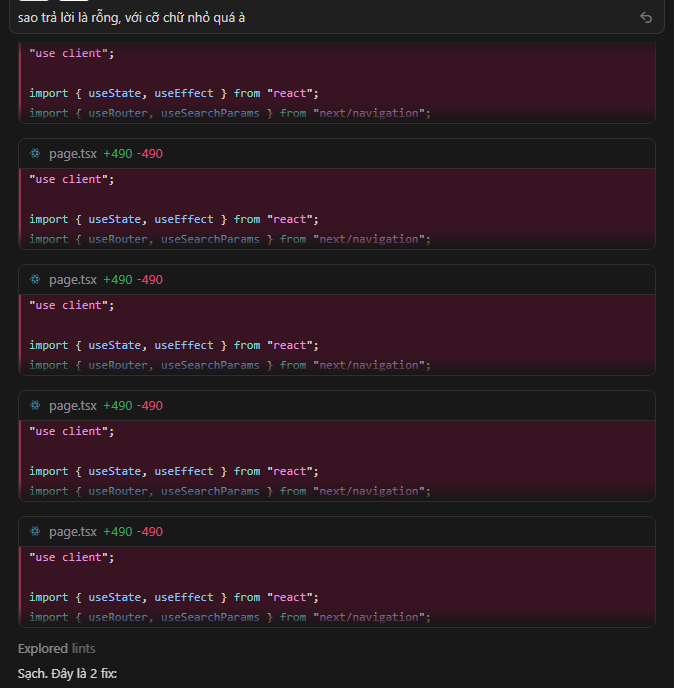
Somewhy instead of short code-block changes, it started to send the whole file change (like +2500 -2495) in every small code block (inside chat) (but it must be like “+5” ) - chat started being laggy because of that, though it was just several changes. issues persisted over the whole that chat. Although tapping over that code block jumped me to proper change-position in the file. The whole program starts to lag, maybe I will start new chat because of that.
Steps to Reproduce
I don’t know, maybe because the original file was big enough. 2300 lines.
Expected Behavior
agent should send only changes it’s made in small code blocks, not the whole file change every time.
After updating to 2.6.11, I noticed right away that the program was running awfully slow, after a couple of prompts and basic operations RAM usage skyrocketed to 5GB+ (and climbing lol) with CPU usage hovering around 20-30% which points to some sort of memory leak.
Killing the process via task manager and a fresh restart to the welcome window “fixes the issue”, HOWEVER reopening the workspace (that has git history and a couple of active chats with agents) starts leaking memory again, the leak is so severe I can barely get to the built in process explorer without cursor crashing.
FOLLOW-UP: The culprit seems to be an agent mode chat with Opus 4.6 (thinking), selecting that tab (or booting Cursor with that tab selected) immediately inflates the RAM usage and starts leaking heavily. Switching to a different agent tab, closing the entire program and re-starting with the non-problematic agent tab fixes the issue.
Same here. I noticed it’s related to the chat toolbar. If I hide it (CTRL+ALT+B on Windows), everything becomes usable again, but it freezes as soon as I show it.
I also noticed it depends on the specific chat that’s open. I couldn’t find a clear pattern—sometimes a short chat history freezes, and sometimes a long one doesn’t. But the same chat session will always either freeze or not freeze consistently.
it seems strong lags are being emitted from my chats conversation panels. That’s perhaps causing 60% of the slowdowns for me. Closing the conversations make things a bit more tolerable.
I also noted that cursor do NOT like when we are dragging files around, that make cursor severely lag (ex dragging a file from outliner to the chats, it froze to death multiple time this week..)
i’m always up to date, and this month performance have been noticeable worse.
I hope some of us will get some credits gifts for all that time waiting for our IDE to respond
I’ve been using Cursor for a month straight. I’ve never seen this happen. I think they should rollback this update - there is something wrong.
had the same. I thought it was the agent not patching properly and wasting all my credits away.
Please tell me it’s not that
It looks like this might be a regression in 2.6.11. Today we’re seeing similar messages from other users too. The agent is showing full file rewrites in chat code blocks instead of minimal diffs, especially on larger files.
A couple questions to narrow it down:
Which model are you using? (Claude, GPT, etc.)
Does this happen with small files too, or only with a ~2,300-line file?
I’ve passed this to the team. Let me know if you notice any pattern tied to specific file types or sizes.
I’m experiencing an issue where the AI code suggestions are overwriting the entire file rather than applying specific fixes. Every time a change is suggested, the tool deletes all existing code and replaces it with a new block, leading to massive line deletions and additions (e.g., +490 -490) even for minor edits.
Steps to Reproduce
Use Sonnet 4.6
planning
executed
Expected Behavior
It should be possible to review specific logic changes.
I just saw this too. I am using Auto in Plan mode that is now in Agent mode during build. In chat I am getting the full file patch, but in the actual diffs it shows only the specifically changed lines. So it appears that the chat is what is broken in showing only the changed lines.
If I open a new chat, and I don’t use Plan mode, it does not do this. Using Auto. Same files are being modified. (nevermind its happening event outside of Plan mode, who knows).