I only see “Agent” and “Ask” after the latest update - did “Manual” get purposefully removed? It’s the only way to get Cursor to write code without automatically taking other files as context, which helps reduce input costs.

Hello! We removed manual mode and also changed the default context to not attach the current file - it now just includes the active tab, and you’re able to remove that one as well. This should significantly reduce context/token usage
So, is my statement incorrect then?
It’s the only way to get Cursor to write code without automatically taking other files as context, which helps reduce input costs.
It sounds like you’re saying I should just use Agent, but doesn’t that risk spending more tokens if it decides to look into other files?
hi @nickz22 we are checking this, for now you could use Ask mode which is closest to Manual when not using Agent.
This is OK as a workaround for now, but manual mode is the only way to automatically apply changes without incurring additional costs associated with agent mode, and it is superior to Ask which forces you to click to apply.
Standing by for an update on Manual mode…
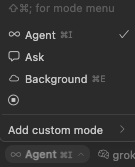
Hey, even though this mode was removed in the latest version, you have the option to add a custom mode and select the necessary options in it.
Interesting…haven’t tried custom modes. Will try this in the next 24 hours and report back.
@deanrie I think that’ll do the trick, thanks. Other than keeping chat threads short, is there a particular tool you would recommend disabling to minimize LLM usage?

Describe the Bug
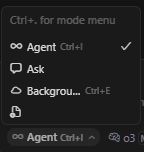
as reported by ‘What is new in 1.3.0? - #26 by nickz22 on the previous thread, today when opening cursor v1.3.0 (Windows), the ‘manual mode’ is missing from cursor chat drop down.
Quite frustrating as that is the mode i use the most, and not sure how to re-create it using ‘custom modes’. My update access is as always been set to ‘default’.
Steps to Reproduce
open cursor v1.3.0 on windows > goto cursor chat window > mode dropdown missing ‘manual mode’. only ‘agent’, ‘ask’ and ‘background agent’ now exist
Expected Behavior
should have ‘agent mode’ , ‘manual mode’, ‘ask mode’ and ‘background agent mode’ in cursor chat window dropdown modes
Screenshots / Screen Recordings
Operating System
Windows 10/11
Current Cursor Version (Menu → About Cursor → Copy)
Version: 1.3.0 (user setup)
VSCode Version: 1.99.3
Commit: 410000a83355c025daba0c6156955bf08687d080
Date: 2025-07-23T05:57:24.496Z
Electron: 34.5.1
Chromium: 132.0.6834.210
Node.js: 20.19.0
V8: 13.2.152.41-electron.0
OS: Windows_NT x64 10.0.26100
Additional Information
‘manual mode’ was there yesterday when i used and closed cursor. i dont believe there has been an update.
Does this stop you from using Cursor
Yes - Cursor is unusable

Hi @sureal and @sgandon thank you for the bug report.
Manual mode has been removed in 1.3.0 but the developers are looking into this.
For now you could use either Ask mode or enable in Settings custom modes, then in Chat Agent create a custom mode where you select only the tools you would like to use.
Hey, please check this:
https://forum.cursor.com/t/manual-mode-missing/121741/6?u=deanrie
Why on earth would the dev team remove the ‘manual mode’ option, as surely they must have telemetry to know how many paying customers are using it daily and that it would affect those customers by spontaneously removing it?
I dont use the agent mode as much as the manual mode as the quality of LLM output is improved often in manual mode when you know exactly which files to add as context + agent mode most likely will be more expensive due to needing more LLM API calls.
I strongly suggest it should be re-added, as new users will surely miss this feature, which is a bog standard way of working.
In just another thread, Dan was saying we can use Manual mode to save cost, “that’s why it’s there”. Why would 1.3 remove it?
Hey, he was talking about custom modes where you can precisely configure the agent.
Well this change has altered my workflow which I had down. Not knowing what the previous manual mode hade (assuming no tools enabled) I tried my usual of using o3 to fix an issue, and then o4-mini to apply the patch/diff from the previous output, though that no longer works now i.e. I cant get o4-mini to successfully apply the patch to the codebase automatically (highlight changes to approve). I tried a custom manual mode with no tools, and with ‘read file’ tool and didn’t work. Agent mode did work, but again it uses more LLM API calls and so will cost more then how manual mode used to already work before v1.3.0!
Good to know I can just toggle things off/on to keep costs low - thanks!
@condor Wow this is a huge regression. I haven’t been one to complain about how Cursor is getting worse blah blah blah but with this change its objectively worse for me.
Manual mode was a way to say “you only need to look at and edit these files and I want you to see them in their entirety”. Now even with a custom mode I can still tell its using the agentic approach under the hood to minimize token use - which is not want at all.
Let me just pay whatever it costs to use 500k tokens of gemini-2.5-pro’s context, don’t delete the manual workflow because some people are including their entire workspace in all their manual requests.
I’m reverting back to 1.2 and disabling auto-updates.
EDIT: It looks like this is a settings level change that removes manual mode even if you revert. 
EDIT2: Had to nuke my .cursor and Cursor/User folder and then reinstall 1.2 to get Manual mode back. Protip: make sure to backup your settings.json, keybindings.json and note down your installed extensions before doing this and then add this to your settings.json file after:
    // Disable Cursor updates
    "update.enableWindowsBackgroundUpdates": false,
    "update.mode": "none",
you have the option to add a custom mode and select the necessary options in it
Its not the same thing. I can tell its still using an agentic approach (reading and editing the file in multiple steps). Manual mode was a way to say “you only need to look at and edit these files and I want you to see them in their entirety”.