What is going with cursor? model just stopped working with zero error message to at least know what the hell is going on

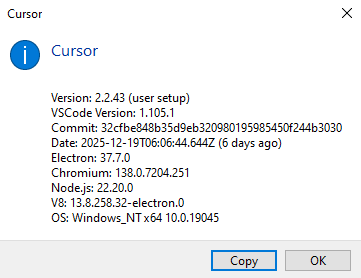
Apparently i have to wait till eternity for it to finally respond. Left it for like 30 minutes and suddenly it replied
Cursor team please do better. At least show us a way to know what is going on. We should at least know if it is connection issues or model issues or whatever maybe account issues etc, better than blank message with no idea what is going on
Hey, thanks for the report.
Since you still got a response after ~30 minutes, this looks more like a connection or configuration issue, not a full model outage.
Please try the following:
- Network Diagnostics: Cursor Settings > Network > Run Diagnostics, then share the results
- MCP servers: Disable all MCP servers in Cursor Settings > Tools & MCP and check if it helps (this recently fixed a similar issue with Gemini)
- HTTP/2: Press
Ctrl+,then search for “HTTP/2” and enable “Disable HTTP/2”
Also please share:
- Which model you’re using
- The Request ID (Chat > top-right menu > Copy Request ID)
Let me know if any of this helps.
I am pretty experienced at troubleshooting and it has nothing to do with any configurations or settings. the same settings been working great a while even after updates and all of a sudden this happened.
i attached screenshots in original post did you not see them? @deanrie
Yep, this is a known active bug with GPT-5 that can cause similar failures.
To help the engineers investigate:
- Copy the Request ID from any stuck request (Chat menu > Copy Request ID)
- Open Developer Tools (Help > Toggle Developer Tools > Console) and take a screenshot of any errors that show up when the request fails
- Try switching to another model. Does it work normally there?