Lars_Danau
(Lars Danau)
1
Where does the bug appear (feature/product)?
Cursor IDE
Describe the Bug
When creating a new project rule via the Cursor settings, it creates an .mdc file instead of a rules/x/RULE.md file
According to Rules | Cursor Docs this shouldn’t be the case.
Steps to Reproduce
Open Cursor Settings and create a new project rule under “Project rules”
Expected Behavior
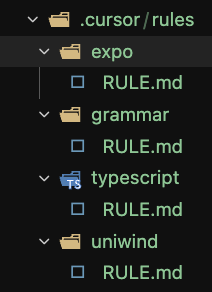
I would expect this creates a new rule with the new structure:
.cursor/rules/x/RULE.md
Instead it gives:
.cursor/rules/X.mdc
Operating System
MacOS
Current Cursor Version (Menu → About Cursor → Copy)
Version: 2.2.43
VSCode Version: 1.105.1
Commit: 32cfbe848b35d9eb320980195985450f244b3030
Date: 2025-12-19T06:06:44.644Z
Electron: 37.7.0
Chromium: 138.0.7204.251
Node.js: 22.20.0
V8: 13.8.258.32-electron.0
OS: Darwin arm64 25.2.0
Does this stop you from using Cursor
No - Cursor works, but with this issue
Lars_Danau
(Lars Danau)
2
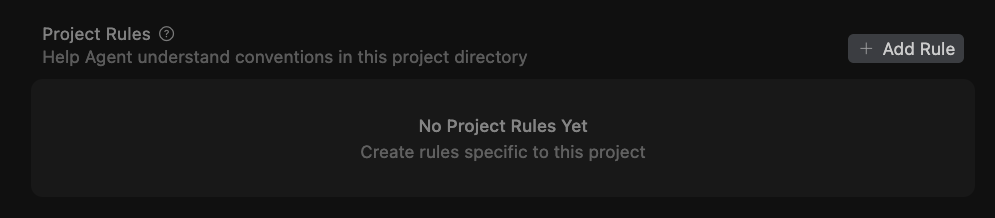
Also. Rules with the new cursor/rules/x/RULE.md don’t show up in the Cursor settings under Project rules but the .mdc files do
deanrie
(Dean Rie)
3
Hey, thanks for the report.
This is a known issue that was fixed, but based on a few recent reports it still seems to reproduce on the latest versions. Here’s what you can try:
- Reload Window: Command Palette > “Reload Window”
- After the reload, try creating a new rule from the UI and see what happens
As a temporary workaround, you can use the .mdc format, which still works as the legacy option.
Let me know if Reload Window helped, or if the issue still happens after the reload.
Lars_Danau
(Lars Danau)
4
Hi!
I’ve tried the reload window (twice to be sure) but still have the same output.
My cursor settings show no project rules (although there are present with the RULE.md format) and creating a new rule uses .mdc
Minho_Park
(Minho Park)
6
Same Issue here. Please update Rules | Cursor Docs or fix bugs. Thank you.