Where does the bug appear (feature/product)?
Cursor IDE
Describe the Bug
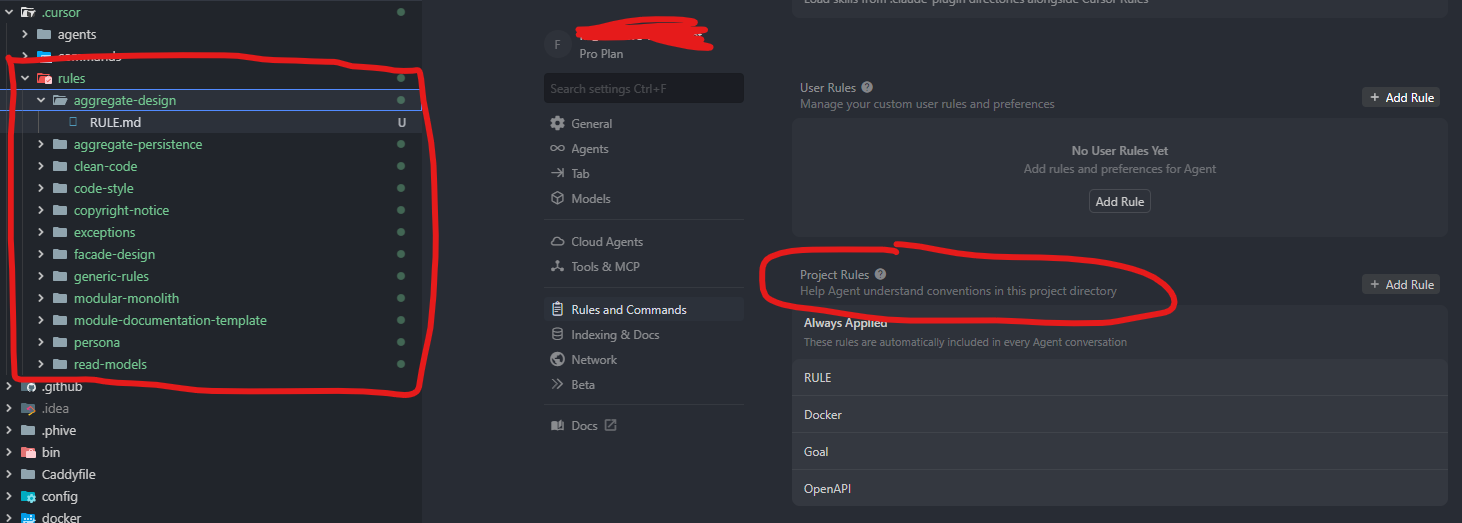
Project Rules using the documented folder-based RULE.md format are not recognised by Cursor. The documentation at https://cursor.com/docs/context/rules shows rules should be created as folders containing a RULE.md file (e.g., .cursor/rules/my-rule/RULE.md), but this format does not work. Rules only appear in Settings when using flat .mdc files directly in .cursor/rules/ (e.g., .cursor/rules/my-rule.mdc).
Steps to Reproduce
- Create .cursor/rules/test-rule/RULE.md with frontmatter (description, globs, alwaysApply)
- Open Cursor Settings → Rules → Project Rules
- Observe: No rules appear
- Convert to .cursor/rules/test-rule.mdc (flat file, same content)
- Observe: Rule now appears in Project Rules
Expected Behavior
Rules created using the documented folder-based format (.cursor/rules//RULE.md) should appear in Settings → Rules → Project Rules, matching the documentation at Rules | Cursor Docs
Operating System
MacOS
Current Cursor Version (Menu → About Cursor → Copy)
Version: 2.2.14
VSCode Version: 1.105.1
Commit: 1685afce45886aa5579025ac7e077fc3d4369c50
Date: 2025-12-11T01:12:35.790Z (8 hrs ago)
Electron: 37.7.0
Chromium: 138.0.7204.251
Node.js: 22.20.0
V8: 13.8.258.32-electron.0
OS: Darwin arm64 25.1.0
For AI issues: which model did you use?
N/A
For AI issues: add Request ID with privacy disabled
N/A
Additional Information
- Verified .cursor/rules/ is not in .gitignore or .cursorignore
- Verified .cursor/ is not excluded in .vscode/settings.json files.exclude
- Files are tracked by Git
- The .mdc format works but is not documented; the documented RULE.md format does not work
- This caused significant debugging time before discovering the undocumented .mdc requirement
Does this stop you from using Cursor
No - Cursor works, but with this issue