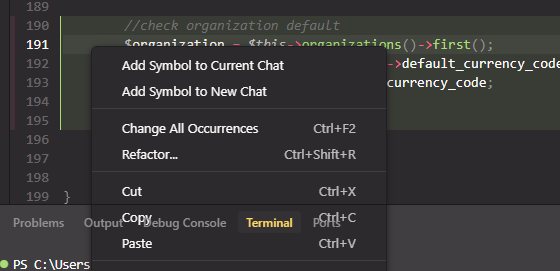
review changes → right click → must have bottom pane open
Version: 2.1.0-pre.2.patch.0 (user setup)
VSCode Version: 1.99.3
Commit: d3c12e88360374a70d1a6729bae06ca5444bb080
Date: 2025-11-02T08:14:12.227Z
Electron: 37.7.0
Chromium: 138.0.7204.251
Node.js: 22.20.0
V8: 13.8.258.32-electron.0
OS: Windows_NT x64 10.0.19045

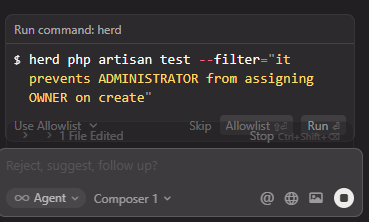


Thank you for the reports @liquefy , worktrees should be automatically cleaned up.
Will forward the details internally as well.
Describe the Bug
There is a problem with the style.
Steps to Reproduce
as shown in the figure
Screenshots / Screen Recordings

Operating System
MacOS
Current Cursor Version (Menu → About Cursor → Copy)
Version: 2.1.0-pre.2.patch.0
VSCode Version: 1.99.3
Commit: d3c12e88360374a70d1a6729bae06ca5444bb080
Date: 2025-11-02T08:14:12.227Z
Electron: 37.7.0
Chromium: 138.0.7204.251
Node.js: 22.20.0
V8: 13.8.258.32-electron.0
OS: Darwin arm64 23.6.0
Does this stop you from using Cursor
No - Cursor works, but with this issue
Where does the bug appear (feature/product)?
Cursor IDE
Describe the Bug
The end of a code/command proposal block overlaps, Run command/code block with Stop.
Steps to Reproduce
Heavy use of Agent Chat>Wrong state of underived nature with panes overlapping
Expected Behavior
No overlapping
Screenshots / Screen Recordings

Operating System
Windows 10/11
Current Cursor Version (Menu → About Cursor → Copy)
Version: 2.0.50 (system setup)
VSCode Version: 1.99.3
Commit: a788ca5efbb89cf7c24e873ea3623b2e47b42490
Date: 2025-11-02T23:59:00.227Z
Electron: 37.7.0
Chromium: 138.0.7204.251
Node.js: 22.20.0
V8: 13.8.258.32-electron.0
OS: Windows_NT x64 10.0.26200
Does this stop you from using Cursor
Sometimes - I can sometimes use Cursor
Where does the bug appear (feature/product)?
Cursor IDE
Describe the Bug
The new UI update doesn’t seem to be very user-friendly for accepting run commands in the chat panel.
Steps to Reproduce
Use agent mode, run a task that the agent will prompt to run bash command. The new translucent bar above the chat input is covering the run button.
Expected Behavior
The translucent bar doesn’t overlap and is no longer translucent.
Operating System
MacOS
Current Cursor Version (Menu → About Cursor → Copy)
Version: 2.0.54
VSCode Version: 1.99.3
Commit: 7a31bffd467aa2d9adfda69076eb924e9062cb20
For AI issues: which model did you use?
Auto
Does this stop you from using Cursor
Sometimes - I can sometimes use Cursor

Where does the bug appear (feature/product)?
Cursor IDE
Describe the Bug
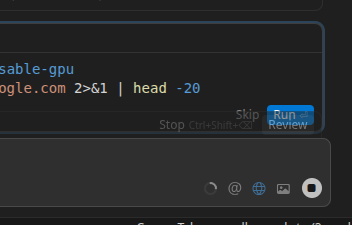
The run command confirmation box is overlapping the file edit summary (x files edited, review/undo)
Steps to Reproduce
- Make a change
- See 1.
Expected Behavior
Buttons should not be overlapping
Screenshots / Screen Recordings
Operating System
Linux
Current Cursor Version (Menu → About Cursor → Copy)
Version: 2.0.54
VSCode Version: 1.99.3
Commit: 7a31bffd467aa2d9adfda69076eb924e9062cb20
Date: 2025-11-03T22:40:44.657Z
Electron: 37.7.0
Chromium: 138.0.7204.251
Node.js: 22.20.0
V8: 13.8.258.32-electron.0
OS: Linux x64 6.8.0-86-generic
Does this stop you from using Cursor
No - Cursor works, but with this issue
Where does the bug appear (feature/product)?
Cursor IDE
Describe the Bug
See the screenshot
Steps to Reproduce
Go to the agents
Launch the agent (with 3x model in my case, but I don’t think it matters)
Get error and can’t see the button (see screenshot)
Screenshots / Screen Recordings

Operating System
MacOS
Current Cursor Version (Menu → About Cursor → Copy)
Version: 2.0.54
VSCode Version: 1.99.3
Commit: 7a31bffd467aa2d9adfda69076eb924e9062cb20
Date: 2025-11-03T22:40:44.657Z
Electron: 37.7.0
Chromium: 138.0.7204.251
Node.js: 22.20.0
V8: 13.8.258.32-electron.0
OS: Darwin arm64 24.6.0
Does this stop you from using Cursor
No - Cursor works, but with this issue
I was using 3x models in parallel (with git worktree)
Where does the bug appear (feature/product)?
Cursor IDE
Describe the Bug
Waited too long to manually accept a tool call and it errored out but the error Card widget was sitting behind the File Edited panel so it couldn’t be read fully.
Steps to Reproduce
Make sure you have enough chat history to so the content fill the panel and already have made changes to files.
Have it make a tool call that requires user acceptance to run it.
Wait for the timeout (don’t know how long, the Cursor UI devs will know how long to wait)
Run the waiting tool call.
Should show error panel and will be behind the panel that shows how many Edit have already been made
Expected Behavior
The error Card either sits above that Edit panel or overlaps on top.
Screenshots / Screen Recordings

Operating System
MacOS
Current Cursor Version (Menu → About Cursor → Copy)
Version: 2.0.54 (Universal)
VSCode Version: 1.99.3
Commit: 7a31bffd467aa2d9adfda69076eb924e9062cb20
Date: 2025-11-03T22:40:44.657Z
Electron: 37.7.0
Chromium: 138.0.7204.251
Node.js: 22.20.0
V8: 13.8.258.32-electron.0
OS: Darwin arm64 24.6.0
Does this stop you from using Cursor
No - Cursor works, but with this issue
Where does the bug appear (feature/product)?
Cursor IDE
Describe the Bug
The Run Command “Run” button overlaps with the “Review” button. The Run button is very hard to click.
Steps to Reproduce
Agent request which requires a cmd run.
Screenshots / Screen Recordings

Operating System
Windows 10/11
Current Cursor Version (Menu → About Cursor → Copy)
Version: 2.0.54 (system setup)
VSCode Version: 1.99.3
Commit: 7a31bffd467aa2d9adfda69076eb924e9062cb20
Date: 2025-11-03T22:40:44.657Z
Electron: 37.7.0
Chromium: 138.0.7204.251
Node.js: 22.20.0
V8: 13.8.258.32-electron.0
OS: Windows_NT x64 10.0.19045
Does this stop you from using Cursor
Yes - Cursor is unusable
Where does the bug appear (feature/product)?
Cursor IDE
Describe the Bug
The generated command section in chat is behind the stop view and am at the end of scrolling. Clicking on run can accidentally click on stop button
Steps to Reproduce
Ask the chat to generate any command for running
Expected Behavior
A well defined margin to place the generated command view above the stop view
Screenshots / Screen Recordings

Operating System
MacOS
Current Cursor Version (Menu → About Cursor → Copy)
Version: 2.0.54 (Universal)
VSCode Version: 1.99.3
Commit: 7a31bffd467aa2d9adfda69076eb924e9062cb20
Date: 2025-11-03T22:40:44.657Z
Electron: 37.7.0
Chromium: 138.0.7204.251
Node.js: 22.20.0
V8: 13.8.258.32-electron.0
OS: Darwin x64 25.1.0
Does this stop you from using Cursor
No - Cursor works, but with this issue
Where does the bug appear (feature/product)?
Cursor IDE
Describe the Bug
every time the agent is asking me to run a command, the review panel is hiding it, and It bothers me to click on the run buttom
Steps to Reproduce
ask agent to run something, without auto approve
Expected Behavior
that it wont cover it
Screenshots / Screen Recordings

Operating System
MacOS
Current Cursor Version (Menu → About Cursor → Copy)
Version: 2.0.54 (Universal)
VSCode Version: 1.99.3
Commit: 7a31bffd467aa2d9adfda69076eb924e9062cb20
Does this stop you from using Cursor
Yes - Cursor is unusable
Where does the bug appear (feature/product)?
Cursor IDE
Describe the Bug
The bottom drawer UI element (showing “File Edited”, queued agent messages, etc.) overlaps and obscures the terminal command action buttons (“Run”, “Allowlist”, “Skip”). This makes it impossible to interact with these buttons.
Steps to Reproduce
Open Cursor IDE.
Trigger the agent to run a command while Auto-Run mode is set to “Use Allowlist”.
Observe the bottom drawer displaying “File Edited” notifications and/or queued messages.
The “Run” and “Skip” buttons for active terminal commands become hidden behind the drawer and are not accessible.
Screenshots / Screen Recordings

Operating System
Windows 10/11
Current Cursor Version (Menu → About Cursor → Copy)
Version: 2.0.54 (user setup)
VSCode Version: 1.99.3
Commit: 7a31bffd467aa2d9adfda69076eb924e9062cb20
Date: 2025-11-03T22:40:44.657Z
Electron: 37.7.0
Chromium: 138.0.7204.251
Node.js: 22.20.0
V8: 13.8.258.32-electron.0
OS: Windows_NT x64 10.0.26200
Does this stop you from using Cursor
No - Cursor works, but with this issue
Where does the bug appear (feature/product)?
Cursor IDE
Describe the Bug
When the agent suggests and waits for me to manually run the command, the bottom UI of the chat interface overlaps the button and the rest of the UI elements for that card.
Steps to Reproduce
- Yolo mode = off (manual command runs)
- Let the agent suggest / ask you to run a command
- Look at the interface of that highlighted command UI card element, its overlapped by the chat input interface
Expected Behavior
Theres supposed to be some spacing between the chat output and the input so all buttons are easily clickable.
Screenshots / Screen Recordings

Operating System
MacOS
Current Cursor Version (Menu → About Cursor → Copy)
Version: 2.0.54
VSCode Version: 1.99.3
Commit: 7a31bffd467aa2d9adfda69076eb924e9062cb20
Date: 2025-11-03T22:40:44.657Z
Electron: 37.7.0
Chromium: 138.0.7204.251
Node.js: 22.20.0
V8: 13.8.258.32-electron.0
OS: Darwin arm64 24.6.0
Does this stop you from using Cursor
No - Cursor works, but with this issue
Where does the bug appear (feature/product)?
Cursor IDE
Describe the Bug
in the chat currently the file changes box has two expand arrows and overlaps the chat window. It is making the run button impossible to click because I also cannot click the collapse button on the file popup.
Steps to Reproduce
Use the IDE?
Expected Behavior
No overlap.
Screenshots / Screen Recordings

Operating System
Windows 10/11
Current Cursor Version (Menu → About Cursor → Copy)
Version: 2.0.54 (system setup)
VSCode Version: 1.99.3
Commit: 7a31bffd467aa2d9adfda69076eb924e9062cb20
Date: 2025-11-03T22:40:44.657Z
Electron: 37.7.0
Chromium: 138.0.7204.251
Node.js: 22.20.0
V8: 13.8.258.32-electron.0
OS: Windows_NT x64 10.0.26200
Does this stop you from using Cursor
Sometimes - I can sometimes use Cursor
Where does the bug appear (feature/product)?
Cursor IDE
Describe the Bug
Updated to version 2.0.60 and now in cursor , the ai panel have overlapping buttons, like command Run and Review. See screenshot. Restart of the IDE doesnt solve the issue.
Steps to Reproduce
Open cursor, ask cursor to do something which requires command runs in wsl (in my case).
Screenshots / Screen Recordings

Operating System
Windows 10/11
Current Cursor Version (Menu → About Cursor → Copy)
Version: 2.0.60 (system setup)
VSCode Version: 1.99.3
Commit: c6d93c13f57509f77eb65783b28e75a857b74c00
Date: 2025-11-05T00:50:54.645Z
Electron: 37.7.0
Chromium: 138.0.7204.251
Node.js: 22.20.0
V8: 13.8.258.32-electron.0
OS: Windows_NT x64 10.0.22631
Does this stop you from using Cursor
No - Cursor works, but with this issue
Where does the bug appear (feature/product)?
Cursor IDE
Describe the Bug
When the agent proposes a terminal command for user approval, the command execution panel overlaps with UI elements below it (such as the “Reject, suggest, follow up…” input box and model selector). This makes it difficult to click on the correct buttons or interact with the overlapped elements. The panel should adjust its position or the layout should accommodate it without overlapping other controls.
Steps to Reproduce
- Open Cursor IDE and start a chat session with the agent
- Trigger a longer-running agent task that generates changes and eventually proposes a terminal command (e.g., ask the agent to start a server and test connectivity)
- Wait for the agent to propose a command that requires user approval
- Observe that the “Run command” panel appears and overlaps with the UI elements below it
- Note that the “Reject, suggest, follow up…” input field and other controls are partially or fully obscured by the command panel
Expected Behavior
The command execution panel should appear without overlapping other UI elements. The layout should either:
- Push down the elements below to make room for the command panel, or
- Position the command panel in a way that doesn’t obscure interactive elements, or
- Make the chat area scrollable so all elements remain accessible
Users should be able to clearly see and interact with all buttons (Skip, Allowlist, Run & Review) as well as the input field below without any visual obstruction.
Screenshots / Screen Recordings

Operating System
Windows 10/11
Current Cursor Version (Menu → About Cursor → Copy)
Version: 2.0.60 (system setup)
VSCode Version: 1.99.3
Commit: c6d93c13f57509f77eb65783b28e75a857b74c00
Date: 2025-11-05T00:50:54.645Z
Electron: 37.7.0
Chromium: 138.0.7204.251
Node.js: 22.20.0
V8: 13.8.258.32-electron.0
OS: Windows_NT x64 10.0.26100
Additional Information
This seems to be a very recent problem. I update daily, and the problem wasn’t there yesterday.
Does this stop you from using Cursor
No - Cursor works, but with this issue