Having the exact same issue. Now I have to precision-click on 1-2 pixels and the button text and other text are obscured.
Where does the bug appear (feature/product)?
Cursor IDE
Describe the Bug
I have accepted all changes. but it’s not getting hide. And this is started after did cursor update
Steps to Reproduce
- First ask agent to do code change.
- Once it’s done by cursor agent. Review panel have list of the file to accept.
- Accept all changes.
Expected Behavior
After accepting all changes, review panel must be hide as before it was hide. I have attached screen shot where review panel is empty but still did not hide.
Screenshots / Screen Recordings


Operating System
Windows 10/11
Current Cursor Version (Menu → About Cursor → Copy)
Version: 2.0.60 (system setup)
VSCode Version: 1.99.3
Commit: c6d93c13f57509f77eb65783b28e75a857b74c00
Date: 2025-11-05T00:50:54.645Z
Electron: 37.7.0
Chromium: 138.0.7204.251
Node.js: 22.20.0
V8: 13.8.258.32-electron.0
OS: Windows_NT x64 10.0.26200
Does this stop you from using Cursor
No - Cursor works, but with this issue
Hey all - truly apologize. 2.0.63 fixes the overlap issue.
Where does the bug appear (feature/product)?
Cursor IDE
Describe the Bug
See picture.
It appears as though the panel tabs render above the Main menu items.
Steps to Reproduce
- Maximize Vertical Panel Window
- Ensure Explorer/Primary column does not prevent panel from being below main menu items
- Open a main menu item over the panel tabs names.
Expected Behavior
Id expect the menu to block the panel tab header names
Screenshots / Screen Recordings

Operating System
Windows 10/11
Current Cursor Version (Menu → About Cursor → Copy)
Version: 2.1.0-pre.9.patch.0 (user setup)
VSCode Version: 1.99.3
Commit: 5126b77792f0c1405b5eb1b93c77f37228cd6e70
Date: 2025-11-05T18:22:07.176Z
Electron: 37.7.0
Chromium: 138.0.7204.251
Node.js: 22.20.0
V8: 13.8.258.32-electron.0
OS: Windows_NT x64 10.0.26200
Does this stop you from using Cursor
No - Cursor works, but with this issue
Where does the bug appear (feature/product)?
Cursor IDE
Describe the Bug
I don’t know what they are called, but I have a picture attached. Sometimes it crossesover so much that I can not hit “Allowlist” or “Run”
Steps to Reproduce
Literally doing this after startup.
Expected Behavior
They don’t cover each other.
Screenshots / Screen Recordings

Operating System
Windows 10/11
Current Cursor Version (Menu → About Cursor → Copy)
Version: 2.0.57 (user setup)
VSCode Version: 1.99.3
Commit: eb037ef2bfba33ac568b0da614cb1c7b738455d0
Date: 2025-11-04T20:52:03.838Z
Electron: 37.7.0
Chromium: 138.0.7204.251
Node.js: 22.20.0
V8: 13.8.258.32-electron.0
OS: Windows_NT x64 10.0.26100
Does this stop you from using Cursor
Sometimes - I can sometimes use Cursor
Where does the bug appear (feature/product)?
Cursor IDE
Describe the Bug
The stop button is shown on top of the Run button in Chat. It’s too easy to press “Stop” instead of “Run” or “Allowlist”.
Steps to Reproduce
Make Cursor ask you to approve a console command
Screenshots / Screen Recordings

Operating System
Windows 10/11
Current Cursor Version (Menu → About Cursor → Copy)
Version: 2.0.54 (user setup)
VSCode Version: 1.99.3
Commit: 7a31bffd467aa2d9adfda69076eb924e9062cb20
Date: 2025-11-03T22:40:44.657Z
Electron: 37.7.0
Chromium: 138.0.7204.251
Node.js: 22.20.0
V8: 13.8.258.32-electron.0
OS: Windows_NT x64 10.0.26200
Additional Information
The scale doesn’t affect this issue, so nevermind that the screenshot is zoomed in
Does this stop you from using Cursor
No - Cursor works, but with this issue
Where does the bug appear (feature/product)?
Cursor IDE
Describe the Bug
The UI have a glitch that not let me click the confirm button. With or without the the queue. Very strange start do this together with the fact that my AUTO is completely disdappeared and i not know why.
Steps to Reproduce
Let the conversation reach the bottom and then we cannot use that buttons anymore.
Screenshots / Screen Recordings
Operating System
MacOS
Current Cursor Version (Menu → About Cursor → Copy)
Version: 2.0.60
VSCode Version: 1.99.3
Commit: c6d93c13f57509f77eb65783b28e75a857b74c00
Date: 2025-11-05T00:50:54.645Z
Electron: 37.7.0
Chromium: 138.0.7204.251
Node.js: 22.20.0
V8: 13.8.258.32-electron.0
OS: Darwin arm64 24.6.0
For AI issues: which model did you use?
Claude now
Additional Information
The software is great but this glitch make me unable to use AUTO and unable sometime to accept a command because the stop / skip overlap the button. On my laptop all good on the Macstudio i have this issue.
Does this stop you from using Cursor
No - Cursor works, but with this issue
Here there is another glitch that i keep getting
It seems like it cannot remember the Ultra plan.
Where does the bug appear (feature/product)?
Cursor IDE
Describe the Bug
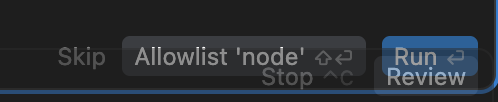
button components for user-interaction are overdrawn
Steps to Reproduce
Make the window for the chat ~65% window width
Expected Behavior
Cursor’s option buttons for CLI cmds is overdrawn by the review button in several window breakpoints
Screenshots / Screen Recordings
Operating System
MacOS
Current Cursor Version (Menu → About Cursor → Copy)
Version: 2.0.60
VSCode Version: 1.99.3
Commit: c6d93c13f57509f77eb65783b28e75a857b74c00
Date: 2025-11-05T00:50:54.645Z
Electron: 37.7.0
Chromium: 138.0.7204.251
Node.js: 22.20.0
V8: 13.8.258.32-electron.0
OS: Darwin arm64 23.5.0
For AI issues: which model did you use?
Auto
Does this stop you from using Cursor
No - Cursor works, but with this issue
Hey @aeropasta, unfortunately, the overlapping z-index issue is a known problem. There is a larger tracker here, where other users have reported the same problem with other UI elements.
Where does the bug appear (feature/product)?
Cursor IDE
Describe the Bug
When using the Agent Panel, the Run button only appears when the agent needs user approval to execute a command. If this happens while the thread is scrolled to the bottom, the Run button sits flush with the panel’s bottom edge. The grayed-out Stop button sits directly behind that area and becomes active on hover. As a result, trying to click Run often activates the Stop button instead, unless the user clicks a very small gap.
Steps to Reproduce
Run an agent that generates multiple steps/messages (long thread required).
Allow it to reach a point where it requests user approval to run a command.
Scroll to the bottom of the thread (or let the UI auto-scroll).
Observe behavior in two conditions:
Approval lands at bottom → Run overlaps Stop hover zone
Approval lands below view → Run button not shown until manually scrolled
Expected Behavior
Run button should always be visible when approval is required.
Run should not overlap or be obstructed by the Stop button hover zone.
No precise clicking should be required.
Screenshots / Screen Recordings

Operating System
MacOS
Current Cursor Version (Menu → About Cursor → Copy)
Version: 2.0.60 (Universal)
VSCode Version: 1.99.3
Commit: c6d93c13f57509f77eb65783b28e75a857b74c00
Date: 2025-11-05T00:50:54.645Z
Electron: 37.7.0
Chromium: 138.0.7204.251
Node.js: 22.20.0
V8: 13.8.258.32-electron.0
OS: Darwin arm64 24.6.0
For AI issues: which model did you use?
Sonnet 4.5, AI Tab on the right
Does this stop you from using Cursor
No - Cursor works, but with this issue
Hey @Mil05h, currently this is a known z‑index bug that several users have run into.
Workarounds:
- Try resizing the Agent panel (drag the divider) so the Run button stays fully visible.
- If the button is still hidden, try manually scrolling a bit up to see the button.
Does that help show the run button? Hopefully this catches staff attention soon, and a long-term solution is available.
Where does the bug appear (feature/product)?
Cursor IDE
Describe the Bug
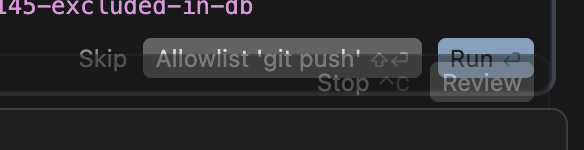
Run and Review are overlaid over each other. I only have a small space to use the Run button without the mouse going over the Review button.
Steps to Reproduce
Run any command in the cursor CLI that requires a Run prompt
Expected Behavior
There needs to be more spacing between the Run and Review buttons that allow me to click Run without having Review selected
Screenshots / Screen Recordings

Operating System
Linux
Current Cursor Version (Menu → About Cursor → Copy)
Version: 2.0.60
VSCode Version: 1.99.3
Commit: c6d93c13f57509f77eb65783b28e75a857b74c00
Date: 2025-11-05T00:50:54.645Z
Electron: 37.7.0
Chromium: 138.0.7204.251
Node.js: 22.20.0
V8: 13.8.258.32-electron.0
OS: Darwin arm64 24.6.0
Additional Information
I am using a 16-inch Macbook Pro, Nov 2024
Does this stop you from using Cursor
No - Cursor works, but with this issue
Where does the bug appear (feature/product)?
Cursor IDE
Describe the Bug
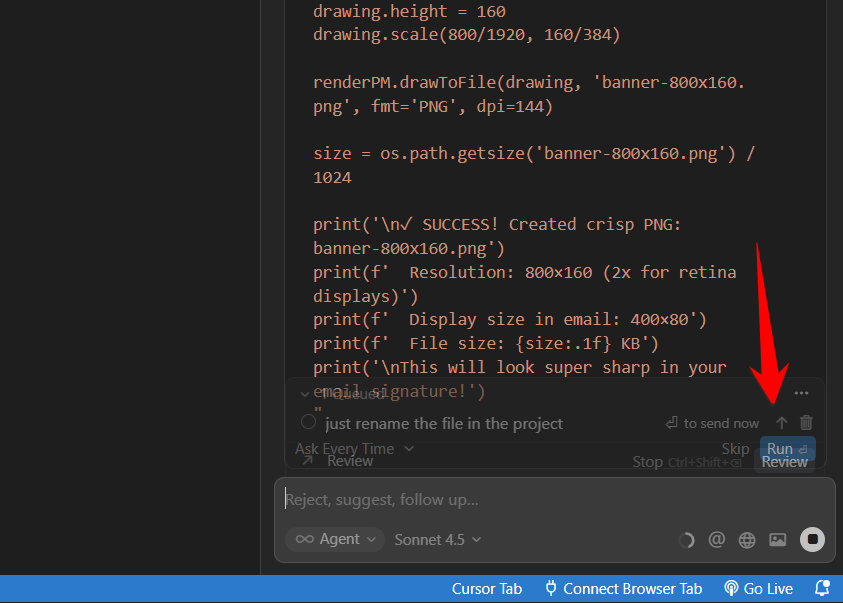
After sending 2–3 messages in a conversation, once the agent panel reaches the bottom of the chat view, the “Review” button overlaps with the “Run” button in the action bar. This makes both buttons partially unreadable and difficult to click.
Steps to Reproduce
1.	Start a new chat in Cursor.
2.	Send some messages (usually 2–3).
3.	When the conversation panel scrolls to the bottom, observe the top-right corner of the agent panel.
Expected Behavior
The “Run” and “Review” buttons should remain clearly separated and fully visible, regardless of chat scroll position.
Screenshots / Screen Recordings

Operating System
MacOS
Current Cursor Version (Menu → About Cursor → Copy)
Version: 2.0.60 (Universal)
VSCode Version: 1.99.3
Commit: c6d93c13f57509f77eb65783b28e75a857b74c00
Date: 2025-11-05T00:50:54.645Z
Electron: 37.7.0
Chromium: 138.0.7204.251
Node.js: 22.20.0
V8: 13.8.258.32-electron.0
OS: Darwin arm64 23.6.0
Does this stop you from using Cursor
No - Cursor works, but with this issue

Where does the bug appear (feature/product)?
Cursor IDE
Describe the Bug
I noticed this a couple days ago after an update. check the attached image for detail.
Steps to Reproduce
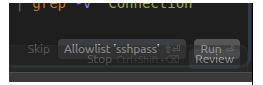
Try to run something with the agent until the context push the confirm box to the end and the run/confirm button with be overlapped with the review button (when there are files changing)
Expected Behavior
the undo+keep all+review should occupy their own space and push the confirm box above
Screenshots / Screen Recordings
Operating System
Linux
Current Cursor Version (Menu → About Cursor → Copy)
Version: 2.0.60
VSCode Version: 1.99.3
Commit: c6d93c13f57509f77eb65783b28e75a857b74c00
Date: 2025-11-05T00:50:54.645Z
Electron: 37.7.0
Chromium: 138.0.7204.251
Node.js: 22.20.0
V8: 13.8.258.32-electron.0
OS: Linux x64 6.14.0-33-generic
Does this stop you from using Cursor
No - Cursor works, but with this issue

Where does the bug appear (feature/product)?
Cursor IDE
Describe the Bug
The run button is hidden by the Files Edited bottom sheet and barely pops up over the stop button causing unwanted stop action.
Steps to Reproduce
Run multi step prompt that starts filling out chat panel. As the chat response fills up the space then next task that needs approval will have its run button hidden
Expected Behavior
It should not be hidden. The opacity of the bottom sheet is nice but it something needs to be done so it doesn’t hide any action needed on the chat.
Screenshots / Screen Recordings

Operating System
MacOS
Current Cursor Version (Menu → About Cursor → Copy)
Version: 2.0.54 (Universal)
VSCode Version: 1.99.3
Commit: 7a31bffd467aa2d9adfda69076eb924e9062cb20
Date: 2025-11-03T22:40:44.657Z
Electron: 37.7.0
Chromium: 138.0.7204.251
Node.js: 22.20.0
V8: 13.8.258.32-electron.0
OS: Darwin arm64 24.6.0
Does this stop you from using Cursor
No - Cursor works, but with this issue