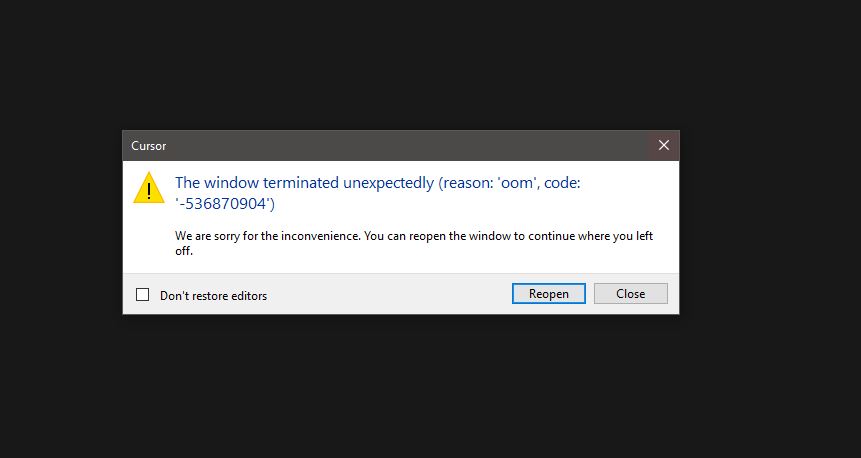
How to deal with it ?
ts file has 20 k recors and gettign OOM all time…
Windows 10/11
Version: 2.1.17 (user setup)
Yes - Cursor is unusable
deanrie
November 21, 2025, 1:32pm
2
Hey, thanks for the report. The OOM error code -536870904 has already been reported by other users. Let’s try to figure it out:
First, test Cursor without extensions. Run this in your terminal:cursor --disable-extensions
If it works like this, then one of your extensions is causing the issue.
If the problem remains, please share:
Does this happen only in this project, or also in a new empty folder?
Which extensions do you have installed? (check in Settings)
Do you have any MCP servers configured?
Can you open Help > About Cursor and share your full version info?
Related workarounds from other users:
Clear workspace storage (project-specific):%APPDATA%\Cursor\User\workspaceStorage → Delete the folder that matches your project → Open Cursor again
Let me know what you find in safe mode!
It didn’t work… I switched to VS Code with Copilot, and it was the best decision I could have made.
Cursor IDE
termiantion of window citing reason oom code 536870904
use cursor
functiion of the program
Windows 10/11
Version: 2.1.25 (user setup)
Yes - Cursor is unusable
I have the same issue…
Without very much to go on, i.e. “Vibe trouble shooting” ;-P, I see that my “cloud agent” is now synched into the Cursor IDE, and I think this may be related?
Looked in the logs and here is the “main.log”:
PS C:\Users\qvick\AppData\Roaming\Cursor\logs\20251215T090747> more .\main.log
C:\Program Files\cursor\resources\app\node_modules\cursor-proclist\index.js
C:\Program Files\cursor\resources\app\out\main.jshttps://api2.cursor.sh/updates/api/update/win32-x64/cursor/2.2.20/eabb478ee4c3fa80dba22cfc2e6a9ace98a982f573d02dcc2e30294dc2984bc7/stable
SOLUTION for me: Removed AppData/Cursor directory. Note - you loose a lot doing this…
sor1229
December 15, 2025, 10:00am
7
from past few weeks our tasks are like keep fighting with day 2 day new cursor bugs.
user1590
December 24, 2025, 7:56pm
8
Just got the same failure.
When the app reopens, after I type about 3 characters in the agent window it fails. I tried clearing the cache and still fails.
user1590
December 24, 2025, 8:51pm
9
Just got the same failure.
When the app reopens, after I type about 3 characters in the agent window it fails. I tried clearing the cache and still fails.
Version: 2.2.43 (system setup)
main log file reported
2025-12-24 15:43:44.127 [warning] [CursorProclistService] Native module unavailable; disabling proclist metrics: Cannot find module ‘./build/Release/cursor_proclist.node’
C:\Program Files\cursor\resources\app\node_modules\cursor-proclist\index.js
C:\Program Files\cursor\resources\app\out\main.jshttps://api2.cursor.sh/updates/api/update/win32-x64/cursor/2.2.43/a33b5095d6ed2a42954cda4b8e01040b5719bd63259793fed91cddf8592f1c99/stable
Bromz
December 24, 2025, 8:59pm
10
getting this as well, never before and i use cursor daily for months.
user1590
December 24, 2025, 9:40pm
11
Continuing the discussion from OOM Cursor - The window terminated unexpectedly (reason: ‘oom’, code: ‘-536870904’) We are sorry for the inconvenience. You can reopen the window to continue where you left off :
Just got the same failure.
When the app reopens, after I type about 3 characters in the agent window it fails. I tried clearing the cache and still fails.
Version: 2.2.43 (system setup)
Removed and re-installed Cursor and still fails immediately.
JavaScript problem is the root cause (see below)
2025-12-24 15:43:44.127 [warning] [CursorProclistService] Native module unavailable; disabling proclist metrics: Cannot find module ‘./build/Release/cursor_proclist.node’
C:\Program Files\cursor\resources\app\node_modules\cursor-proclist\index.js
C:\Program Files\cursor\resources\app\out\main.jshttps://api2.cursor.sh/updates/api/update/win32-x64/cursor/2.2.43/a33b5095d6ed2a42954cda4b8e01040b5719bd63259793fed91cddf8592f1c99/stable 2025-12-24 15:43:51.443 [warning] [BrowserViewMainService] Cannot flush storage data: browser view not created for window 1 2025-12-24 15:44:42.732 [error] CodeWindow: renderer process gone (reason: oom, code: -536870904)
Unkn0wnT
January 14, 2026, 9:38pm
12
sorry, please what and what did you really loose after removing the AppData/Cursor???