Strange Google error when using Claude 4 Opus MAX

Describe the Bug

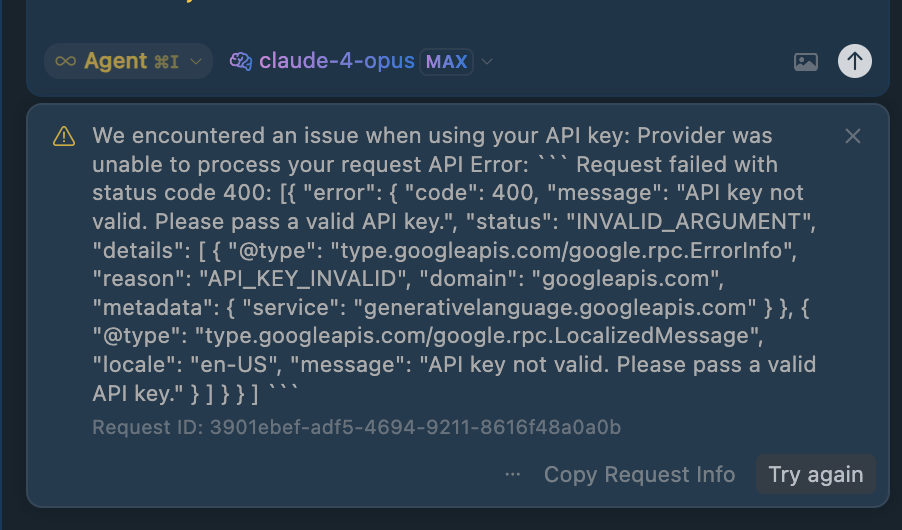
When using Claude 4 Opus MAX (with or without thinking), I eventually run into this error:

We encountered an issue when using your API key: Provider was unable to process your request API Error: ``` Request failed with status code 400: [{ "error": { "code": 400, "message": "API key not valid. Please pass a valid API key.", "status": "INVALID_ARGUMENT", "details": [ { "@type": "type.googleapis.com/google.rpc.ErrorInfo", "reason": "API_KEY_INVALID", "domain": "googleapis.com", "metadata": { "service": "generativelanguage.googleapis.com" } }, { "@type": "type.googleapis.com/google.rpc.LocalizedMessage", "locale": "en-US", "message": "API key not valid. Please pass a valid API key." } ] } } ] ```

Which is odd, given Claude is an Anthropic model.

Any idea how to solve this?

It interrupts the thread and the only way around the issue is to start a new thread (losing all context).

This happens even when I try to switch to using my own API key.

Steps to Reproduce

  • Use Claude 4 Opus MAX in Cursor for long enough

Expected Behavior

Claude 4 Opus MAX (with our without thinking) works.

If I run into any rate limits, I am told.

If I can switch to using my own API key, I am told.

Operating System

MacOS

Current Cursor Version (Menu → About Cursor → Copy)

Version: 1.2.4
VSCode Version: 1.99.3
Commit: a8e95743c5268be73767c46944a71f4465d05c90
Date: 2025-07-10T16:53:59.659Z
Electron: 34.5.1
Chromium: 132.0.6834.210
Node.js: 20.19.0
V8: 13.2.152.41-electron.0
OS: Darwin arm64 24.5.0

Does this stop you from using Cursor

No - Cursor works, but with this issue

Hi @joneslloyd the error would appear if you have a custom API URL set in settings or an API key setup that is not for Anthropic but using a model from Anthropic.

I have neither of those things.

I don’t have a custom API URL.

My Anthropic API key is verified and works (I even regenerated it to be sure).

API keys / URLs

Chat Window

@condor is there any way I can get this looked at by a member of the engineering team?

Thanks for the details, I will forward it to Cursor Team.

1 Like

Thank you

Could you additionally check if the issue remains if you remove the OpenAI key? (to exclude this as an effect)

I get the same error. It doesn’t make any difference.

1 Like

I have the same error.

I have the same error

Describe the Bug

When I try to use Claude 4 (Opus and Sonnet) in MAX mode, I get the following error:

Request ID: 8ec3514a-84e7-4135-b663-75d6fe19311b
{“error”:“ERROR_OPENAI”,“details”:{“title”:“Unable to reach the model provider”,“detail”:“We encountered an issue when using your API key: Provider was unable to process your request\n\nAPI Error:\n\n\nRequest failed with status code 400: [{\n \"error\": {\n \"code\": 400,\n \"message\": \"API key not valid. Please pass a valid API key.\",\n \"status\": \"INVALID_ARGUMENT\",\n \"details\": [\n {\n \"@type\": \"type.googleapis.com/google.rpc.ErrorInfo\",\n \"reason\": \"API_KEY_INVALID\",\n \"domain\": \"googleapis.com\",\n \"metadata\": {\n \"service\": \"generativelanguage.googleapis.com\"\n }\n },\n {\n \"@type\": \"type.googleapis.com/google.rpc.LocalizedMessage\",\n \"locale\": \"en-US\",\n \"message\": \"API key not valid. Please pass a valid API key.\"\n }\n ]\n }\n}\n]\n”,“additionalInfo”:{},“buttons”:},“isExpected”:true}
ConnectError: [invalid_argument] Error
at x9a.$endAiConnectTransportReportError (vscode-file://vscode-app/Users/dm/Applications/Cursor.app/Contents/Resources/app/out/vs/workbench/workbench.desktop.main.js:4757:223764)
at hir.S (vscode-file://vscode-app/Users/dm/Applications/Cursor.app/Contents/Resources/app/out/vs/workbench/workbench.desktop.main.js:492:17741)
at hir.Q (vscode-file://vscode-app/Users/dm/Applications/Cursor.app/Contents/Resources/app/out/vs/workbench/workbench.desktop.main.js:492:17519)
at hir.M (vscode-file://vscode-app/Users/dm/Applications/Cursor.app/Contents/Resources/app/out/vs/workbench/workbench.desktop.main.js:492:16607)
at hir.L (vscode-file://vscode-app/Users/dm/Applications/Cursor.app/Contents/Resources/app/out/vs/workbench/workbench.desktop.main.js:492:15708)
at Bwt.value (vscode-file://vscode-app/Users/dm/Applications/Cursor.app/Contents/Resources/app/out/vs/workbench/workbench.desktop.main.js:492:14500)
at ve.B (vscode-file://vscode-app/Users/dm/Applications/Cursor.app/Contents/Resources/app/out/vs/workbench/workbench.desktop.main.js:48:2398)
at ve.fire (vscode-file://vscode-app/Users/dm/Applications/Cursor.app/Contents/Resources/app/out/vs/workbench/workbench.desktop.main.js:48:2617)
at Git.fire (vscode-file://vscode-app/Users/dm/Applications/Cursor.app/Contents/Resources/app/out/vs/workbench/workbench.desktop.main.js:4744:10379)
at u.onmessage (vscode-file://vscode-app/Users/dm/Applications/Cursor.app/Contents/Resources/app/out/vs/workbench/workbench.desktop.main.js:6968:12271)

Judging by the error, the request is hitting Google’s API, not Anthropic’s

Steps to Reproduce

Enter your API key in Anthropic, choose MAX mode, and send any request in the chat.

Operating System

MacOS

Current Cursor Version (Menu → About Cursor → Copy)

Version: 1.2.4
VSCode Version: 1.99.3
Commit: a8e95743c5268be73767c46944a71f4465d05c90
Date: 2025-07-10T16:53:59.659Z
Electron: 34.5.1
Chromium: 132.0.6834.210
Node.js: 20.19.0
V8: 13.2.152.41-electron.0
OS: Darwin arm64 24.5.0

Does this stop you from using Cursor

Yes - Cursor is unusable

I have this exact same error using any Claude models with API key

Same.

Same

Running into the same error

I’ve wasted a heck of a lot of quite expensive (Opus MAX) tokens on re-sending requests / starting fresh threads when I shouldn’t have had to

Use without keys. You pay more, they stay happy!

Problem solved.

I’m encountering the same Google API error, but I’m not using MAX mode.

  • Model: Claude 4 Sonnet (thinking)
  • Mode: Agent mode only
  • MAX mode: Not enabled
  • Anthropic API key: Valid (tried multiple)
  • Google API key: Empty and toggle is off
  • No OpenAI, Azure, or other APIs enabled
  • No custom endpoint is set

The same error appears:

API Error: Request failed with status code 400
“API key not valid. Please pass a valid API key.”
“domain”: “googleapis.com”

I have also tried:

  • Logging out/in
  • Restarting IDE and PC
  • Switching between Agent and Custom mode
  • Adding claude-4-sonnet-20250514 as a custom model
  • Removing unused models and APIs
  • Replacing Anthropic API key

The error continues to occur in existing threads.
Starting a new chat works, but previous conversations are lost and summaries return empty.

I am on Cursor Pro (T4), and this is disrupting my work.

Please confirm if this bug is known to occur outside of MAX mode as well, and if a fix is in progress.

hi @YAKIMARUYAKI the issue maybe with usage of Anthropic models and not necessarily only max.

I will bump it up again for further checks and an update. Thank you all for the details.

cc @danperks

2 Likes

Well I’m getting this issue with/without keys. Regardless of cost it’s ruining my workflow.