Dear Cursor Team,
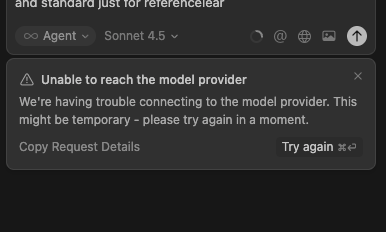
I wanted you to look into this matter when I am trying to access the agent model sonnet 4.5 thinking, I am getting this error:
Request ID: 78d0a20e-57c4-4859-b7c0-f1017edd7e1a
{“error”:“ERROR_OPENAI”,“details”:{“title”:“Unable to reach the model provider”,“detail”:“We’re having trouble connecting to the model provider. This might be temporary - please try again in a moment.”,“additionalInfo”:{},“buttons”:,“planChoices”:},“isExpected”:false}
ConnectError: [unavailable] Error
at dZc.$endAiConnectTransportReportError (vscode-file://vscode-app/Applications/Cursor.app/Contents/Resources/app/out/vs/workbench/workbench.desktop.main.js:6330:408452)
at MPo._doInvokeHandler (vscode-file://vscode-app/Applications/Cursor.app/Contents/Resources/app/out/vs/workbench/workbench.desktop.main.js:7180:11314)
at MPo._invokeHandler (vscode-file://vscode-app/Applications/Cursor.app/Contents/Resources/app/out/vs/workbench/workbench.desktop.main.js:7180:11056)
at MPo._receiveRequest (vscode-file://vscode-app/Applications/Cursor.app/Contents/Resources/app/out/vs/workbench/workbench.desktop.main.js:7180:9818)
at MPo._receiveOneMessage (vscode-file://vscode-app/Applications/Cursor.app/Contents/Resources/app/out/vs/workbench/workbench.desktop.main.js:7180:8635)
at mPt.value (vscode-file://vscode-app/Applications/Cursor.app/Contents/Resources/app/out/vs/workbench/workbench.desktop.main.js:7180:6727)
at _e._deliver (vscode-file://vscode-app/Applications/Cursor.app/Contents/Resources/app/out/vs/workbench/workbench.desktop.main.js:49:2962)
at _e.fire (vscode-file://vscode-app/Applications/Cursor.app/Contents/Resources/app/out/vs/workbench/workbench.desktop.main.js:49:3283)
at Gmt.fire (vscode-file://vscode-app/Applications/Cursor.app/Contents/Resources/app/out/vs/workbench/workbench.desktop.main.js:6315:12156)
at MessagePort. (vscode-file://vscode-app/Applications/Cursor.app/Contents/Resources/app/out/vs/workbench/workbench.desktop.main.js:8972:18439)
when i trying to use sonnet 4.5 thinking model i am getting this error, how to rectify this?
For AI issues: add Request ID with privacy disabled
Request ID: aa72d643-b9b8-4581-a99f-55ef68342cdb
{“error”:“ERROR_OPENAI”,“details”:{“title”:“Unable to reach the model provider”,“detail”:“We’re having trouble connecting to the model provider. This might be temporary - please try again in a moment.”,“additionalInfo”:{},“buttons”:,“planChoices”:},“isExpected”:false}
ConnectError: [unavailable] Error
at dZc.$endAiConnectTransportReportError (vscode-file://vscode-app/Applications/Cursor.app/Contents/Resources/app/out/vs/workbench/workbench.desktop.main.js:6330:408452)
at MPo._doInvokeHandler (vscode-file://vscode-app/Applications/Cursor.app/Contents/Resources/app/out/vs/workbench/workbench.desktop.main.js:7180:11314)
at MPo._invokeHandler (vscode-file://vscode-app/Applications/Cursor.app/Contents/Resources/app/out/vs/workbench/workbench.desktop.main.js:7180:11056)
at MPo._receiveRequest (vscode-file://vscode-app/Applications/Cursor.app/Contents/Resources/app/out/vs/workbench/workbench.desktop.main.js:7180:9818)
at MPo._receiveOneMessage (vscode-file://vscode-app/Applications/Cursor.app/Contents/Resources/app/out/vs/workbench/workbench.desktop.main.js:7180:8635)
at mPt.value (vscode-file://vscode-app/Applications/Cursor.app/Contents/Resources/app/out/vs/workbench/workbench.desktop.main.js:7180:6727)
at _e._deliver (vscode-file://vscode-app/Applications/Cursor.app/Contents/Resources/app/out/vs/workbench/workbench.desktop.main.js:49:2962)
at _e.fire (vscode-file://vscode-app/Applications/Cursor.app/Contents/Resources/app/out/vs/workbench/workbench.desktop.main.js:49:3283)
at Gmt.fire (vscode-file://vscode-app/Applications/Cursor.app/Contents/Resources/app/out/vs/workbench/workbench.desktop.main.js:6315:12156)
at MessagePort. (vscode-file://vscode-app/Applications/Cursor.app/Contents/Resources/app/out/vs/workbench/workbench.desktop.main.js:8972:18439)
Additional Information
this is is the only problem this model is not running.
Hey, thanks for the report. To clarify, ERROR_OPENAI is a generic error code in Cursor, and in your case the selected model is Claude Sonnet 4.5 Thinking.
This error has been affecting several users intermittently over the past few days. Please try the following steps:
Run network diagnostics: Cursor Settings → Network → Run Diagnostics (share the results)
Check the HTTP/2 setting: CMD+, → search for “HTTP/2” → enable “Disable HTTP/2”
Test in a new chat: create a new Agent chat and see if the error appears again
It would also be helpful to know:
Are you using a VPN, corporate network, or firewall?
Does the error occur constantly or only from time to time?
If the issue persists after these steps, I’ll escalate it for further investigation.
when i disabled all the mcp server then the logs were:
Request ID: 59b11379-9a42-4d9a-b40e-84df11734813
{“error”:“ERROR_OPENAI”,“details”:{“title”:“Unable to reach the model provider”,“detail”:“We’re having trouble connecting to the model provider. This might be temporary - please try again in a moment.”,“additionalInfo”:{},“buttons”:,“planChoices”:},“isExpected”:false}
ConnectError: [unavailable] Error
at RZc.$endAiConnectTransportReportError (vscode-file://vscode-app/Applications/Cursor.app/Contents/Resources/app/out/vs/workbench/workbench.desktop.main.js:6330:408452)
at GPo._doInvokeHandler (vscode-file://vscode-app/Applications/Cursor.app/Contents/Resources/app/out/vs/workbench/workbench.desktop.main.js:7180:11314)
at GPo._invokeHandler (vscode-file://vscode-app/Applications/Cursor.app/Contents/Resources/app/out/vs/workbench/workbench.desktop.main.js:7180:11056)
at GPo._receiveRequest (vscode-file://vscode-app/Applications/Cursor.app/Contents/Resources/app/out/vs/workbench/workbench.desktop.main.js:7180:9818)
at GPo._receiveOneMessage (vscode-file://vscode-app/Applications/Cursor.app/Contents/Resources/app/out/vs/workbench/workbench.desktop.main.js:7180:8635)
at bPt.value (vscode-file://vscode-app/Applications/Cursor.app/Contents/Resources/app/out/vs/workbench/workbench.desktop.main.js:7180:6727)
at _e._deliver (vscode-file://vscode-app/Applications/Cursor.app/Contents/Resources/app/out/vs/workbench/workbench.desktop.main.js:49:2962)
at _e.fire (vscode-file://vscode-app/Applications/Cursor.app/Contents/Resources/app/out/vs/workbench/workbench.desktop.main.js:49:3283)
at Qmt.fire (vscode-file://vscode-app/Applications/Cursor.app/Contents/Resources/app/out/vs/workbench/workbench.desktop.main.js:6315:12156)
at MessagePort. (vscode-file://vscode-app/Applications/Cursor.app/Contents/Resources/app/out/vs/workbench/workbench.desktop.main.js:8972:18439)
when i disabled all the mcp server then the logs were please solve the model error:
Request ID: 59b11379-9a42-4d9a-b40e-84df11734813
{“error”:“ERROR_OPENAI”,“details”:{“title”:“Unable to reach the model provider”,“detail”:“We’re having trouble connecting to the model provider. This might be temporary - please try again in a moment.”,“additionalInfo”:{},“buttons”:,“planChoices”:},“isExpected”:false}
ConnectError: [unavailable] Error
at RZc.$endAiConnectTransportReportError (vscode-file://vscode-app/Applications/Cursor.app/Contents/Resources/app/out/vs/workbench/workbench.desktop.main.js:6330:408452)
at GPo._doInvokeHandler (vscode-file://vscode-app/Applications/Cursor.app/Contents/Resources/app/out/vs/workbench/workbench.desktop.main.js:7180:11314)
at GPo._invokeHandler (vscode-file://vscode-app/Applications/Cursor.app/Contents/Resources/app/out/vs/workbench/workbench.desktop.main.js:7180:11056)
at GPo._receiveRequest (vscode-file://vscode-app/Applications/Cursor.app/Contents/Resources/app/out/vs/workbench/workbench.desktop.main.js:7180:9818)
at GPo._receiveOneMessage (vscode-file://vscode-app/Applications/Cursor.app/Contents/Resources/app/out/vs/workbench/workbench.desktop.main.js:7180:8635)
at bPt.value (vscode-file://vscode-app/Applications/Cursor.app/Contents/Resources/app/out/vs/workbench/workbench.desktop.main.js:7180:6727)
at _e._deliver (vscode-file://vscode-app/Applications/Cursor.app/Contents/Resources/app/out/vs/workbench/workbench.desktop.main.js:49:2962)
at _e.fire (vscode-file://vscode-app/Applications/Cursor.app/Contents/Resources/app/out/vs/workbench/workbench.desktop.main.js:49:3283)
at Qmt.fire (vscode-file://vscode-app/Applications/Cursor.app/Contents/Resources/app/out/vs/workbench/workbench.desktop.main.js:6315:12156)
at MessagePort. (vscode-file://vscode-app/Applications/Cursor.app/Contents/Resources/app/out/vs/workbench/workbench.desktop.main.js:8972:18439)