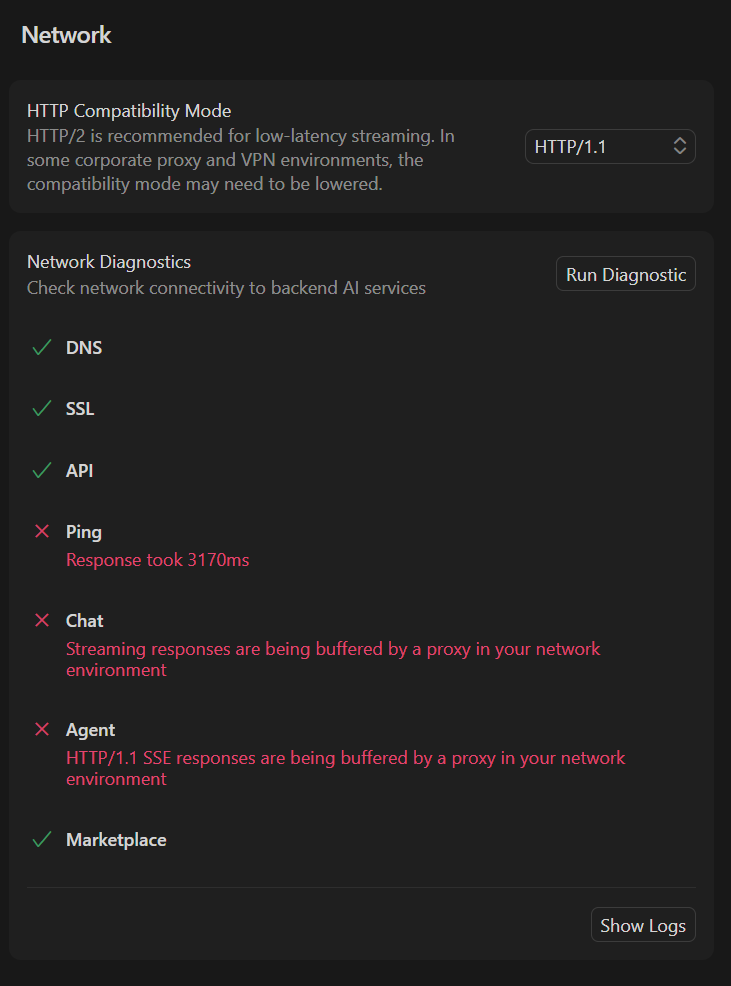
Where does the bug appear (feature/product)?
Cursor IDE
Describe the Bug
Couldn’t access openai models for 4 hours now. other models are working fine
Request ID: 89163d57-e437-42c3-a770-535f4b35d149
{“error”:“ERROR_OPENAI”,“details”:{“title”:“Unable to reach the model provider”,“detail”:“We’re having trouble connecting to the model provider. This might be temporary - please try again in a moment.”,“additionalInfo”:{},“buttons”:,“planChoices”:},“isExpected”:false}
ConnectError: [unavailable] Error
at Fqc.$endAiConnectTransportReportError (vscode-file://vscode-app/c:/Users/Acer/AppData/Local/Programs/cursor/resources/app/out/vs/workbench/workbench.desktop.main.js:4984:399337)
at uwo._doInvokeHandler (vscode-file://vscode-app/c:/Users/Acer/AppData/Local/Programs/cursor/resources/app/out/vs/workbench/workbench.desktop.main.js:490:36007)
at uwo._invokeHandler (vscode-file://vscode-app/c:/Users/Acer/AppData/Local/Programs/cursor/resources/app/out/vs/workbench/workbench.desktop.main.js:490:35749)
at uwo._receiveRequest (vscode-file://vscode-app/c:/Users/Acer/AppData/Local/Programs/cursor/resources/app/out/vs/workbench/workbench.desktop.main.js:490:34514)
at uwo._receiveOneMessage (vscode-file://vscode-app/c:/Users/Acer/AppData/Local/Programs/cursor/resources/app/out/vs/workbench/workbench.desktop.main.js:490:33336)
at qDt.value (vscode-file://vscode-app/c:/Users/Acer/AppData/Local/Programs/cursor/resources/app/out/vs/workbench/workbench.desktop.main.js:490:31429)
at _e._deliver (vscode-file://vscode-app/c:/Users/Acer/AppData/Local/Programs/cursor/resources/app/out/vs/workbench/workbench.desktop.main.js:49:2962)
at _e.fire (vscode-file://vscode-app/c:/Users/Acer/AppData/Local/Programs/cursor/resources/app/out/vs/workbench/workbench.desktop.main.js:49:3283)
at hgt.fire (vscode-file://vscode-app/c:/Users/Acer/AppData/Local/Programs/cursor/resources/app/out/vs/workbench/workbench.desktop.main.js:4969:12156)
at MessagePort. (vscode-file://vscode-app/c:/Users/Acer/AppData/Local/Programs/cursor/resources/app/out/vs/workbench/workbench.desktop.main.js:7492:18403)
Steps to Reproduce
Select any openai model and run something in agent or ask mode
Operating System
Windows 10/11
Current Cursor Version (Menu → About Cursor → Copy)
Version: 2.0.54 (user setup)
VSCode Version: 1.99.3
Commit: 7a31bffd467aa2d9adfda69076eb924e9062cb20
Date: 2025-11-03T22:40:44.657Z
Electron: 37.7.0
Chromium: 138.0.7204.251
Node.js: 22.20.0
V8: 13.8.258.32-electron.0
OS: Windows_NT x64 10.0.22631
For AI issues: which model did you use?
openai
For AI issues: add Request ID with privacy disabled
89163d57-e437-42c3-a770-535f4b35d149
Does this stop you from using Cursor
Yes - Cursor is unusable