Hey, thanks for the report. This looks like a known intermittent connection issue on Windows. The most common fix is to disable HTTP/2:
Open Cursor Settings Ctrl + ,
Search for “HTTP/2”
Enable “Disable HTTP/2”
Restart Cursor
If that doesn’t help, also try:
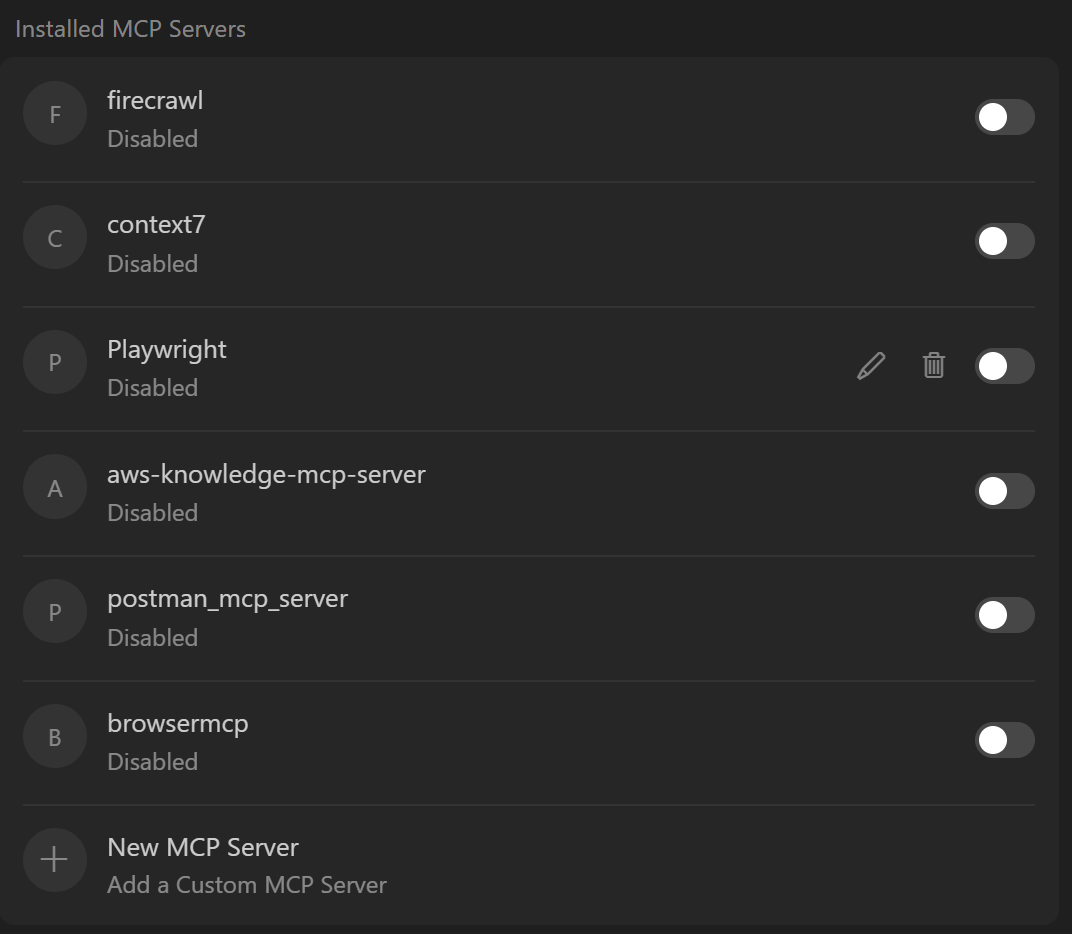
Check MCP servers (if configured): Cursor has a limit of 80 tools. Disable any MCP servers you’re not using
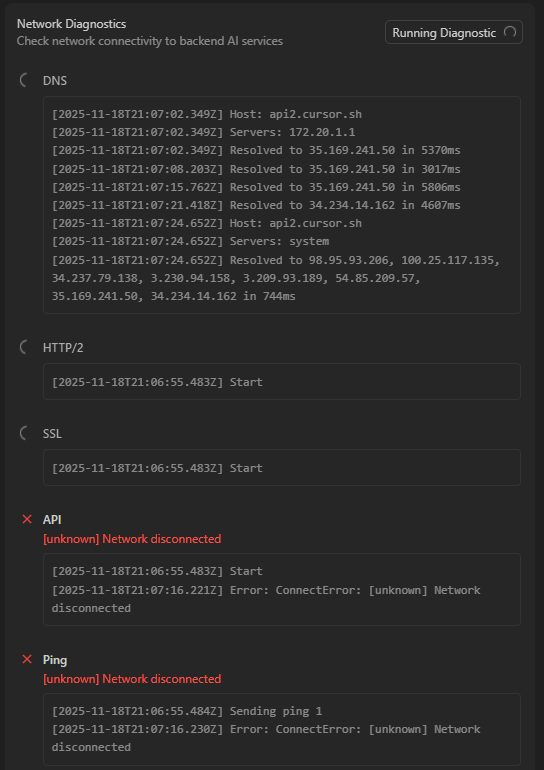
Run network diagnostics: Cursor Settings → Network → Run Diagnostics
Check firewall/antivirus: Windows may need to re‑allow internet access for the updated app version
Switch DNS to Google/Cloudflare: Settings → Network & Internet → Ethernet (or Wi‑Fi) → select your connection → Edit (DNS) → Manual → IPv4 ON →
Preferred DNS: 8.8.8.8 or 1.1.1.1
Alternate DNS: 8.8.4.4 or 1.0.0.1
Save
Let me know if disabling HTTP/2 fixes it. If the issue persists, please share any error messages so we can investigate further.
Request ID: c1641e8e-ee1f-48ef-9f32-b152bbb2c5b1
ConnectError: [unknown] Network disconnected
at QJc.$streamAiConnect (vscode-file://vscode-app/c:/Program%20Files/cursor/resources/app/out/vs/workbench/workbench.desktop.main.js:4989:397603)
at async vscode-file://vscode-app/c:/Program%20Files/cursor/resources/app/out/vs/workbench/workbench.desktop.main.js:590:72442
at async uas.toolWrappedStream (vscode-file://vscode-app/c:/Program%20Files/cursor/resources/app/out/vs/workbench/workbench.desktop.main.js:1647:24239)
at async vscode-file://vscode-app/c:/Program%20Files/cursor/resources/app/out/vs/workbench/workbench.desktop.main.js:2749:7776
at async _L.handleStreamComposer (vscode-file://vscode-app/c:/Program%20Files/cursor/resources/app/out/vs/workbench/workbench.desktop.main.js:1446:993)
at async Pjr.streamResponse (vscode-file://vscode-app/c:/Program%20Files/cursor/resources/app/out/vs/workbench/workbench.desktop.main.js:5609:12143)
at async UKr. (vscode-file://vscode-app/c:/Program%20Files/cursor/resources/app/out/vs/workbench/workbench.desktop.main.js:5754:7648)
at async WKr. (vscode-file://vscode-app/c:/Program%20Files/cursor/resources/app/out/vs/workbench/workbench.desktop.main.js:5756:1998)
at async IKr. (vscode-file://vscode-app/c:/Program%20Files/cursor/resources/app/out/vs/workbench/workbench.desktop.main.js:5750:567)
at async RKr. (vscode-file://vscode-app/c:/Program%20Files/cursor/resources/app/out/vs/workbench/workbench.desktop.main.js:5750:28168)
at async AKr. (vscode-file://vscode-app/c:/Program%20Files/cursor/resources/app/out/vs/workbench/workbench.desktop.main.js:5750:42040)
at async ZMe. (vscode-file://vscode-app/c:/Program%20Files/cursor/resources/app/out/vs/workbench/workbench.desktop.main.js:1647:39372)
at async BKr. (vscode-file://vscode-app/c:/Program%20Files/cursor/resources/app/out/vs/workbench/workbench.desktop.main.js:5754:6794)
at async Uie.processCodeBlocks (vscode-file://vscode-app/c:/Program%20Files/cursor/resources/app/out/vs/workbench/workbench.desktop.main.js:1583:3486)
at async L$.submitChatMaybeAbortCurrent (vscode-file://vscode-app/c:/Program%20Files/cursor/resources/app/out/vs/workbench/workbench.desktop.main.js:2749:9845)
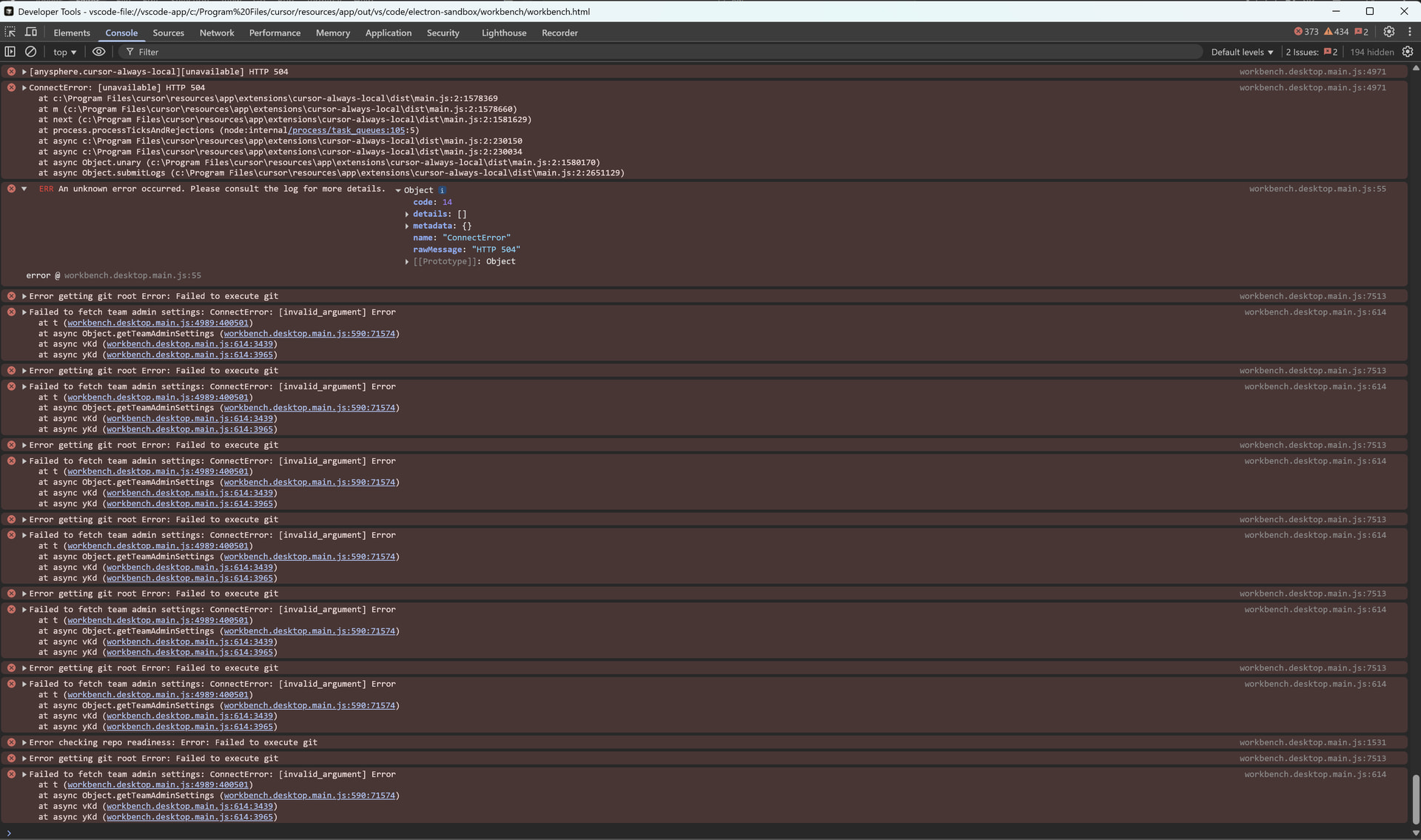
Hey, I see you’ve shared the error logs. To actually get this resolved, I still need the diagnostics that were requested earlier. Could you please check the following and share the results?
Most important - MCP Servers (this has fixed the issue for other users with the same errors):
Open Cursor Settings Ctrl+Shift+J
Search for “MCP”
Screenshot or list what you see - do you have any MCP servers configured?
Network diagnostics:
Cursor Settings → Network → “Run Diagnostics”
Share the results
Also, please confirm:
Are you using a VPN?
What antivirus/security software is running?
Did you try changing DNS to Google DNS 8.8.8.8 as mentioned earlier?
Right now the error stack trace only shows that the connection drops during the AI streaming process. Without the diagnostics above, it’s hard to tell whether this is due to MCP tools overload, network configuration, or firewall blocking. The MCP check usually takes about 30 seconds and has resolved this exact error for several users recently.
Thanks for the screenshots. I can see MCP servers are disabled, so we can rule those out.
Since you’re on a work laptop with a VPN, this is most likely a corporate network issue. Based on your network diagnostics showing “Connection: Failed”, please try the following steps:
Change DNS to Google DNS (you mentioned you’ll try this, so start here):
Settings → Network & Internet → Ethernet/Wi‑Fi → Edit DNS → Manual IPv4
Preferred: 8.8.8.8, Alternate: 8.8.4.4
Save the changes and restart Cursor
Test without VPN:
Temporarily disconnect from the VPN and check if Cursor works
If it works without VPN, your corporate network is likely blocking or inspecting SSL traffic
Test direct connectivity:
Open Command Prompt and run:
curl -v https://api2.cursor.sh
Share the output here
If none of this works, your IT team may need to add Cursor’s domains to an allowlist or disable SSL inspection for Cursor traffic.
Let me know what happens after you try these steps.