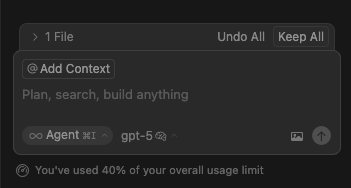
Does anyone noticed that the fast requests counter has disappeared? I want to know how many fast requests I have got yet (from the 500 included in pro) and when the counter will be reset.
I could find it in Usage section in my user area, but now it is not shown.
They have done an update of the pricing system, see this post on their blog:
It seems that we can choose between the new way of usage, with unlimited (but rated) requests, or as before with up to 500 fast request and then it goes to slow.
But I don’t get what they would mean with “unlimited-with-rate-limits model”: will we pay an extra costs eventually?
What I do not understand is that we have not enabled Usage-based Pricing Settings, if we will still be charged or how it will be managed.
Hey, the only time you will get charged by usage based pricing is if you hit your Pro plan rate limits - instead of seeing an error, Cursor will charge you for any requests over your rate limits, until you drop back below your usage and can continue using inclusive requests.
Thanks, I almost had a heart attack. It would be nice if inside cursor we have a pressure meter of sorts showing our potential to hit the rate. Even if it doesn’t give us specific values.
Before there was a progress bar so we can know exactly the % of usage at any moment.
Now I just got the surprise that I reached my 20$ usage after a few days of programming only, so I’m gonna continue with Windsurf that still shows transparently how much we are using.
Please don’t remove the transparency of usage and maintain your users happy.
Also if i’m not wrong you previously put how many credits each model use directly in the selection. That was good to know to avoid using a big model to center a div.
(Anyways, thank you for your tool, just suggesting things but everything else is incredible)