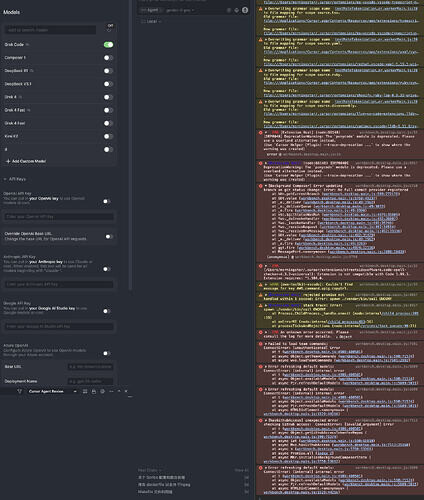
After updating Cursor to version 2.1.42, most models disappeared, custom models cannot be deleted, and connection errors occur.How can I fix this issue?
I re-downloaded the DMG(Cursor 2.0.7) from the official website and reinstalled it. Different versions still have the same issue — most models are missing
Based on feedback from other posts, I disabled HTTP/2 and the error message changed.
I tried using my own API key, but custom models still don’t work. just told me , “error”: {
“code”: 400,
“message”: “* GenerateContentRequest.model: unexpected model name format\n”,
“status”: “INVALID_ARGUMENT”
}.
Operating System
MacOS
Current Cursor Version (Menu → About Cursor → Copy)
hi @MorningStar if you disable the external API key temporarily you should be able to use Composer 1 and other models included in the subscription. From your screenshot it will be necessary to enable them.
It is most likely that models are disabled as they can not be reached on the custom API.
From your custom API URL, can you copy from there the exact model names with hyphens and add them as new models in Cursor Settings > Models.
When you disable the API key and URL. do you see again more models? If not, please let me know in which country you are using Cursor as there may be regional limitations on which models are available. (VPN does not count)
I disabled the API key, but even after clicking the refresh button or restarting Cursor, the models are still missing.
I’m based in Singapore, but sometimes I access Cursor through my company’s US network via VPN. Before today’s update, the model list was always fully visible — no models were missing, regardless of whether the API key was enabled.
Everything was normal until I updated Cursor.
It is likely that the AI providers detected the regional usage despite VPN which limited the availability of models. Do you not see more models when you click on “View All Models”?
We have only one place where API URL and API key can be configured.
As this seem to affect only Anthropic and OpenAI models this its most likely the regional limitation. Since this is required by AI providers for certain areas we have no options to add those models manually.
Upgrading to higher plan will not change model list.
I do recommend to try another IP from your company.
Thank you for your reply. I tried other IPs as well, but it still didn’t work. I’ll try again tomorrow, and if it still doesn’t work, I’ll have no choice but to request a refund.
I actually think this might be a bug. I tried multiple IPs, and even asked my friend in the U.S. to log into my account from his home network, but the models still wouldn’t load.
I previously added some custom models for testing, but how do I delete them? These models seem to sync with my account, but I can’t find any option to remove them. What’s confusing is that the Models list and the model selector below the input box are not in sync.
@condor
I’ve actually identified the cause of the bug — it’s related to the custom models. In the database located at ~/Library/Application Support/Cursor/User/globalStorage/state.vscdb, there is a key named
src.vs.platform.reactivestorage.browser.reactiveStorageServiceImpl.persistentStorage.applicationUser.
Its value is a very large JSON object that includes the custom models I previously added. A fresh installation of Cursor does not contain these custom models in that key, which explains why everything works after reinstalling.
So as long as there’s a way to delete the old custom models from this storage, I believe the issue can be fully resolved.
My question is: how can I delete the custom models that were defined in the past?
Thank you for checking further what the cause could be.
I had a look and the key you suggested is not involved in the process of displaying models.
If you are comfortable editing the SQLite file, make a backup of it and check for a key related to user added models. There is for now no quick solution other than clearing settings (config folders).
However, the trade-off is that I lost all chat history for my projects — the chats are now permanently stuck on “loading chat”. This feels like some kind of cache or internal state bug.
If possible, I hope your team can investigate this issue further.