“Agents | Editor” tab-switching UI is missing in new update. Is it possible to keep the tabs? I can’t find a setting or control to switch back to this, and now it’s replaced with a small arrow in the top right to switch between Agents/Editor which I really cannot work with.
Steps to Reproduce
Update to latest version, but not sure if that’s the exact reason.
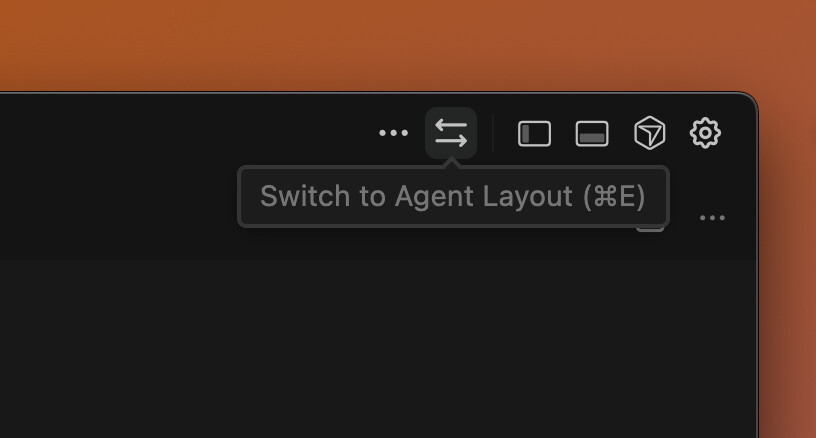
Hey, thanks for the report. It seems these buttons have been replaced with an arrow button in the top right corner. You can use that or the shortcut Cmd + E.
I would like to request an option to revert to the previous tab layout. I find the current “small button” navigation less efficient than the old dedicated tabs. Is there an existing setting to switch back, or is there a known CSS modification to restore the original interface?
Unfortunately, you can’t go back to the old “Agents | Editor” tabs right now - there’s no setting to revert. Use the arrows button in the top right corner or the Cmd/Ctrl+E shortcut.
I’ll pass your request for the old layout to the team.
This is really weird, I have the switch buttons on my macbook, but on windows they are not there anymore, and the two arrow button that Dean mentioned has another purpose for me which is simply moving the agent pane to the left or to the right (not switching between editor and agents)
The problem with this in my windows pc is that I dont have the status bar that stays all the way at the bottom which shows some git info, prettier status, vim extension mode, files.eol configuration. It is completely gone, how can I enable that? It is gone in my macbook but only on agent mode which makes sense, when using editor mode it is there.
There’s definitely a UI bug here. When in editor mode, the double arrow icon indeed says “Switch to Agent layout”. When in Agent layout however, the double arrow says “Switch Agent side” and clicking it does not switch back to editor layout.
CTRL-E however does switch between the 2 layouts in either case, despite what the button says in agent mode.
As far as I can tell, when in Agent mode there is no UI button or way to switch back to editor mode without using CTRL-E or changing the cursor settings default view.
In editor layout:
In agent layout:
I also think the Editor/Agent tabs that were there before was a much clearer UI for this toggle of layout modes, then utilizing the buttons in the top-right for customization of each layout mode.
I as well have no buttons. Cmd-E on my mac doesn’t work. The entire editor tab is unaccessible from what I can tell. And I cannot use the product without agents. If I try to use the chat box at all it just says Connect to Github first. Anyway, for me on MAC the product is unusable. I’m hesitant to upgrade my windows client because its still using the old version with a functional Editor. The only buttons I have is this:
on the left which either toggles or untoggles the pane (doesn’t move it to left or right) and this
It’s even stranger for me. I’m on Version: 2.2.20 (Universal), VSCode Version: 1.105.1 and for me:
The agent/editor button section is gone
“switch” arrows have TWO distinct functions - in editor mode they switch to agent mode, but in agent mode they… Just reorder the “agent” section (move to right/left), regardless of being exactly the same icon!
Whenever I reload the window, my UI is completely messed up now. Every time I lose whatever I have set in my “editor” view and I’m forced into “agents” view, which is sub-optimal.
Anything I set in the “view settings” under three dots is forgotten after editor reload
When I’m in the “editor” mode and try to get back to the default layout (using sidebar on the left/sidebar on the right options), I’m always forced into “agent” mode.
Switching the sidebar position is forgotten after the reload. I cannot work with how it’s re-ordered after the reload, as all the essentials (file browser, GIT etc.) are by default on the right, which is completely counter-intuitive for me
In short, “editor” mode becomes totally non-functional for me, which significantly affects the way I work with the code.



 on the left which either toggles or untoggles the pane (doesn’t move it to left or right) and this
 which just gets me to a pretty useless dashboard.