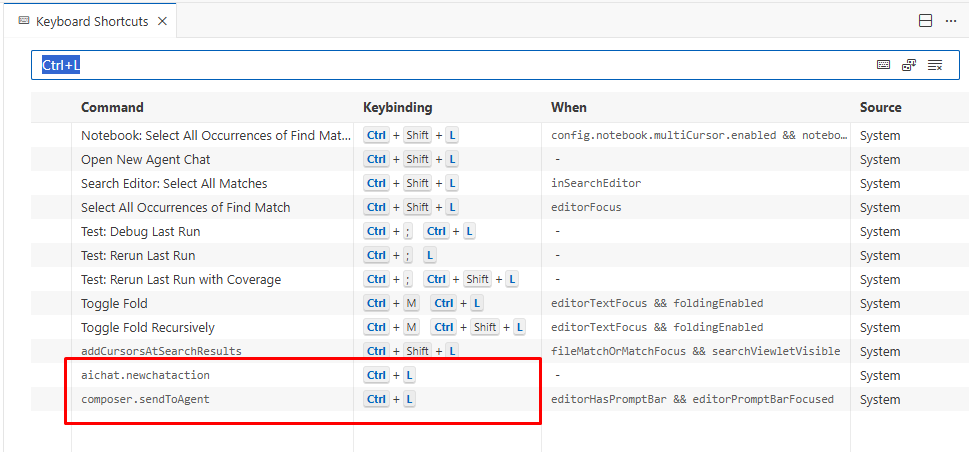
When the terminal is docked inside the main Cursor window, pressing Ctrl+L correctly adds the terminal output to the AI chat.
But if I move the terminal into a separate detached window, the same shortcut no longer adds the terminal context — it only toggles the AI chat panel.
Is this expected behavior?
And is there a way (or planned feature) to allow Ctrl+L to send context from a detached terminal window as well?
Steps to Reproduce
Open the integrated terminal in Cursor.
Use Ctrl+L → terminal context is added to chat.
Detach the terminal into a new window.
Press Ctrl+L → chat toggles, but no terminal context is added.
Expected Behavior
Ctrl+L should add the terminal context to the AI chat even when the terminal is in a detached window
Operating System
Windows 10/11
Current Cursor Version (Menu → About Cursor → Copy)
The log from Help > Toggle Developer Tools while pressing Ctrl+L in the standalone window
I opened Help Help > Toggle Developer Tools and a separate window appeared of Developer Tools. I opened Console and pressed Ctrl+L. Just nothing appeared in Console. At the same time AI Chat removed (toggles on and off)
The output of Developer: Toggle Keyboard Shortcuts Troubleshooting after pressing Ctrl+L in both cases
Please tell me where can i find this functionality - “Developer: Toggle Keyboard Shortcuts Troubleshooting“
Whether you have any custom keybindings for Ctrl+L and which shell you use in the terminal
Also i do not know how to see those keybindings and how to get what is my “shell”, sorry (
If you can help me with finding those endpoints - i will send it immediately.
Also i found out that when i first set focus to somewhere else from ai chat say to an opened file, then move focus to integrated terminal, then select needed piece of logs from terminal and then press Ctrl+L - it does exactly what i need, it passed that data into ai chat. So to make this work i need to remove focus from AI chat somehow. I think that is a bug cause it works fine from imbedded terminal (not detached)
Keyboard logs with detached window upon Ctrl+L:
2025-12-17 21:43:22.301 [info] [Window] [KeybindingService]: / Soft dispatching keyboard event
2025-12-17 21:43:22.301 [info] [Window] [KeybindingService]: \ Keyboard event cannot be dispatched
2025-12-17 21:43:22.301 [info] [Window] [KeybindingService]: / Received keydown event - modifiers: [ctrl], code: ControlLeft, keyCode: 17, key: Control
2025-12-17 21:43:22.302 [info] [Window] [KeybindingService]: | Converted keydown event - modifiers: [ctrl], code: ControlLeft, keyCode: 5 (‘Ctrl’)
2025-12-17 21:43:22.302 [info] [Window] [KeybindingService]: \ Keyboard event cannot be dispatched in keydown phase.
2025-12-17 21:43:22.709 [info] [Window] [KeybindingService]: / Soft dispatching keyboard event
2025-12-17 21:43:22.709 [info] [Window] [KeybindingService]: | Resolving ctrl+L
2025-12-17 21:43:22.709 [info] [Window] [KeybindingService]: \ From 2 keybinding entries, matched aichat.newchataction, when: no when condition, source: built-in.
2025-12-17 21:43:22.709 [info] [Window] [KeybindingService]: / Received keydown event - modifiers: [ctrl], code: KeyL, keyCode: 76, key: l
2025-12-17 21:43:22.709 [info] [Window] [KeybindingService]: | Converted keydown event - modifiers: [ctrl], code: KeyL, keyCode: 42 (‘L’)
2025-12-17 21:43:22.709 [info] [Window] [KeybindingService]: | Resolving ctrl+L
2025-12-17 21:43:22.709 [info] [Window] [KeybindingService]: \ From 2 keybinding entries, matched aichat.newchataction, when: no when condition, source: built-in.
2025-12-17 21:43:22.709 [info] [Window] [KeybindingService]: + Invoking command aichat.newchataction.
2025-12-17 21:43:22.835 [info] [Window] [KeybindingService]: / Soft dispatching keyboard event
2025-12-17 21:43:22.835 [info] [Window] [KeybindingService]: | Resolving ctrl+L
2025-12-17 21:43:22.835 [info] [Window] [KeybindingService]: \ From 2 keybinding entries, matched aichat.newchataction, when: no when condition, source: built-in.
2025-12-17 21:43:23.009 [info] [Window] [KeybindingService]: / Soft dispatching keyboard event
2025-12-17 21:43:23.009 [info] [Window] [KeybindingService]: \ Keyboard event cannot be dispatched
2025-12-17 21:43:23.009 [info] [Window] [KeybindingService]: + Ignoring single modifier ctrl due to it being pressed together with other keys.
Keyboard logs with imbedded window upon Ctrl+L (also does not work!!):
2025-12-17 21:47:58.400 [info] [Window] [KeybindingService]: / Received keydown event - modifiers: [ctrl], code: ControlLeft, keyCode: 17, key: Control
2025-12-17 21:47:58.400 [info] [Window] [KeybindingService]: | Converted keydown event - modifiers: [ctrl], code: ControlLeft, keyCode: 5 (‘Ctrl’)
2025-12-17 21:47:58.401 [info] [Window] [KeybindingService]: \ Keyboard event cannot be dispatched in keydown phase.
2025-12-17 21:47:58.704 [info] [Window] [KeybindingService]: + Ignoring single modifier ctrl due to it being pressed together with other keys.
In the terminal run: echo $SHELL (if Git Bash/WSL) - empty string
Or echo %COMSPEC% (if Command Prompt) - empty string
PowerShell (default) in the dropdown menu
It looks like i get different powershells when i just get terminal from Ctrl+J and when i run python file with “Run python file“ - they behave different. So when i Ctrl+J and then select some data in terminal and press Ctrl+L - then info goes straight into the ai chat window as expected but only in imbedded terminal:
2025-12-17 21:52:15.953 [info] [Window] [KeybindingService]: / Soft dispatching keyboard event
2025-12-17 21:52:15.954 [info] [Window] [KeybindingService]: \ Keyboard event cannot be dispatched
2025-12-17 21:52:15.954 [info] [Window] [KeybindingService]: / Received keydown event - modifiers: [ctrl], code: ControlLeft, keyCode: 17, key: Control
2025-12-17 21:52:15.954 [info] [Window] [KeybindingService]: | Converted keydown event - modifiers: [ctrl], code: ControlLeft, keyCode: 5 (‘Ctrl’)
2025-12-17 21:52:15.954 [info] [Window] [KeybindingService]: \ Keyboard event cannot be dispatched in keydown phase.
2025-12-17 21:52:16.160 [info] [Window] [KeybindingService]: / Soft dispatching keyboard event
2025-12-17 21:52:16.160 [info] [Window] [KeybindingService]: | Resolving ctrl+L
2025-12-17 21:52:16.161 [info] [Window] [KeybindingService]: \ From 2 keybinding entries, matched aichat.newchataction, when: no when condition, source: built-in.
2025-12-17 21:52:16.161 [info] [Window] [KeybindingService]: / Received keydown event - modifiers: [ctrl], code: KeyL, keyCode: 76, key: l
2025-12-17 21:52:16.161 [info] [Window] [KeybindingService]: | Converted keydown event - modifiers: [ctrl], code: KeyL, keyCode: 42 (‘L’)
2025-12-17 21:52:16.161 [info] [Window] [KeybindingService]: | Resolving ctrl+L
2025-12-17 21:52:16.161 [info] [Window] [KeybindingService]: \ From 2 keybinding entries, matched aichat.newchataction, when: no when condition, source: built-in.
2025-12-17 21:52:16.161 [info] [Window] [KeybindingService]: + Invoking command aichat.newchataction.
2025-12-17 21:52:16.418 [info] [Window] [KeybindingService]: + Ignoring single modifier ctrl due to it being pressed together with other keys.
Also i noticed that sometimes pressing Ctrl+L just deletes all the info in AI Chat withouy any change to restore that info! So i write a lot of text, then try to append lines from terminal, press Ctrl+L and all m text just evaporates without adding those lines from terminal ((
Thanks for the detailed logs, they were really helpful.
The keybinding fires correctly in both cases (aichat.newchataction), but the terminal context doesn’t get passed through when the terminal is in a detached window. Before I pass this to the team, let’s rule out settings.
If it reproduces in the clean profile, I’ll share it with the team. If it doesn’t, it’s likely caused by settings or extensions.
About the second issue (Ctrl+L deletes text in chat), does that happen under the same conditions or independently? Can you share exact steps to reproduce?
Ran cursor with “cursor --user-data-dir %TEMP%\cursor-test-profile --extensions-dir %TEMP%\cursor-test-extensions“.
Open the terminal Ctrl+J
Select some text, press Ctrl+L. Does it work?
Entered some text, presssed Ctrl+L - added text to Ai Chat and AI Chat windows disappeared
Detach the terminal into a separate window
Select some text, press Ctrl+L. Does it work?
Entered some text, presssed Ctrl+L - added text to Ai Chat and AI Chat windows disappeared
The same. Sometimes it adds text to ai chat sometimes not. But what it surely does that it toggles Ai chat window every time
In embedded terminal i clearly see popup button “Add to Chat Ctrl+L“ and when i press it with a mouse - it just do what i need - sets that text to Ai Chat. In detached window i do not see that popup button. It would help a lot there
About the second issue (Ctrl+L deletes text in chat), does that happen under the same conditions or independently? Can you share exact steps to reproduce?
I can’t reproduce this - it happened very rarely, but it’s really annoying, and I can’t undo it with Ctrl+Z either.
I encountered a similar issue when using poetry shell, where shortcuts such as Ctrl + L or Ctrl + C—which normally work inside a command shell—did not function properly.
Since handing this over to Cursor was not very useful anyway (Cursor does not handle poetry shell well), I eventually developed a habit of prefixing commands with poetry run instead. However, for users who still rely on poetry shell, this could be a fairly critical issue.
That said, this is a bug I discovered quite a long time ago, and the project I am currently working on does not use Python, so I am unable to verify whether the issue still exists. You can safely assign this a low priority.