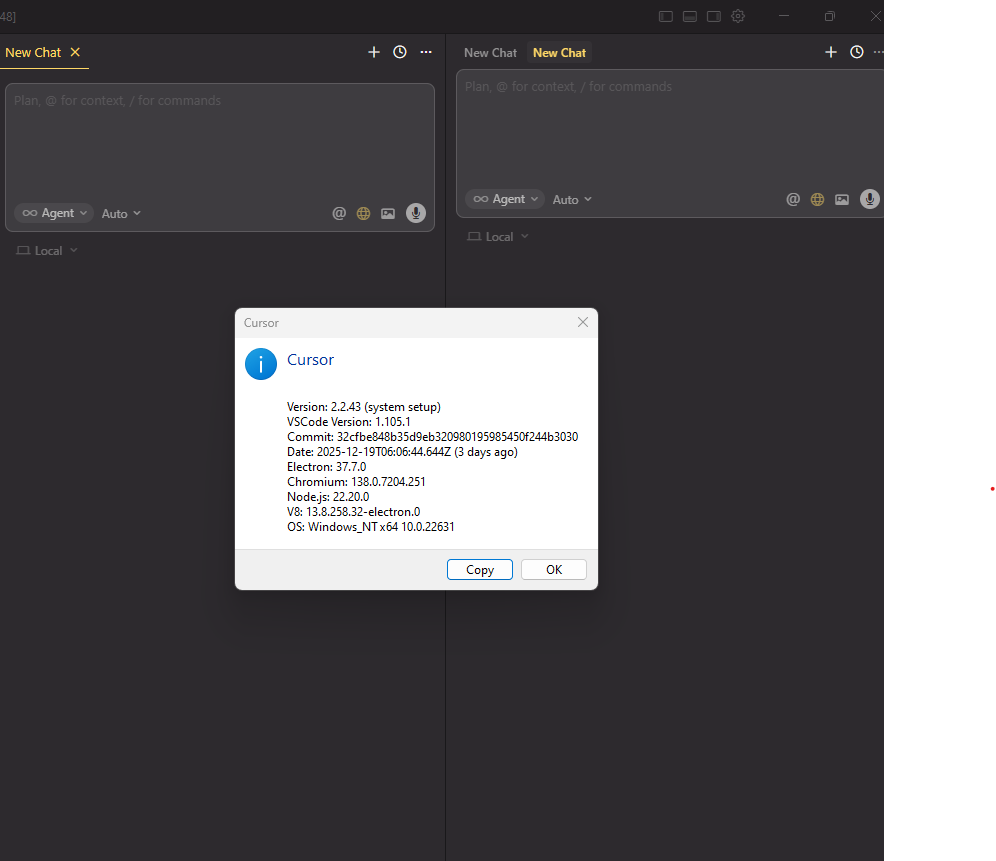
When I have “Open chat as editor” enabled, I’m seeing two separate chat interfaces on the same screen:
The editor-based chat (as expected)
The compose/sidebar chat (should be hidden)
Steps to Reproduce
Enable “Open chat as editor” in Cursor settings
Open a new chat - both the editor chat and compose chat panels appear simultaneously
Click the “+” (add) icon from the left editor chat panel
A new tab gets created in the right compose chat instead of in the editor chat
Expected Behavior
Only one chat interface should be visible when “Open chat as editor” is enabled
The add icon in the editor chat should create a new tab within the same editor chat panel
Operating System
Windows 10/11
Current Cursor Version (Menu → About Cursor → Copy)
So after updating from 2.2.44 to 2.3.29 and following the steps that you recommended, the previous issue is not coming up anymore. But, still “Open Chat as Editor” is not working.
As you can see in video, it goes into loading state and hides itself.
I need to press Ctrl+Alt+B to bring it back and even when it’s back, it’s loading.
To get rid of this, I need to select “Clear All Chats” option.
I have the same think happening to me. It happens when I start a new chat, and then use “Add to Chat” feature from my code. It creates a new empty pane, that I didn’t ask for.