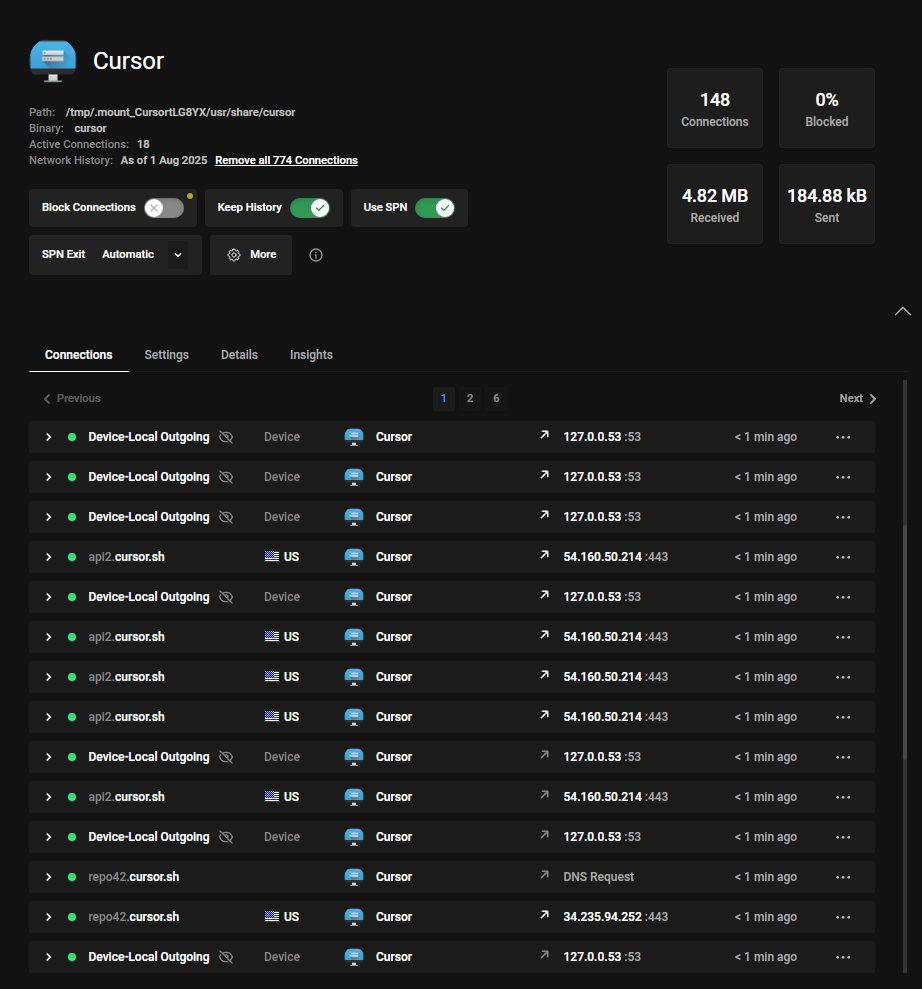
Steps to reproduce : Open cursor, do nothing at all
As Enterprise user doing serious work with intellectual property, I was reassured reading privacy policies no code is stored, at best seen by servers they’re interacting with.
BUT. Extensive telemetry is collected (see privacy policies), as such I wish to have answers an be reassured.
Why do I see cursor 1 – establishing persistent connections (1 or 2 for service continuation would be normal, 16 to 30+ IDLE raises serious concerns). Also I’ve seen cursor activating all my ‘npm’ MCP servers all establishing as well persistent connection to registries, needing DNS reset to remove these. I’ve also seen strange service discoveries on KDE.
What the hell happens under the hood ? Why sometimes 60 persistent connections are at ALL TIMES connecting me to cursor services even if I’m doing nothing ? Why weird child processes seemingly designed to probe pop and force an entire multi hop network reset to magically see them disappear ?
What does cursor collects at all times with these 15 - 30 - sometimes 60 IDLE on its customers ?
I wish to have an answer to know if I stay or move far away from cursor for ever.
Hey bro, I’ve looked into this behavior before, and your screenshot actually matches what Cursor typically does under the hood
Connections: Multiple api2.cursor.sh and repo42.cursor.sh endpoints are used for AI features, updates, and MCP registry sync.
Why so many sockets: Cursor keeps several persistent WebSocket/gRPC links open for low-latency responses and background services (AI assistance, MCP servers).
Data usage: 184 KB sent / 4.8 MB received suggests mostly keep-alive and telemetry, not code uploads. Source code isn’t sent unless you explicitly invoke AI features (per policy).
Local DNS lookups (127.0.0.53): Normal for Ubuntu systemd-resolved, not external leaks.
If you need certainty for compliance:
Use tcpdump/Wireshark to confirm traffic is just HTTPS to Cursor’s domains.
Disable unneeded MCP servers or request offline/limited-telemetry mode from enterprise support.
This looks expected, not malicious, but monitoring with packet capture is best if IP protection is critical.
hope it helps.
From your screenshot these connections are common requests. Not all are realtime “active” as they just connect and receive a response. Some like those used for AI use HTTP/2.0 connections to receive low latency stream of data.
Could you clarify if this screenshot is showing requests from a single machine or if its a collection from several machines.
Additionally, does the screenshot show recently active connections? or all currently active connections in realtime?
Following servers are commonly connected to.
‘api2.cursor.sh’: Used for most API requests.
‘api3.cursor.sh’: Used for Cursor Tab requests (HTTP/2 only).
‘repo42.cursor.sh’: Used for codebase indexing (HTTP/2 only).
‘api4.cursor.sh’, ‘us-asia.gcpp.cursor.sh’, ‘us-eu.gcpp.cursor.sh’, ‘us-only.gcpp.cursor.sh’: Used for Cursor Tab requests depending on your location (HTTP/2 only).
recent and active. I’ve reset it roughly 10 mins before the screenshot.
Though I do understand this need for active connection, in use the history in 1 hour of usage or so gets above 1000 in history, why this need to have so much connections to serve.
Claude code serves immediately and is set to 0 when not used, why cursor for an ENTERPRISE user which [email protected] states has no telemetry, behavioral analysis etc, has the need for this sick amount of connection. Idle it bursts at 60 mostly.
My tool uses double-hop + entry + exit (so 4 hops), it seems you still need to pinpoint me. So I don’t believe you at all with the claim of ‘no telemetry’.
10k+ connections history in 3 days. That’s sick. And what the 50 connections are for, this is no normal ‘keep alive’, keep alive needs at best 5 (10 is already to much), most of the time it’s above 30.
What are you doing in the background. Also for Pro users I state they should triple check privacy policies as for enterprise, my CTO knowledge knows ‘forcibly’ enabled privacy means an ocean of privacy difference from pro, which it is, needless to speak for those in Max which have the same telemetry as pro users.
Appreciate the additional info. Could you still share the detailed version so we can see if its an older networking issue that has been fixed in recent releases?
Well you may be easier to pinpoint to get geolocation data, perhaps machine data, and other ‘telemetry on’ data, which is not related to behavioral analysis indeed. I trust this.
It is consistent since months of analysis and accross versions, right now is 1.39.
OS : Ubuntu server 22.04 LTS Pro (tweaked a headless distro to avoid the bloat precisely so no excuse here, minimal install, had to manually set and activate EVEN ethernet tweaking config files, NO bluetooth, NO avahi/cups, NO snapd socket, NO wifi, NO Gnome, NO GTK, so NO EXCUSE)
I’m CTO and I would set this up if I cannot pinpoint a user, multiply connections to get intel I need using ‘cell-tower triangulation’ method to infer coarse location (perhaps also attempts to get IP, MAC address, machine specs which is stated in privacy policy)
Since I trick cursor metrics on all these points - you’ll never get something set to rotate every half-hour, I see a behavior of active tracking. My question : WHAT as I’m enterprise.