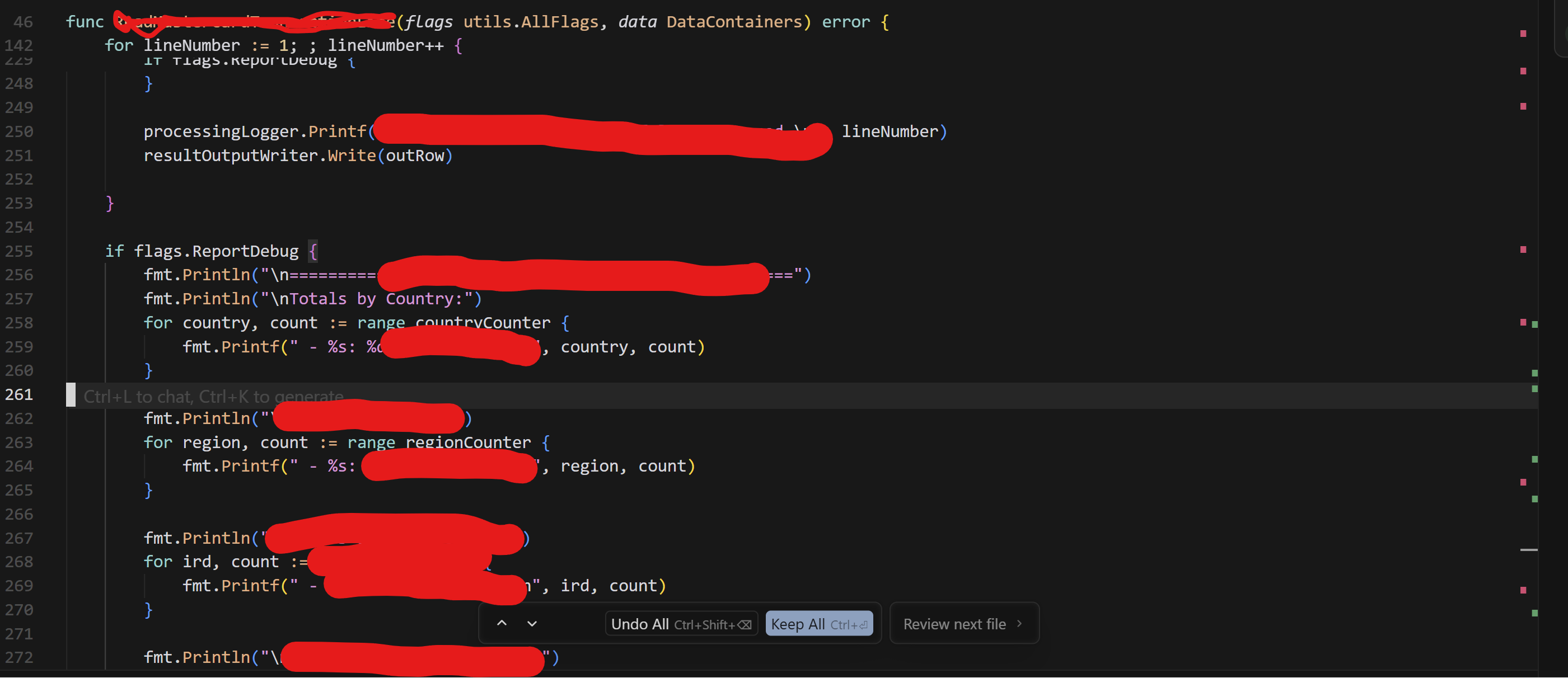
probably a related issue - frequently (multiple times a day) i see this hover accept/undo changes popup:
no matter what i click, it does not disappear, sometimes i fully restart cursor and it is still present
sometimes i accept all the changes and this window still stays there
sometimes when i open an old chat, this popup appears and is impossible to get rid of or it shows changes that i have already accepted and when i accept them again, the affected files remain unchanged
workbench.desktop.main.js:55 WARN Missing property “rpcFileLoggerFolder” in oldValue. Filling with value from initValue. Please add a migration if necessary.
warn @ workbench.desktop.main.js:55
workbench.desktop.main.js:55 WARN Via ‘product.json#extensionEnabledApiProposals’ extension ‘ms-toolsai.datawrangler’ wants API proposal ‘debugFocus’ but that proposal DOES NOT EXIST. Likely, the proposal has been finalized (check ‘vscode.d.ts’) or was abandoned.
warn @ workbench.desktop.main.js:55
workbench.desktop.main.js:55 WARN Via ‘product.json#extensionEnabledApiProposals’ extension ‘ms-vscode.vscode-copilot-data-analysis’ wants API proposal ‘chatVariableResolver’ but that proposal DOES NOT EXIST. Likely, the proposal has been finalized (check ‘vscode.d.ts’) or was abandoned.
warn @ workbench.desktop.main.js:55
workbench.desktop.main.js:55 WARN Via ‘product.json#extensionEnabledApiProposals’ extension ‘ms-python.python’ wants API proposal ‘terminalShellType’ but that proposal DOES NOT EXIST. Likely, the proposal has been finalized (check ‘vscode.d.ts’) or was abandoned.
warn @ workbench.desktop.main.js:55
workbench.desktop.main.js:55 WARN Via ‘product.json#extensionEnabledApiProposals’ extension ‘ms-python.vscode-python-envs’ wants API proposal ‘terminalShellType’ but that proposal DOES NOT EXIST. Likely, the proposal has been finalized (check ‘vscode.d.ts’) or was abandoned.
warn @ workbench.desktop.main.js:55
workbench.desktop.main.js:55 WARN Via ‘product.json#extensionEnabledApiProposals’ extension ‘github.copilot-chat’ wants API proposal ‘chatReadonlyPromptReference’ but that proposal DOES NOT EXIST. Likely, the proposal has been finalized (check ‘vscode.d.ts’) or was abandoned.
warn @ workbench.desktop.main.js:55
workbench.desktop.main.js:55 WARN Via ‘product.json#extensionEnabledApiProposals’ extension ‘ms-azuretools.vscode-azure-github-copilot’ wants API proposal ‘lmTools’ but that proposal DOES NOT EXIST. Likely, the proposal has been finalized (check ‘vscode.d.ts’) or was abandoned.
warn @ workbench.desktop.main.js:55
workbench.desktop.main.js:55 WARN Via ‘product.json#extensionEnabledApiProposals’ extension ‘vscjava.vscode-java-pack’ wants API proposal ‘lmTools’ but that proposal DOES NOT EXIST. Likely, the proposal has been finalized (check ‘vscode.d.ts’) or was abandoned.
warn @ workbench.desktop.main.js:55
workbench.desktop.main.js:55 WARN Via ‘product.json#extensionEnabledApiProposals’ extension ‘apidev.azure-api-center’ wants API proposal ‘chatParticipant’ but that proposal DOES NOT EXIST. Likely, the proposal has been finalized (check ‘vscode.d.ts’) or was abandoned.
warn @ workbench.desktop.main.js:55
workbench.desktop.main.js:55 WARN Via ‘product.json#extensionEnabledApiProposals’ extension ‘apidev.azure-api-center’ wants API proposal ‘languageModels’ but that proposal DOES NOT EXIST. Likely, the proposal has been finalized (check ‘vscode.d.ts’) or was abandoned.
warn @ workbench.desktop.main.js:55
workbench.desktop.main.js:55 WARN No search provider registered for scheme: file, waiting
warn @ workbench.desktop.main.js:55
workbench.desktop.main.js:7824 [TerminalExecutionServiceProxy] v3 health check failed after 6866ms: Error: Extension host not ready after 10 attempts (6866ms elapsed)
at Uyo._createSessionWithRetry (workbench.desktop.main.js:7824:8317)
at async Uyo._healthCheckV3 (workbench.desktop.main.js:7824:6995)
at async Uyo._initializeDelegate (workbench.desktop.main.js:7824:11415)
_healthCheckV3 @ workbench.desktop.main.js:7824
workbench.desktop.main.js:7824 [TerminalExecutionServiceProxy] v3 health check failed, staying with current version
_initializeDelegate @ workbench.desktop.main.js:7824
workbench.desktop.main.js:55 ERR [Extension Host] (node:35248) [DEP0040] DeprecationWarning: The punycode module is deprecated. Please use a userland alternative instead.
(Use Cursor --trace-deprecation ... to show where the warning was created)
error @ workbench.desktop.main.js:55
workbench.desktop.main.js:4957 [Extension Host] (node:35248) [DEP0040] DeprecationWarning: The punycode module is deprecated. Please use a userland alternative instead.
(Use Cursor --trace-deprecation ... to show where the warning was created)
T5h @ workbench.desktop.main.js:4957
workbench.desktop.main.js:7500 Failed to load team commands: ConnectError: [unauthenticated] Error
at t (workbench.desktop.main.js:4989:400502)
at async Object.getTeamCommands (workbench.desktop.main.js:589:348464)
at async Xpo.loadTeamCommands (workbench.desktop.main.js:7500:2992)
this error is super frustrating bc cursor starts re editing the same things that it had already edited before and the context gets all messed up. Until it´s been fixed I´ll have to switch to another IDE
is there any quick fix to get rid of the UI atm? It’s frustrating to have it hanging in that state. It’s breaking my workflow because i cannot go to next changes and i have to relay on the edits listed in agents which isn’t ideal
I’m having the same issue, stuck with the “Review next file” hovering the interface since yesterday, restarted everything, closed the project, tried the Clear Editor History command… makes no difference. New blocks of review are not pulled from that button, i have to use the other button on the chat, then it seems to pull the chain of new changes.
Please give us a way to just remove whatever cache is being pulled and causing this error.
windows 11, just updated cursor and the stuck button is still there.
The cursor ide becomes kinda stuck in a state where it loses track of changes it has made. In this state any deletions it makes will NOT show up marked in red when reviewing changes.
Apart from that it also causes all the controls at the bottom of the screen to become useless. The up and down arrows, the undo and keep all, the review next file etc all don’t work anymore for the specific file this happens in.
It also doesn’t save the file(s) after making the changes to it so the changes only actually apply after hitting ctrl + s
This happens very often and even after a full reinstall (with deleted appdata etc)
If you need any more information i am happy to provide it because this is unusable
Steps to Reproduce
Start any chat and make some changes, it will happen.
Screenshots / Screen Recordings
Operating System
Windows 10/11
Current Cursor Version (Menu → About Cursor → Copy)
I’m assuming useless to post here… but might as well try
console logs:
`
workbench.desktop.main.js:1484 This document requires ‘TrustedScript’ assignment.
(anonymous) @ workbench.desktop.main.js:1484
workbench.desktop.main.js:1484 The JavaScript Function constructor does not accept TrustedString arguments. See Trusted Types for function constructor · w3c/trusted-types Wiki · GitHub for more information.
api3.cursor.sh/tev1/v1/rgstr?k=client-Bm4HJ0aDjXHQVsoACMREyLNxm5p6zzuzhO50MgtoT5D&st=javascript-client&sv=3.20.2&t=1762668765964&sid=c76843cc-1594-4bfc-9a04-7a32f106f159&ec=27:1 Failed to load resource: net::ERR_SSL_BAD_RECORD_MAC_ALERT
api3.cursor.sh/tev1/v1/rgstr?k=client-Bm4HJ0aDjXHQVsoACMREyLNxm5p6zzuzhO50MgtoT5D&st=javascript-client&sv=3.20.2&t=1762682806063&sid=89216c82-510b-46db-9ab2-6a4cad17483c&ec=27:1 Failed to load resource: net::ERR_CONNECTION_RESET
api3.cursor.sh/tev1/v1/rgstr?k=client-Bm4HJ0aDjXHQVsoACMREyLNxm5p6zzuzhO50MgtoT5D&st=javascript-client&sv=3.20.2&t=1762792067742&sid=e393a7d6-321e-486e-aed9-81fd4cf9307c&ec=2:1 Failed to load resource: net::ERR_NAME_NOT_RESOLVED
api3.cursor.sh/tev1/v1/rgstr?k=client-Bm4HJ0aDjXHQVsoACMREyLNxm5p6zzuzhO50MgtoT5D&st=javascript-client&sv=3.20.2&t=1762792103742&sid=e393a7d6-321e-486e-aed9-81fd4cf9307c&ec=2:1 Failed to load resource: net::ERR_NAME_NOT_RESOLVED
api3.cursor.sh/tev1/v1/rgstr?k=client-Bm4HJ0aDjXHQVsoACMREyLNxm5p6zzuzhO50MgtoT5D&st=javascript-client&sv=3.20.2&t=1762793387762&sid=e393a7d6-321e-486e-aed9-81fd4cf9307c&ec=1:1 Failed to load resource: net::ERR_NAME_NOT_RESOLVED
api3.cursor.sh/tev1/v1/rgstr?k=client-Bm4HJ0aDjXHQVsoACMREyLNxm5p6zzuzhO50MgtoT5D&st=javascript-client&sv=3.20.2&t=1762793749914&sid=e393a7d6-321e-486e-aed9-81fd4cf9307c&ec=4:1 Failed to load resource: net::ERR_NAME_NOT_RESOLVED
api3.cursor.sh/tev1/v1/rgstr?k=client-Bm4HJ0aDjXHQVsoACMREyLNxm5p6zzuzhO50MgtoT5D&st=javascript-client&sv=3.20.2&t=1762793753219&sid=e393a7d6-321e-486e-aed9-81fd4cf9307c&ec=1:1 Failed to load resource: net::ERR_NAME_NOT_RESOLVED
api3.cursor.sh/tev1/v1/rgstr?k=client-Bm4HJ0aDjXHQVsoACMREyLNxm5p6zzuzhO50MgtoT5D&st=javascript-client&sv=3.20.2&t=1762793774522&sid=e393a7d6-321e-486e-aed9-81fd4cf9307c&ec=4:1 Failed to load resource: net::ERR_NETWORK_CHANGED marketplace.cursorapi.com/_apis/public/gallery/extensionquery:1 Failed to load resource: net::ERR_INTERNET_DISCONNECTED
444workbench.desktop.main.js:601 InlineDiffService#addLine: line contains newline characters, which is not supported
addLinesToDiff @ workbench.desktop.main.js:601
workbench.desktop.main.js:55 WARN ToolCallEventService: Tracked tool call end - call_TsyEBNTjl21LTOvf522X1zyt
ctc_0045b8f8c4001c4101691234761d5c819a84e4ec4ed2da67a6
warn @ workbench.desktop.main.js:55
workbench.desktop.main.js:1442 [composer] Large diff detected for c:\source\Requisite\Requisite.WebApplication\Pages\Import\ImportTest\ImportTestReviewViewModel.cs (226/254 lines). This may be due to diff timeout or whitespace issues.
getCodeBlockDiffStats @ workbench.desktop.main.js:1442
workbench.desktop.main.js:1442 [composer] Large diff detected for c:\source\Requisite\Requisite.WebApplication\wwwroot\css\import-review.css (214/214 lines). This may be due to diff timeout or whitespace issues.
getCodeBlockDiffStats @ workbench.desktop.main.js:1442
workbench.desktop.main.js:55 WARN ToolCallEventService: Tracked tool call start - call_8bngYidKD3wfr2YPvFNnifeD
fc_0045b8f8c4001c41016912348082d4819aa4c56c22bc88ee58 (read_lints)
warn @ workbench.desktop.main.js:55
workbench.desktop.main.js:1442 [composer] Large diff detected for c:\source\Requisite\Requisite.Services.Scripts\ReverseInfluenzeAutoUnclearScript.cs (501/501 lines). This may be due to diff timeout or whitespace issues.
getCodeBlockDiffStats @ workbench.desktop.main.js:1442
workbench.desktop.main.js:1561 [MemoriesService] Error calling potentiallyGenerateMemory: ConnectError: [unavailable] HTTP 504
at t (workbench.desktop.main.js:4989:400502)
at async Object.potentiallyGenerateMemory (workbench.desktop.main.js:590:71571)
at async Yss.checkIfMemoryNeeded (workbench.desktop.main.js:1561:27855)
at async uKr.checkForMemories (workbench.desktop.main.js:5748:74382)
checkIfMemoryNeeded @ workbench.desktop.main.js:1561
workbench.desktop.main.js:55 WARN ToolCallEventService: Tracked tool call start - call_R7skRYiR1YIIHHWsU8zxnQ1z
ctc_04e6c999a00a704a01691234b2626c8199a0a1cc59a0bdfda2 (apply_patch)
warn @ workbench.desktop.main.js:55
workbench.desktop.main.js:4857 ERROR WHEN RENDERING SOLID COMPONENT ReferenceError: Cannot access ‘ae’ before initialization
at Object.fn (workbench.desktop.main.js:4737:14304)
at bIa (workbench.desktop.main.js:276:30076)
at _it (workbench.desktop.main.js:276:29830)
at Ee (workbench.desktop.main.js:276:25219)
at Cxh (workbench.desktop.main.js:4737:14259)
at workbench.desktop.main.js:276:36276
at wo (workbench.desktop.main.js:276:27246)
at V (workbench.desktop.main.js:276:36269)
at _xh (workbench.desktop.main.js:4737:13032)
at workbench.desktop.main.js:276:36276
at wo (workbench.desktop.main.js:276:27299)
at V (workbench.desktop.main.js:276:36269)
at get fallback (workbench.desktop.main.js:4740:33913)
at Object.fn (workbench.desktop.main.js:276:38787)
at bIa (workbench.desktop.main.js:276:30076)
at _it (workbench.desktop.main.js:276:29830)
at Ee (workbench.desktop.main.js:276:25219)
at Me (workbench.desktop.main.js:276:38631)
at workbench.desktop.main.js:276:36276
at wo (workbench.desktop.main.js:276:27246)
at V (workbench.desktop.main.js:276:36269)
at scs (workbench.desktop.main.js:4740:33862)
at workbench.desktop.main.js:276:36276
at wo (workbench.desktop.main.js:276:27246)
at V (workbench.desktop.main.js:276:36269)
at workbench.desktop.main.js:5718:25230
at mif (workbench.desktop.main.js:5718:26467)
at workbench.desktop.main.js:276:36276
at wo (workbench.desktop.main.js:276:27246)
at V (workbench.desktop.main.js:276:36269)
at children (workbench.desktop.main.js:5741:14529)
at workbench.desktop.main.js:276:38723
at wo (workbench.desktop.main.js:276:27299)
at Object.fn (workbench.desktop.main.js:276:38716)
at bIa (workbench.desktop.main.js:276:30076)
at _it (workbench.desktop.main.js:276:29830)
at FLt (workbench.desktop.main.js:276:31457)
at wIa (workbench.desktop.main.js:276:32380)
at EBd (workbench.desktop.main.js:276:31745)
at iG (workbench.desktop.main.js:276:31646)
at ID (workbench.desktop.main.js:276:27196)
at r (workbench.desktop.main.js:276:44261)
at Object.update (workbench.desktop.main.js:546:33254)
at Dwo.setData (workbench.desktop.main.js:546:37957)
at workbench.desktop.main.js:590:23688
at workbench.desktop.main.js:5748:205
at workbench.desktop.main.js:590:23678
at vp.updateComposerDataSetStore (workbench.desktop.main.js:590:14114)
at workbench.desktop.main.js:52:44641
at _Ys (workbench.desktop.main.js:52:44327)
at oH (workbench.desktop.main.js:52:44288)
at n.value (workbench.desktop.main.js:52:44630)
at vp.updateComposerBubbleSetStore (workbench.desktop.main.js:590:23645)
at workbench.desktop.main.js:52:44641
at _Ys (workbench.desktop.main.js:52:44327)
at oH (workbench.desktop.main.js:52:44288)
at n.value (workbench.desktop.main.js:52:44630)
at nKr.setBubbleData (workbench.desktop.main.js:5748:154)
at Pos.streamedCall (workbench.desktop.main.js:1633:11133)
at async Wos.runStreamingTool (workbench.desktop.main.js:1647:18483)
at async Wos.toolWrappedStream (workbench.desktop.main.js:1647:27568)
at async workbench.desktop.main.js:2749:7776
at async vL.handleStreamComposer (workbench.desktop.main.js:1446:993)
at async ojr.streamResponse (workbench.desktop.main.js:5607:12143)
(anonymous) @ workbench.desktop.main.js:4857
492workbench.desktop.main.js:601 InlineDiffService#addLine: line contains newline characters, which is not supported
addLinesToDiff @ workbench.desktop.main.js:601
workbench.desktop.main.js:55 WARN ToolCallEventService: Tracked tool call end - call_R7skRYiR1YIIHHWsU8zxnQ1z
ctc_04e6c999a00a704a01691234b2626c8199a0a1cc59a0bdfda2
warn @ workbench.desktop.main.js:55
workbench.desktop.main.js:1442 [composer] Large diff detected for c:\source\Requisite\Requisite.WebApplication\Pages\Import\ImportTest\ImportTestReviewViewModel.cs (226/254 lines). This may be due to diff timeout or whitespace issues.
getCodeBlockDiffStats @ workbench.desktop.main.js:1442
workbench.desktop.main.js:1442 [composer] Large diff detected for c:\source\Requisite\Requisite.WebApplication\wwwroot\css\import-review.css (214/214 lines). This may be due to diff timeout or whitespace issues.
getCodeBlockDiffStats @ workbench.desktop.main.js:1442
workbench.desktop.main.js:1442 [composer] Large diff detected for c:\source\Requisite\Requisite.Services.Scripts\ReverseInfluenzeAutoUnclearScript.cs (494/494 lines). This may be due to diff timeout or whitespace issues.
getCodeBlockDiffStats @ workbench.desktop.main.js:1442
workbench.desktop.main.js:1442 [composer] Large diff detected for c:\source\Requisite\Requisite.WebApplication\Pages\Import\ImportTest\ImportTestReviewViewModel.cs (226/254 lines). This may be due to diff timeout or whitespace issues.
getCodeBlockDiffStats @ workbench.desktop.main.js:1442
workbench.desktop.main.js:1442 [composer] Large diff detected for c:\source\Requisite\Requisite.WebApplication\wwwroot\css\import-review.css (214/214 lines). This may be due to diff timeout or whitespace issues.
getCodeBlockDiffStats @ workbench.desktop.main.js:1442
workbench.desktop.main.js:1442 [composer] Large diff detected for c:\source\Requisite\Requisite.Services.Scripts\ReverseInfluenzeAutoUnclearScript.cs (494/494 lines). This may be due to diff timeout or whitespace issues.
getCodeBlockDiffStats @ workbench.desktop.main.js:1442
6workbench.desktop.main.js:1419 Error in codeBlockFromRemote: Q1: Unable to read file ‘c:\source\Requisite.specstory\history\2025-07-21_14-37Z-implement-getpreviouswindowasync-method.md’ (Error: Unable to resolve nonexistent file ‘c:\source\Requisite.specstory\history\2025-07-21_14-37Z-implement-getpreviouswindowasync-method.md’)
at Hgo.restoreReadError (vscode-file://vscode-app/c:/Users/james/AppData/Local/Programs/cursor/resources/app/out/vs/workbench/workbench.desktop.main.js:7454:93557)
at Hgo.doReadFileStream (vscode-file://vscode-app/c:/Users/james/AppData/Local/Programs/cursor/resources/app/out/vs/workbench/workbench.desktop.main.js:7454:93333)
at async nmo.doRead (vscode-file://vscode-app/c:/Users/james/AppData/Local/Programs/cursor/resources/app/out/vs/workbench/workbench.desktop.main.js:7460:13724)
at async nmo.readStream (vscode-file://vscode-app/c:/Users/james/AppData/Local/Programs/cursor/resources/app/out/vs/workbench/workbench.desktop.main.js:7460:13478)
at async Tms.resolveFromFile (vscode-file://vscode-app/c:/Users/james/AppData/Local/Programs/cursor/resources/app/out/vs/workbench/workbench.desktop.main.js:5565:17123)
at async Tms.resolve (vscode-file://vscode-app/c:/Users/james/AppData/Local/Programs/cursor/resources/app/out/vs/workbench/workbench.desktop.main.js:5565:15282)
at async emo.doResolve (vscode-file://vscode-app/c:/Users/james/AppData/Local/Programs/cursor/resources/app/out/vs/workbench/workbench.desktop.main.js:7460:8707)
at async aGr.doCreateReferencedObject (vscode-file://vscode-app/c:/Users/james/AppData/Local/Programs/cursor/resources/app/out/vs/workbench/workbench.desktop.main.js:5565:28918)
codeBlockFromRemote @ workbench.desktop.main.js:1419
workbench.desktop.main.js:1419 Error in codeBlockFromRemote: Q1: Unable to read file ‘c:\source\Requisite.specstory\history\2025-07-21_14-37Z-implement-getpreviouswindowasync-method.md’ (Error: Unable to resolve nonexistent file ‘c:\source\Requisite.specstory\history\2025-07-21_14-37Z-implement-getpreviouswindowasync-method.md’)
at Hgo.restoreReadError (vscode-file://vscode-app/c:/Users/james/AppData/Local/Programs/cursor/resources/app/out/vs/workbench/workbench.desktop.main.js:7454:93557)
at Hgo.doReadFileStream (vscode-file://vscode-app/c:/Users/james/AppData/Local/Programs/cursor/resources/app/out/vs/workbench/workbench.desktop.main.js:7454:93333)
at async nmo.doRead (vscode-file://vscode-app/c:/Users/james/AppData/Local/Programs/cursor/resources/app/out/vs/workbench/workbench.desktop.main.js:7460:13724)
at async nmo.readStream (vscode-file://vscode-app/c:/Users/james/AppData/Local/Programs/cursor/resources/app/out/vs/workbench/workbench.desktop.main.js:7460:13478)
at async Tms.resolveFromFile (vscode-file://vscode-app/c:/Users/james/AppData/Local/Programs/cursor/resources/app/out/vs/workbench/workbench.desktop.main.js:5565:17123)
at async Tms.resolve (vscode-file://vscode-app/c:/Users/james/AppData/Local/Programs/cursor/resources/app/out/vs/workbench/workbench.desktop.main.js:5565:15282)
at async emo.doResolve (vscode-file://vscode-app/c:/Users/james/AppData/Local/Programs/cursor/resources/app/out/vs/workbench/workbench.desktop.main.js:7460:8707)
at async aGr.doCreateReferencedObject (vscode-file://vscode-app/c:/Users/james/AppData/Local/Programs/cursor/resources/app/out/vs/workbench/workbench.desktop.main.js:5565:28918)
at async Izs.acquire (vscode-file://vscode-app/c:/Users/james/AppData/Local/Programs/cursor/resources/app/out/vs/workbench/workbench.desktop.main.js:47:2805)
at async lGr.createModelReference (vscode-file://vscode-app/c:/Users/james/AppData/Local/Programs/cursor/resources/app/out/vs/workbench/workbench.desktop.main.js:5565:31423)
at async pQn.codeBlockFromRemote (vscode-file://vscode-app/c:/Users/james/AppData/Local/Programs/cursor/resources/app/out/vs/workbench/workbench.desktop.main.js:1415:75368)
at async pQn.convertToLocalBlock (vscode-file://vscode-app/c:/Users/james/AppData/Local/Programs/cursor/resources/app/out/vs/workbench/workbench.desktop.main.js:1419:5760)
at async vscode-file://vscode-app/c:/Users/james/AppData/Local/Programs/cursor/resources/app/out/vs/workbench/workbench.desktop.main.js:1419:7153
at async Promise.allSettled (index 8)
at async pQn.getFinalCodeResults (vscode-file://vscode-app/c:/Users/james/AppData/Local/Programs/cursor/resources/app/out/vs/workbench/workbench.desktop.main.js:1419:7378)
at async pQn.refreshTabContext (vscode-file://vscode-app/c:/Users/james/AppData/Local/Programs/cursor/resources/app/out/vs/workbench/workbench.desktop.main.js:1419:4531)
at async a (vscode-file://vscode-app/c:/Users/james/AppData/Local/Programs/cursor/resources/app/out/vs/workbench/workbench.desktop.main.js:7549:8924)
codeBlockFromRemote @ workbench.desktop.main.js:1419
2workbench.desktop.main.js:1419 Error in codeBlockFromRemote: Q1: Unable to read file ‘c:\source\Requisite.specstory\history\2025-07-21_14-37Z-implement-getpreviouswindowasync-method.md’ (Error: Unable to resolve nonexistent file ‘c:\source\Requisite.specstory\history\2025-07-21_14-37Z-implement-getpreviouswindowasync-method.md’)
at Hgo.restoreReadError (vscode-file://vscode-app/c:/Users/james/AppData/Local/Programs/cursor/resources/app/out/vs/workbench/workbench.desktop.main.js:7454:93557)
at Hgo.doReadFileStream (vscode-file://vscode-app/c:/Users/james/AppData/Local/Programs/cursor/resources/app/out/vs/workbench/workbench.desktop.main.js:7454:93333)
at async nmo.doRead (vscode-file://vscode-app/c:/Users/james/AppData/Local/Programs/cursor/resources/app/out/vs/workbench/workbench.desktop.main.js:7460:13724)
at async nmo.readStream (vscode-file://vscode-app/c:/Users/james/AppData/Local/Programs/cursor/resources/app/out/vs/workbench/workbench.desktop.main.js:7460:13478)
at async Tms.resolveFromFile (vscode-file://vscode-app/c:/Users/james/AppData/Local/Programs/cursor/resources/app/out/vs/workbench/workbench.desktop.main.js:5565:17123)
at async Tms.resolve (vscode-file://vscode-app/c:/Users/james/AppData/Local/Programs/cursor/resources/app/out/vs/workbench/workbench.desktop.main.js:5565:15282)
at async emo.doResolve (vscode-file://vscode-app/c:/Users/james/AppData/Local/Programs/cursor/resources/app/out/vs/workbench/workbench.desktop.main.js:7460:8707)
at async aGr.doCreateReferencedObject (vscode-file://vscode-app/c:/Users/james/AppData/Local/Programs/cursor/resources/app/out/vs/workbench/workbench.desktop.main.js:5565:28918)
`
Seems to only happen to me when using Auto model. Auto model was Sonnet 4.5 but manually selecting Sonnet 4.5 seems to be working without this problem appearing
Every time i would reopen cursor i would have two files unsaved with pending changes to accept. The keep all or any other button didn’t work and my git was clean.
I cleaned my workspace storage in cursor folder but that didn’t help. I finally decided to remove the highlighted changes and read them later but then i couldn’t save the file. There seemed to be two versions now, I could choose to overwrite or discard them, i decided to overwrite, then i simply discarded those changes in git.
The issue got resolved like that
So sounds like some file lock + git / cursor side effect perhaps i ran two agents that tried to modify same file. If i run into this again im gonna try to have more precise reproduce
After reading @ArinCantCode suggestion about 2 versions of file, I’ve found solution for myself.
I previously checked that renaming myfile.py to myfile2.py would temporarily fix the problem, but the issue would return if I restored the original name.
So I decided to try reopening the Cursor app while the original file didn’t exist (assuming maybe it would create one or something). This actually resolved the problem!
Here’s my step-by-step solution:
Make sure the problematic file (the one with highlighted changes) is open in a tab.
Close the Cursor app completely.
Rename the file (while the app is closed) using your file explorer, console, or any other tool.
Reopen the Cursor app.
The previously open tab should now display an error message (file does not exist).
Change the file name back to its original name.
In my case—success! The unwanted highlighting was finally gone.
Same problem for me - happens frequently and is annoying. But the fix worked for me also. Thankful to have a way to escape the problem when it happens. Thanks for the creative debugging and workaround @salamanderkrajza !
Having the same problem here, the console gives m a lot of errors:
Uncaught TypeError: Cannot read properties of undefined (reading ‘replaceCells’)
at D.\_eraseInBufferLine (xterm.js:1:168594)
at D.eraseInLine (xterm.js:1:170118)
at Array. (xterm.js:1:152160)
at h.parse (xterm.js:1:250225)
at D.parse (xterm.js:1:160592)
at n.\_action (xterm.js:1:144220)
at n.\_innerWrite (xterm.js:1:237370)
at xterm.js:1:237128