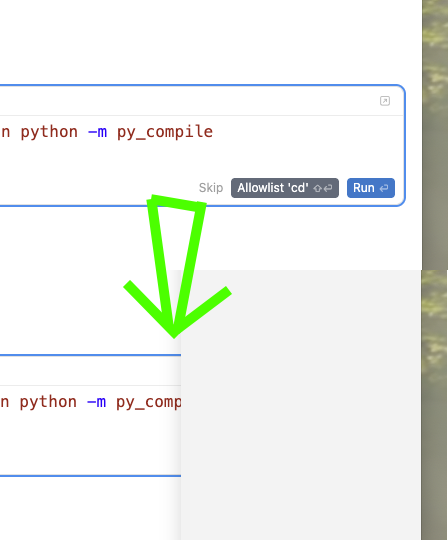
When working with the Agent in “Editor” mode (i.e. the chat panel docked on the right) one is often prompted to Run commands (in addition to “Skip” and “Allowlist ‘${cmd}’” options). If the mouse enters the cursor window from the right side (because the editor is not full-screen and you have another window to the right of Cursor, perhaps even the application you’re working on), as soon as the mouse cursor crosses into Cursor the Agent selection window pops out and covers the buttons you are intending to click, so you need to do extra work to make the Agents flyout go away and hope that you are young and with fine motor skills such that you don’t accidentally cause it to pop out again as you try to get back to click on these buttons.
Steps to Reproduce
Interact with an agent such that you get the prompt to run a command. Move the mouse off of the right edge of the (not maximized) Cursor window and then back onto the window. See that the Agents selector pops out, covering the buttons you need to press to make the command run.
Expected Behavior
The Agents flyout probably should become its own dockable panel as it certainly shouldn’t pop out every time you move the mouse into Cursor’s client rectangle. (I do not understand the use case for switching back and forth between agents like this in the first place as I never revisit old agents once they’ve done the task I created them for. My active agents are already easily accessible.)
I’d love it if the Cursor folks could slow down on adding new features so they can prioritize making the basic functionality work again. For an experienced developer the whole “move fast and break things” means “find an alternative” and I actually like Cursor despite it becoming harder and harder to use over the past few weeks.