user1501
December 16, 2025, 7:36pm
1
Cursor IDE
the chat icon (cursor icon) on the top right is missing
why the classic icon on the top right to toggle on/off the chat is missing?
Windows 10/11
Version: 2.2.23 (user setup)
Sometimes - I can sometimes use Cursor
user1501
December 16, 2025, 7:37pm
2
deanrie
December 16, 2025, 8:01pm
3
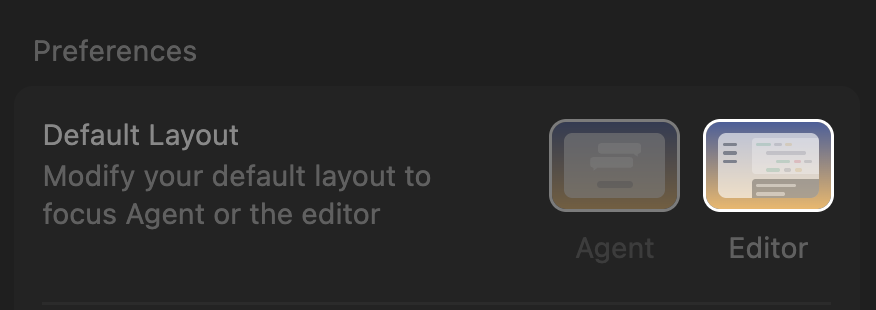
Hey, thanks for the report. You’re in Agent mode, you need to switch to Editor mode in Cursor settings.
Hyphen
December 16, 2025, 8:07pm
4
Cursor IDE
Cannot switch into Editor layout. Clicking it just takes me into some secondary Agents layouts, and it doesn’t highlight “Editor”.
All I remember doing prior to this is disabling telemetry in VS Code. Launched Cursor, and this bug started occurring. Never experienced this before.
I should be able to switch between modes.
Windows 10/11
Version: 2.2.23 (user setup)
Sometimes - I can sometimes use Cursor
user1501
December 16, 2025, 8:13pm
5
hi @deanrie - i think this is a bug? i am already in editor mode:
user1501
December 16, 2025, 8:15pm
6
1 Like
deanrie
December 16, 2025, 8:17pm
7
Yes, I can now reproduce this on my side. I’ll check with the team - this might be a recent change.
1 Like
sanjeed5
December 17, 2025, 8:10am
8
Thanks for the report. As a workaround, you can use Ctrl+E (Windows) to switch between Agent and Editor layouts until the fix is released. I’ll merge this with the primary bug report.
1 Like
Hyphen
December 17, 2025, 9:01am
9
No, that doesn’t work.
Here is all that happens whenever I press Ctrl+E or interact with the buttons.
sanjeed5
December 17, 2025, 9:02am
10
Thanks for the report and the video - this helps confirm the issue. I’ll merge this with the other reports and share with the team.
Hyphen
December 17, 2025, 9:03am
11
If I switch to another project where I was in Editor mode, it displays fine. If I ever switch to Agents mode, I’m unable to switch back.
deanrie
December 17, 2025, 11:47am
12
@user1501 @Hyphen try updating to 2.2.30. It should work.
Hyphen
December 17, 2025, 12:02pm
13
On 2.2.23, with the client telling me no available updates. Will update and check back in once it rolls out to me.
user1501
December 17, 2025, 3:52pm
14
hi team - i cannot update as well; i am on 2.2.23 – how soon will this 2.2.30 roll out?
deanrie
December 17, 2025, 4:22pm
15
Can you try enabling “Early Access” in Cursor settings on the beta tab? Then CMD/Ctrl+Shift+P > Attempt Update.
system
January 8, 2026, 4:23pm
16
This topic was automatically closed 22 days after the last reply. New replies are no longer allowed.

 previously there was icon like this to toggle the chat