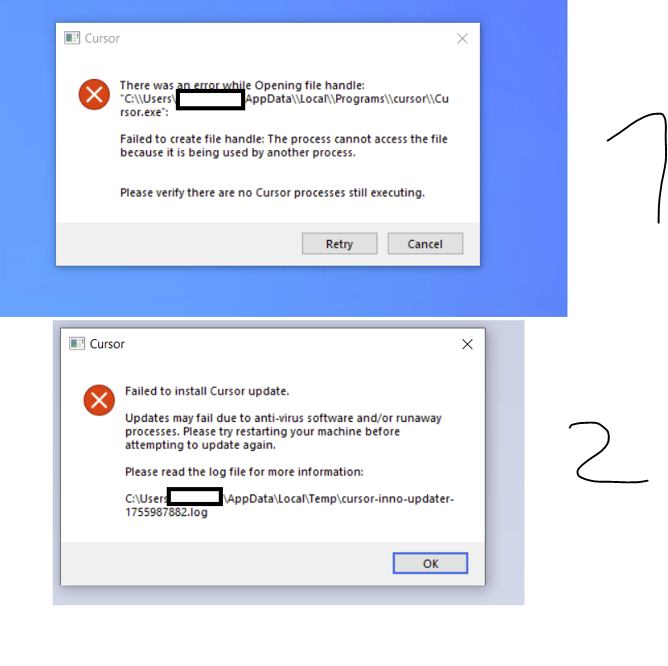
I am trying to update Cursor which fails every time (Since V1.5).
Antivirus software does (apparently) block the update in some cases.
Each update fails.
I followed suggested solutions from previous posts, which have no or little success:
I did deactivate my AV software for the update with no difference. I can still not update Cursor
I did check for running processes when updating with no difference. I can still not update Cursor
I did change the read only setting of the tools folder to read/write with no difference. I can still not update Cursor.
I did uninstall cursor and installed a fresh version. I was able to do 1 update but every subsequent update failed again just like before.
This is seriously a thread to my business and I will have to change tools.
I do not understand why cursor cannot update it’s software like any other tool.
I do hope for help as I have no idea what to do anymore.
Steps to Reproduce
Open Cursor
Check (or get pinged by Cursor) for a new version
Receive a notice of the update
Click Install update
Cursor closes and installs the update
The update fails and I am getting an error message (see screenshot part 1) and a second one if I click cancel (see screenshot part 2)
Expected Behavior
Updating a software should work just like any other software. Cursor should be no difference
This issue has been described by others before.
I have done everything possible (as far as I know) to solve this issue.
I am close to switching to another provider as this interrupts my work and costs me money. I will not renew my subscription (coming up in 14 days) if this isnt solved.
It is not acceptable that a software update requires complete uninstalls (every time) just to work.
hi @danperks i am not alone with this issue. Would you be able to expedite this with the team at cursor please? Paying for a product that does not allow me to run my business is not going to cut if for much longer but I really want to believe that the team is capable of fixing this issue. It is more than just an isolated case
i dont think Cursor is interested in replying/fixing it. @danperks any chance that you could help here ? i have to leave cursor (and will not renew my subscription)
@condor i am on 1.6.42 now and the bug exists (again) I am seriously very very annoyed.
I have promoted cursor, i have used cursor I have paid for cursor but I am at the end of it …
This is not aimed towards you but I am sure you understand my frustration ..
What is going on with cursor ? One day the bug is solved, the next update it isnt. Seriously what the heck … Can you help me get in contact with someone directly or get your team to actually solve the problem ?
The reason the update is failing is due to there being 2 setups running at the time of the install. To get past this once the update fails once go to this path C:\Users\Admin\AppData\Local\Temp\vscode-stable-user-x64-99gfbyh5fa
Then run the setup file that it is populated in the folder (CodeSetup-stable-1.6.45.exe) this is the file it is trying to run. Just make sure that cusor is closed when you run it or it will error out again. They could easily fix this if they just coded it to kill processes before it runs the install.
Thanks @jet ! This might be worth a shot !
Is my understanding correct that is some sort of installer/package to install ?
I dont have a “99gfbyh5fa” in my temp folder but 89 (!!) similar packages.
Should they all be (manually) deleted if they are, as I assume, old installer packages ?
Is there any update on this, i am also having this issue for over a month now and it is really frustrating. Tried everything, the only thing that seemed to work was that, doowload the installer directly from the website and installing it.
unfortunately not - cursor is clueless and hopeless. Their business wont survive if this is any indicator for how things are managed. I really hope they find a solution but doubt they will. I am moving to other tools