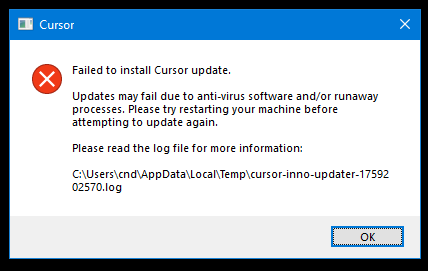
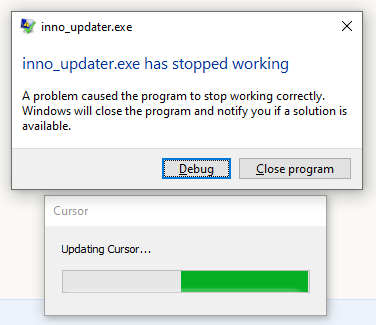
I can’t work this out myself!
Sep 30 22:50:15.658 INFO Starting: C:\Users\cnd\AppData\Local\Programs\cursor\Cursor.exe, true, Updating Cursor…
Sep 30 22:50:15.658 INFO Checking for running Cursor.exe processes… (attempt 1)
Sep 30 22:50:15.664 INFO Cursor.exe is not running
Sep 30 22:50:15.664 INFO Checking for possible conflicting running processes… (attempt 1)
Sep 30 22:50:15.671 INFO Inno Updater v0.12.1
Sep 30 22:50:15.671 INFO Starting update, silent = true
Sep 30 22:50:15.679 INFO do_update: “C:\Users\cnd\AppData\Local\Programs\cursor\Cursor.exe”, _
Sep 30 22:50:15.679 INFO move_update: “C:\Users\cnd\AppData\Local\Programs\cursor\unins000.dat”, _
Sep 30 22:50:15.679 INFO Reading directory: “C:\Users\cnd\AppData\Local\Programs\cursor”
Sep 30 22:50:15.679 INFO Get file handle: “C:\Users\cnd\AppData\Local\Programs\cursor\chrome_100_percent.pak” (attempt 1)
Sep 30 22:50:15.679 INFO Get file handle: “C:\Users\cnd\AppData\Local\Programs\cursor\chrome_200_percent.pak” (attempt 1)
Sep 30 22:50:15.679 INFO Get file handle: “C:\Users\cnd\AppData\Local\Programs\cursor\Cursor.exe” (attempt 1)
Sep 30 22:50:15.730 INFO Get file handle: “C:\Users\cnd\AppData\Local\Programs\cursor\Cursor.exe” (attempt 2)
Sep 30 22:50:15.931 INFO Get file handle: “C:\Users\cnd\AppData\Local\Programs\cursor\Cursor.exe” (attempt 3)
Sep 30 22:50:16.381 INFO Get file handle: “C:\Users\cnd\AppData\Local\Programs\cursor\Cursor.exe” (attempt 4)
Sep 30 22:50:17.182 INFO Get file handle: “C:\Users\cnd\AppData\Local\Programs\cursor\Cursor.exe” (attempt 5)
Sep 30 22:50:18.433 INFO Get file handle: “C:\Users\cnd\AppData\Local\Programs\cursor\Cursor.exe” (attempt 6)
Sep 30 22:50:20.233 INFO Get file handle: “C:\Users\cnd\AppData\Local\Programs\cursor\Cursor.exe” (attempt 7)
Sep 30 22:50:22.684 INFO Get file handle: “C:\Users\cnd\AppData\Local\Programs\cursor\Cursor.exe” (attempt 8)
Sep 30 22:50:25.884 INFO Get file handle: “C:\Users\cnd\AppData\Local\Programs\cursor\Cursor.exe” (attempt 9)
Sep 30 22:50:29.935 INFO Get file handle: “C:\Users\cnd\AppData\Local\Programs\cursor\Cursor.exe” (attempt 10)
Sep 30 22:50:34.935 INFO Get file handle: “C:\Users\cnd\AppData\Local\Programs\cursor\Cursor.exe” (attempt 11)
Sep 30 22:50:40.986 INFO Get file handle: “C:\Users\cnd\AppData\Local\Programs\cursor\Cursor.exe” (attempt 12)
Sep 30 22:50:48.186 INFO Get file handle: “C:\Users\cnd\AppData\Local\Programs\cursor\Cursor.exe” (attempt 13)
Sep 30 22:50:56.637 INFO Get file handle: “C:\Users\cnd\AppData\Local\Programs\cursor\Cursor.exe” (attempt 14)
Sep 30 22:51:06.438 INFO Get file handle: “C:\Users\cnd\AppData\Local\Programs\cursor\Cursor.exe” (attempt 15)
Sep 30 22:51:17.688 INFO Get file handle: “C:\Users\cnd\AppData\Local\Programs\cursor\Cursor.exe” (attempt 16)
Sep 30 22:51:32.133 INFO Get file handle: “C:\Users\cnd\AppData\Local\Programs\cursor\Cursor.exe” (attempt 1)
Sep 30 22:51:32.184 INFO Get file handle: “C:\Users\cnd\AppData\Local\Programs\cursor\Cursor.exe” (attempt 2)
Sep 30 22:51:32.384 INFO Get file handle: “C:\Users\cnd\AppData\Local\Programs\cursor\Cursor.exe” (attempt 3)
Sep 30 22:51:32.835 INFO Get file handle: “C:\Users\cnd\AppData\Local\Programs\cursor\Cursor.exe” (attempt 4)
Sep 30 22:51:33.635 INFO Get file handle: “C:\Users\cnd\AppData\Local\Programs\cursor\Cursor.exe” (attempt 5)
Sep 30 22:51:34.886 INFO Get file handle: “C:\Users\cnd\AppData\Local\Programs\cursor\Cursor.exe” (attempt 6)
Sep 30 22:51:36.686 INFO Get file handle: “C:\Users\cnd\AppData\Local\Programs\cursor\Cursor.exe” (attempt 7)
Sep 30 22:51:39.138 INFO Get file handle: “C:\Users\cnd\AppData\Local\Programs\cursor\Cursor.exe” (attempt 8)
Sep 30 22:51:42.338 INFO Get file handle: “C:\Users\cnd\AppData\Local\Programs\cursor\Cursor.exe” (attempt 9)
Sep 30 22:51:46.389 INFO Get file handle: “C:\Users\cnd\AppData\Local\Programs\cursor\Cursor.exe” (attempt 10)
Sep 30 22:51:51.389 INFO Get file handle: “C:\Users\cnd\AppData\Local\Programs\cursor\Cursor.exe” (attempt 11)
Sep 30 22:51:57.439 INFO Get file handle: “C:\Users\cnd\AppData\Local\Programs\cursor\Cursor.exe” (attempt 12)
Sep 30 22:52:04.640 INFO Get file handle: “C:\Users\cnd\AppData\Local\Programs\cursor\Cursor.exe” (attempt 13)
Sep 30 22:52:13.090 INFO Get file handle: “C:\Users\cnd\AppData\Local\Programs\cursor\Cursor.exe” (attempt 14)
Sep 30 22:52:22.890 INFO Get file handle: “C:\Users\cnd\AppData\Local\Programs\cursor\Cursor.exe” (attempt 15)
Sep 30 22:52:34.141 INFO Get file handle: “C:\Users\cnd\AppData\Local\Programs\cursor\Cursor.exe” (attempt 16)
Sep 30 22:52:39.356 ERRO Failed to create file handle: The process cannot access the file because it is being used by another process.
The file does seem to be locked, but not because it’s running - something else seems to have a hold? I’ve tried disabling, and exiting my A/V - doesn’t make a difference.
I’ve also re-installed form the installer download, which didn’t fix it either.
screen copy/paste below from things I tried:-
C:\Users\cnd\Downloads\cursor\python_mcp>notepad C:\Users\cnd\AppData\Local\temp\cursor-inno-updater-1759272615.log
C:\Users\cnd\Downloads\cursor\python_mcp>dir C:\Users\cnd\AppData\Local\Programs\cursor\Cursor.exe
Volume in drive C is RoG
Volume Serial Number is 9681-8754
Directory of C:\Users\cnd\AppData\Local\Programs\cursor
15/09/2025 10:03 PM 190,879,200 Cursor.exe
1 File(s) 190,879,200 bytes
0 Dir(s) 2,674,567,430,144 bytes free
C:\Users\cnd\Downloads\cursor\python_mcp>copy C:\Users\cnd\AppData\Local\Programs\cursor\Cursor.exe C:\Users\cnd\AppData\Local\Programs\cursor\Cursor-backup.exe
1 file(s) copied.
C:\Users\cnd\Downloads\cursor\python_mcp>copy test_python_build.py C:\Users\cnd\AppData\Local\Programs\cursor\Cursor.exe
Overwrite C:\Users\cnd\AppData\Local\Programs\cursor\Cursor.exe? (Yes/No/All): y
The process cannot access the file because it is being used by another process.
0 file(s) copied.
C:\Users\cnd\Downloads\cursor\python_mcp>tasklist | grep -i cursor
C:\Users\cnd\Downloads\cursor\python_mcp>taskkill /f /im Cursor.exe
ERROR: The process “Cursor.exe” not found.
C:\Users\cnd\Downloads\cursor\python_mcp>