64GB ram here, it managed to fill it up and crash ^^
luckily didn’t happen for months, but it still drains way too much, sometimes upwards of 22GB of Ram (though i have shadow workspace enabled and often 4-5 cursor windows open simultaneously)
64GB ram here, it managed to fill it up and crash ^^
luckily didn’t happen for months, but it still drains way too much, sometimes upwards of 22GB of Ram (though i have shadow workspace enabled and often 4-5 cursor windows open simultaneously)
This makes sense. In 2.2.43, we’re returning the behavior to the click → file behavior. We heard the feedback like this (mainly on the forum).
Just vibe it!
It changes too often for a stable documentation and you can always ask an AI how to do things.
Can we expect modifier clicks for HTML or PDF or other files to go to the browser tab or external apps instead of the editor?
Can we never have this situation where you merge multiple threads into a Megathread, including solutions to bugs or issues in their own separate threads? I know it’s hard for the team to go through everything, but this just makes our individual contributions feel like generic slop.
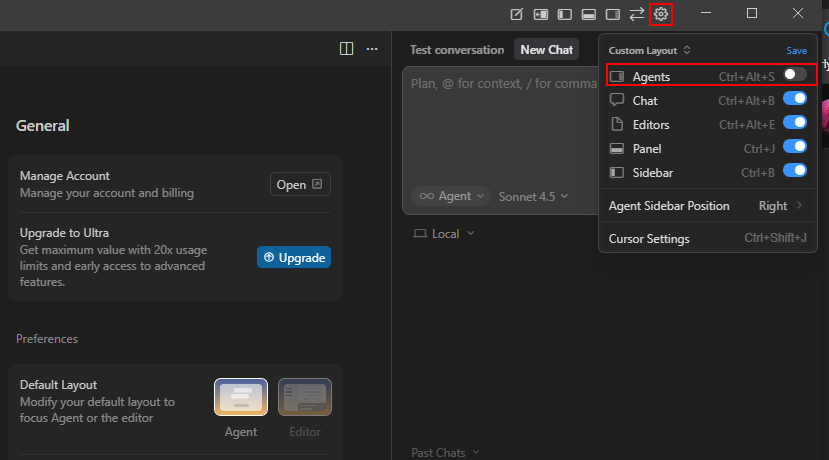
Nevermind, that just seems broken. Normally when in Agent layout the gear at the top right gives you the option to hide the Agents pane. Could try that, eventhough you are already in Editor layout.

Editor mode + ∞ ON = agents auto-change files
What you’re seeing:
You’re in Editor mode (the interface)
∞ icon is ON (autonomous mode enabled)
AI makes changes automatically
Files update without you clicking “accept” each time
So:
Editor mode = where you are (the view)
∞ ON = agents can work automatically
Result = files change automatically
The difference:
Agents tab = different UI layout (still agents, just different view)
Editor mode = normal code editor view
∞ ON = autonomous mode works in both
Bottom line:
You’re in Editor mode with ∞ ON, so agents auto-change files. That’s correct.
The Agents tab is just a different UI; the ∞ icon controls whether changes are automatic.
Explain me then whats the whole sense of Agents tab then?
There is no top right arrow in 2.2 in MacOS for me.
Long time paying customer, spent several thousand $ on cursor already.
Could you please give us a way to revert to 1.7 and stop with annoying upgrade prompt every minute as 2.2 is really unusable? Otherwise we have to look for a different IDE.
I for once actually disagree, merging into a persistent single thread for a know topic is good - as long as:
It avoids repetition, and actually gives an easier opening for users with opinions to voice their concerns rather than having to find a thread that might not specifically encapsulate their concern. This in turn also makes it so that specific threads have less tendency for generic-issue users using them to voice their opinion.
So instead of:
[This button does not work]
User: Yeah, this is just one of the many things wrong with the cursor UI, I’m tired of having the UI change every damn week and…
They can find their way to the generic topic and voice it.
We have Thinking time. I’m missing Exploring time in Agent Chat.
You make an interesting and valid point.
Cursor’s initial appeal was for existing developers to use AI to enhance their workflow and productivity - with the USP of AI being built directly into a familiar IDE, rather than copying and pasting code from chat apps.
However, there’s a new breed of creators who want to make, but who don’t yet a grounding in development. With how useful AI has become, this approach is completely feasible and the reason why ‘natural language → app’ tools, like lovable, v0, firebase studio etc., exist.
To ‘get’ Cursor, even as a vibe-coder, you will need to learn some basic dev best-practices.
I would start with a simple ‘hello world’, utilising Git version control on GitHub, and deployed to Vercel. This is a great web app starting point, that means your work is safe, recoverable and has a real-world output.
The chat window can guide you through how to this in Cursor.
@condor @deanrie @andrewh - we’ve mentioned this before - a best-practice guide will be emmensly useful for people new to IDEs and development. Is it Lee Rob the education chap who can look into this?
A few items things i’d like to see:
Cursor IDE
The biggest fear I have is upgrading. My IDE layout is destroyed everytime I do it. What gives? I don’t like having to spend a few minutes trying to figure out how to get back to normal after every upgrade. I’m sure I’m not the only person who feels that way,
MacOS
I like the ‘Saved Layout’ feature, however it is useless if you can’t key-bind saved layouts. The ideal for me is having my preferred ‘agent’ config as a saved layout, and my preferred ‘editor’ layout as a saved layout, and Ideally I could CTRL + 1,2,3,4 through them. Could you add that?
I can’t currently even find a way to add keybindings to custom layouts in settings.
https://forum.cursor.com/t/how-to-open-agent-window-and-editor-simultaneously/139304
Please bring back the separable agent and editor windows up to 1.7. At least make this layout as an option.
For multi-screen users who want to make conversation and reviewing the code on separate windows both on larger spaces, this is really needed.
Have you figured out how to quickly switch between Saved layouts? Is there a Keyboard shortcut?
It would be nice to have an option to adjust the color schemes of the built in agent modes. The choice of yellow for “Plan” is particularly unpleasant on light themes.

It would have been more promising if we could popout the whole composer chat window.
We can though by dragging a tab outside the cursor window. But, then, there are lagging issues when we do so. Also in one of the case it was observed that the text was reversed when typed in a popout window.
So not sure if it works this way
But a full feature to have a popout window for composer chat will help a lot to many of us who like to place things customized on our multi-monitors