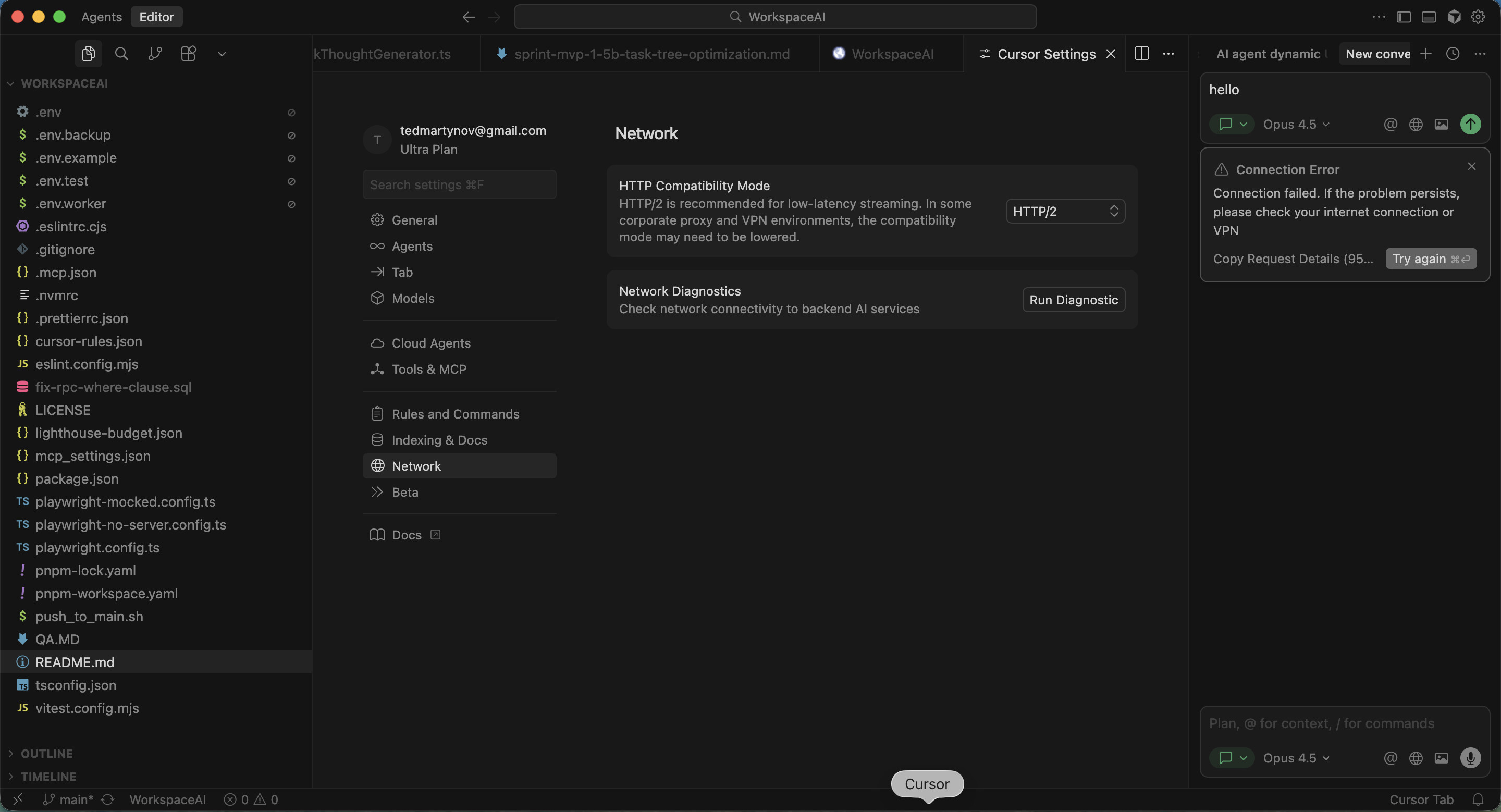
We’re aware of an ongoing issue that appears to primarily affect users connecting from Ukrainian IP addresses. When HTTP/2 is enabled, connections will sometimes fail with an SSL handshake error. This may be exacerbated by unstable internet connections.
This thread consolidates multiple reports so we can track progress in one place!
Symptoms
An error message containing
SSLV3_ALERT_HANDSHAKE_FAILURE:../../third_party/boringssl/src/ssl/tls_record.cc:486:SSL alert number 40
Workarounds
Disable HTTP/2 (Reccomended)
Open Cursor Settings
Search for “HTTP/2”
Set HTTP Compatibility Mode to HTTP/1.1
Restart Cursor
Clear App Data (Not Reccomended)
Follow the instructions here to clear Application data.
This is a destructive operation that will delete extensions, themes, chats, and other installation-related data. Users also report that the issue comes back after some time.
Since last week the chat in the Cursor IDE always gives me Connection error:
Request ID: b98b2bda-1ce1-4868-91ad-d2c66300369d
ConnectError: [internal] 4277788264640:error:10000410:SSL routines:OPENSSL_internal:SSLV3_ALERT_HANDSHAKE_FAILURE:../../third_party/boringssl/src/ssl/tls_record.cc:486:SSL alert number 40
at UZc.$streamAiConnect (vscode-file://vscode-app/tmp/.mount_cursor6LiNq3/usr/share/cursor/resources/app/out/vs/workbench/workbench.desktop.main.js:6331:406060)
at async vscode-file://vscode-app/tmp/.mount_cursor6LiNq3/usr/share/cursor/resources/app/out/vs/workbench/workbench.desktop.main.js:565:75277
at async Object.run (vscode-file://vscode-app/tmp/.mount_cursor6LiNq3/usr/share/cursor/resources/app/out/vs/workbench/workbench.desktop.main.js:6399:42465)
at async o (vscode-file://vscode-app/tmp/.mount_cursor6LiNq3/usr/share/cursor/resources/app/out/vs/workbench/workbench.desktop.main.js:2815:1269)
at async Promise.allSettled (index 0)
at async o7r.run (vscode-file://vscode-app/tmp/.mount_cursor6LiNq3/usr/share/cursor/resources/app/out/vs/workbench/workbench.desktop.main.js:2815:6513)
I’m in Ukraine. And I get the same error if I try to connect using VPN with Ukrainian IP (so it’s not an issue related to my internet provider).
And if I use VPN with, say, German or American IP, everything works fine.
Steps to Reproduce
Connect using Ukrainian IP.
Expected Behavior
I should be able to use Cursor without VPN connections (and it worked fine until last week).
Hi, I’m sorry but is there a way to enable http2 in cursor? with http1 it feels like much worse and slower experience.
It stopped working for me for about a week already and for my friends from Ukraine as well?
Same issue. When trying to use HTTP2, I’m getting error:
а давай виводити вати без дробних, тоді більше взіле в екран
1116693999424:error:10000410:SSL routines:OPENSSL_internal:SSLV3_ALERT_HANDSHAKE_FAILURE:../../third_party/boringssl/src/ssl/tls_record.cc:486:SSL alert number 40
[internal]
When switching to HTTP 1.1 it throwing error:
We’re having trouble connecting to the model provider. This might be temporary - please try again in a moment.
The issue is still relevant. Today, Cursor self-upgraded from v2.1.42 to v2.3.35. I did repeat the steps mentioned here; however, it still doesn’t work fully.
v2.1.42 was supposedly the latest version that didn’t have troubles with HTTP2 connection.
At the moment (v2.3.35), the Auto mode works for me, while the others (tested Composer-1 and Gemini 3 Flash) don’t. It’s a bummer - the tool is completely unusable.
Directly accessing the link results in ERR_SSL_VERSION_OR_CIPHER_MISMATCH, and the IDE shows errors as in the screenshot. The likely cause is incorrectly configured SSL certificates: Fix VERSION_OR_CIPHER_MISMATCH · Cloudflare SSL/TLS docs
.
and there are no SSL issues; HTTP/2 works correctly. Therefore, the problem is related to Cloudflare settings.
There is also an issue in cursor-cli where some requests use an HTTP/2 approach, even though it is explicitly disabled in the settings, so it cannot be used reliably at this time.
My IP is from Ukraine, and DNS resolution may differ when queried from another region.
Thanks for the detailed report. Since switching to Quad9 DNS fixes the SSL issue - does that workaround also resolve the cursor-cli problem, or does the CLI still fail even with Quad9?
If the CLI still has issues, what command are you running and what error do you see?
If I use this DNS (the specific one is not important; the key point is that the routing does not go through Cloudflare), the issue disappears both in the IDE and in the CLI.
Since this problem is related to the network rather than the tool itself, it is necessary to verify that SSL is correctly configured on the server side.
In 2.1.47-48 HTTP2 stopped working and resorted to 1.1 which is slow but stable. 2.1.49 - HTTP2 worked again and 2.1.50 - HTTP2 does not work again and HTTP1.1 chokes often. I tried different connections and it did not help.
For AI issues: add Request ID with privacy disabled
Request ID: 954552f8-622a-4915-9450-46c355b58386
ConnectError: [internal] 1185413486912:error:10000410:SSL routines:OPENSSL_internal:SSLV3_ALERT_HANDSHAKE_FAILURE:../../third_party/boringssl/src/ssl/tls_record.cc:486:SSL alert number 40
at nsu.$streamAiConnect (vscode-file://vscode-app/Applications/Cursor.app/Contents/Resources/app/out/vs/workbench/workbench.desktop.main.js:6409:406134)
at async vscode-file://vscode-app/Applications/Cursor.app/Contents/Resources/app/out/vs/workbench/workbench.desktop.main.js:565:80832
at async Object.run (vscode-file://vscode-app/Applications/Cursor.app/Contents/Resources/app/out/vs/workbench/workbench.desktop.main.js:6477:42602)
at async o (vscode-file://vscode-app/Applications/Cursor.app/Contents/Resources/app/out/vs/workbench/workbench.desktop.main.js:2815:1269)
at async Promise.allSettled (index 0)
at async fHr.run (vscode-file://vscode-app/Applications/Cursor.app/Contents/Resources/app/out/vs/workbench/workbench.desktop.main.js:2815:6519)
 This is a destructive operation that will delete extensions, themes, chats, and other installation-related data. Users also report that the issue comes back after some time.