I dont like the new UI changes. Please bring back the chat history UI and old diffs. This just funnels us into the agent mode and makes cursor more like the other AI coding platforms like claude code or codex. I’m just going to use one of these if Cursor keeps up this direction.
Hey, thanks for the candid feedback.
- We heard the signal about frequent UI changes — the team is already reducing their frequency: Can you NOT change the ui every week?
- The old diff review view is available in the standard Editor approval flow. The button move only affected the Agent window: Bug / UX Report: “Pending Changes” Bar Moved to an Awkward Top-Right Position
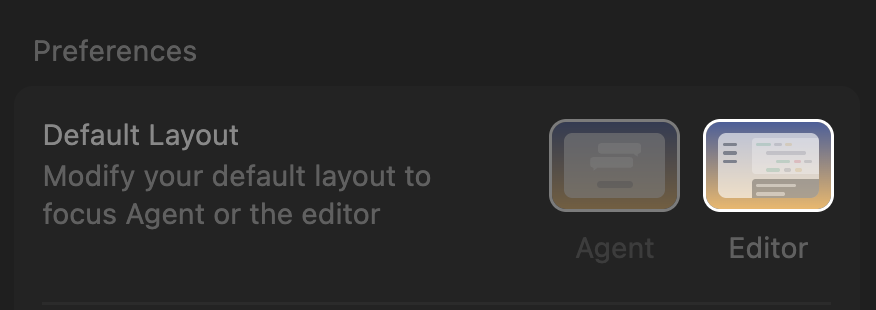
- To avoid the Agent layout, switch using the arrows button at the top right or the
Cmd/Ctrl+Eshortcut: "Agents | Editor" tab-switching UI is missing - Chat history is in the agent’s side panel: History | Cursor Docs
Could you clarify what exactly you’d like to bring back in chat history and diffs? Please share:
- Screenshots of the current and desired views
- Your Cursor and OS versions (Help > About)
- Short steps showing where the UX blocks your flow
I’ll pass the specifics to the team.
TR
In picture above I would like the chat tab buttone be more understandable. No idea what these mean really.
THis button was confusing when it was introduced but better than the current:


In picture above I would like the chat tab buttone be more understandable. No idea what these mean really.
THis button was confusing when it was introduced but better than the current:
also there was a problem somewhere like a month or two ago that I couldn’t add ‘@’ in the agent chat so I couldn’t tag files in the chat (working on finnish keyboard), and it took me many days to actually find a thread which helped me to change it. Turns out it was basic vscode configuration I had to do, but it happened because you had changed some keybinding. This happened again after last update and I could no longer select a each occurence using shift + command + l. This time I knew what to do and was able to switch it back in no time, but I bet there were people that had to do the same struggle I had with the ‘@’ sign. Goes to show you that the keybindings are sacred and should not be tampered with.
This is all I could come up now but I hope you’ll get the idea!
Best regards,
Pietari
one thing that really broke my workflow as of late is that the “review” mode (which I really got into using) now always shows me this diff view, and on my macbook that just makes everything way too small to be able to check it out. I tried clicking around a bunch, but i can’t seem to get rid of this

Hey, thanks for the request. The issue with split diff view in review mode is real. On a small MacBook screen it makes the code too tiny.
To switch to unified view (one column instead of two):
- Quick way: Click the three dots (⋯) in the top-right corner of the diff editor and choose “Unified View”.
Unified view shows changes in one column with green/red markers, which is much easier to use on small screens.
If this doesn’t work or the option doesn’t show up, let me know. I’ll pass it to the team that review mode needs a more obvious way to switch views.
I find it hard to figure out now whether there are unreviewed agent changes. It used to show it on every editor tab that there were changes with a button to jump to them. Now, when I’m jumping around files and different chats, it’s very hard to tell whether there’s pending changes. The old way diffs were presented made a lot of sense to me. Having to go into the review view is confusing.
Thanks, I understand the issue with the visibility of unseen changes.
- Right now, the Pending Changes indicator is in the top-right corner of the Agent window
- If you want the classic review flow and the old diff view, switch from Agent to Editor
This is a known UX issue, and the team is already working on improvements.
I’ll collect your cases and share them with the team.
the cmd + e did bring back the chat view I was looking for, thank you. I’m not sure what arrows youre referring to though. Before posting here, I clicked all the buttons and none of them seemed to bring back the chat view and I thought it was just gone. Please keep the chat-centric mode - it’s the unique thing for me that distinguishes cursor from the myriad other agentic tools I have access to.
Oh I had no idea that there was that kind of thing! Good that it can be changed. I noticed that my other repo had editor layout and I was a bit confused about what was happening. I thought maybe it had an older version on the other repo which on hind sight doesn’t make much sense  I reckon the changing between editor and agent mode could be somewhere in the ui where you could flip it easily?
Anyway thank you for your help. And it’s nice that you take user feedback seriously 
Ok thank you! Can’t believe i missed that one.