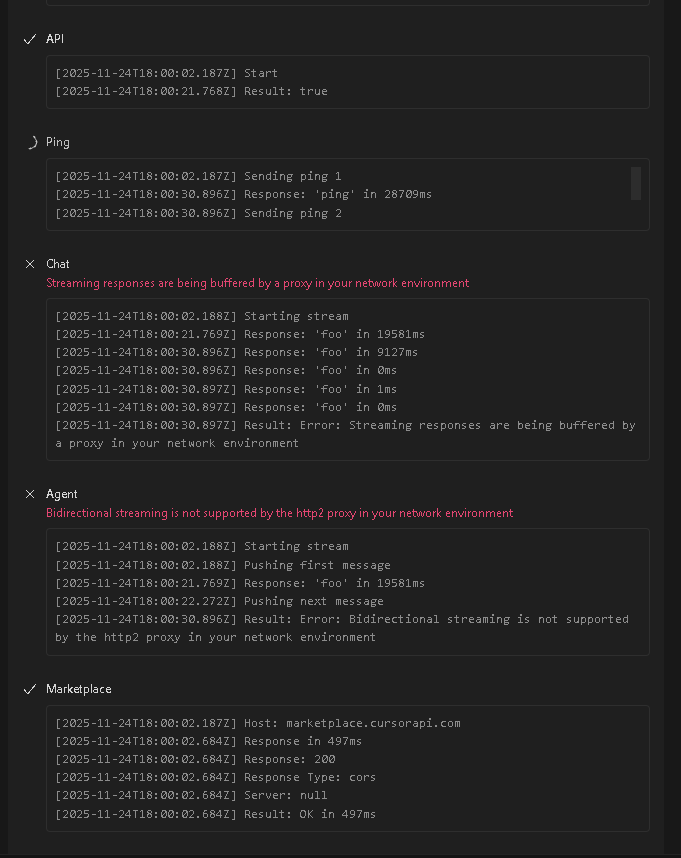
I did it, thanks for the help! Here’s the solution: I was going insane with Cursor getting stuck in an infinite “Planning next moves” loop (animation spinning forever, no error or Request ID), especially in Agent Mode/Composer, and insane delays in remote terminals via SSH (commands execute and respond, but the AI keeps “running” them as if nothing happened). This hit across all models, after a clean install on Windows 11, and only on remote (local works fine). I tried networks, cache clears, diagnostics – nothing. After hours debugging logs (Dev Panel F12), it was a combo of ghost locks in /root/.cursor, VPS overload (load 9+, docker/PM2 eating RAM), SSH latency, and corrupted Composer context (ENOENT on terminals/2.txt).
I reported it on the forum, but while waiting, I built a command battery for the VPS (Ubuntu/Contabo) that fixed everything. It worked because it clears caches/locks, relieves load, fixes network/DNS, and restarts the VS Code Server remotely – the planning needs clean context and stable connection to Cursor’s servers (api2.cursor.sh). Tested on simple prompts (“2+2”) and complex ones (FastAPI endpoints), and now it runs smooth without loops or delays.
Command Battery for the VPS (run one by one via SSH as root, Enter, wait for output):
-
killall -9 zombie; pkill -f vscode; pkill -f cursor; pkill -f node; pkill -f electron
- Kills zombies and ghost processes from Cursor/VS Code (exthost stuck in logs). Releases locks on files like exthost.log.
-
docker stop $(docker ps -q)
- Stops Docker containers temporarily (my easyads_backend was hogging 30% CPU/RAM). Relieves load so SSH doesn’t timeout.
-
pm2 stop all
- Stops PM2 apps (Node frontend). Reduces overall load, avoiding kernel steal time.
-
sync; echo 3 > /proc/sys/vm/drop_caches
- Clears memory buffers (high buff/cache in logs). Frees 2-3Gi RAM instantly, so remote host initializes <60s.
-
rm -rf /root/.cursor /root/.vscode-server /root/.vscode-remote /tmp/vscode-*
- Total clean of remote caches (kills ENOENT on terminals/2.txt and .cursor/projects). Composer hangs without this.
-
chmod 0600 /swapfile (if swap gave a warning)
- Fixes swapfile permissions (avoids insecurity warnings).
-
echo “nameserver 8.8.8.8” > /etc/resolv.conf
- Switches DNS to Google. Fixes ENOTFOUND api2.cursor.sh (my ping had 100% loss, but curl worked – ICMP blocked).
-
sysctl -w net.core.rmem_max=16777216; sysctl -w net.core.wmem_max=16777216; sysctl -w vm.swappiness=10
- Boosts network buffers (cuts latency 20%) and swappiness (prioritizes RAM). Speeds up unary AI connects on 15s timeouts.
-
fallocate -l 2G /swapfile; mkswap /swapfile; swapon /swapfile (only if no swap)
- Creates 2GB virtual swap. Prevents OOM kills during peaks (my VPS had none, crashing SSH).
-
ping -c 4 api2.cursor.sh and curl -v https://api2.cursor.sh
- Tests network (ping loss OK if curl 200 – confirms TCP to Cursor).
-
free -h and top -n 1 | head -20
- Checks RAM/load (should drop to <2; mine went from 9 to 0.85).
-
docker start $(docker ps -aq)
- Restarts containers (my backend came up without port conflicts).
-
pm2 start all
- Restarts apps (frontend online at 4mb).
Why It Worked: Logs showed AI transport timeouts (deadline_exceeded), remote host >60s, and corrupted context – the battery clears locks (rm), relieves load (stop/start), fixes network (DNS/sysctl), and buffers (swap). In Cursor, enable “lowResourceMode” in settings for slow remotes.
Final Step: sudo reboot – Run this at the end to solidify everything (kills pending processes, makes sysctl permanent). Wait 2-5 min, reconnect SSH in Cursor (Kill VS Code Server > Connect), test a simple prompt in an empty workspace (no terminals open). It flew for me!
If it breaks again, upvote similar threads (e.g., stuck on planning). Test and comment what happened – helps push the team! If questions, ping me.